P/N 95B-6131-00 (April 2022) RiverRay Deployment Guide
Page 10
EAR-Controlled Technology Subject to Restrictions Contained on the Cover Page.
WinRiver II GPS Configuration
Start WinRiver II.
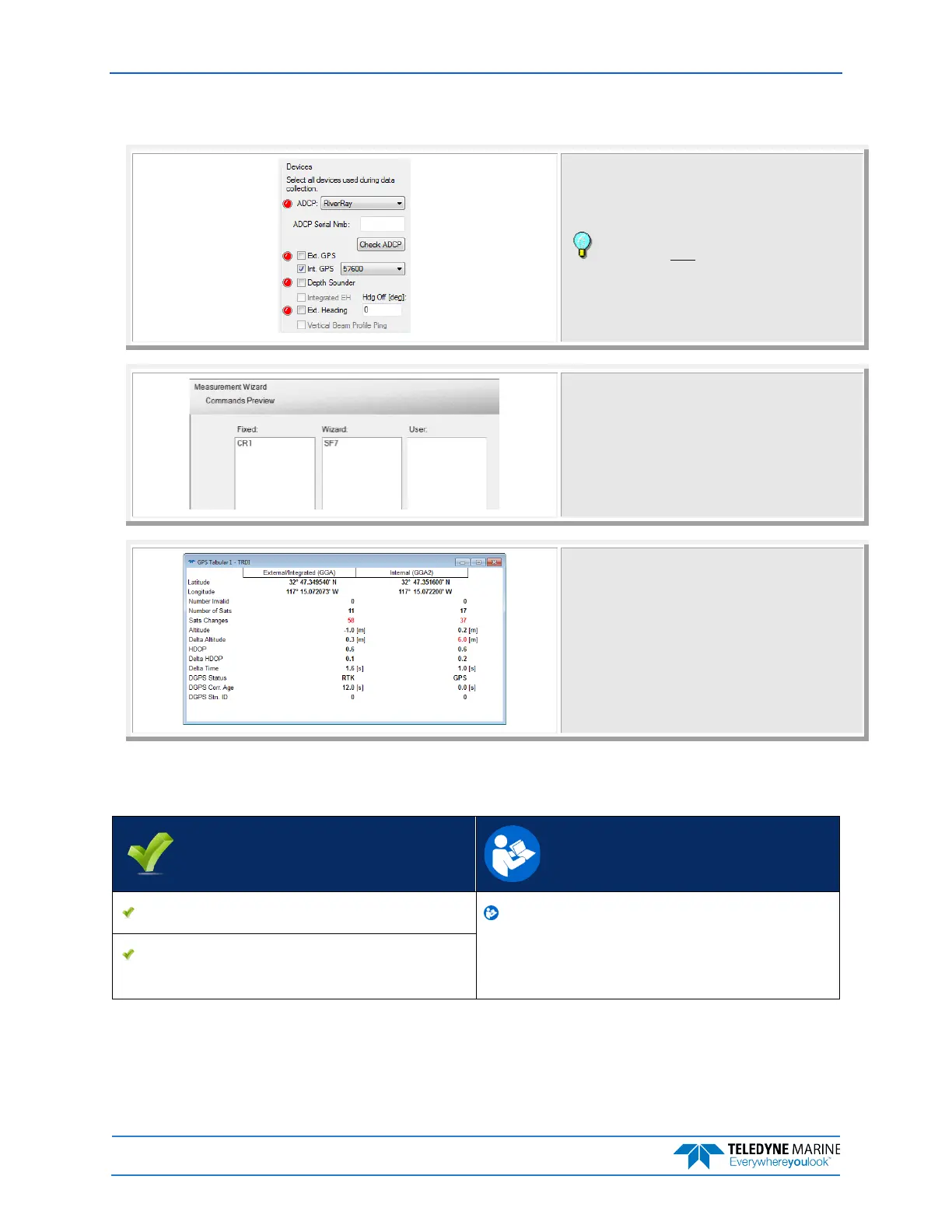
Using the Measurement Wizard, select the checkbox
for Int. GPS and configure the baud rate to match that
of the receiver.
The baud rate must be greater than 9600. The
recommended baud rate is 57600 or 115,200.
On the Commands Preview page, verify the SF
command was added.
SF3 = 4800 baud
SF4 = 9600 baud
SF5 = 19200 baud
SF6 = 38400 baud
SF7 = 57600 baud
SF8 = 115200 baud
On the Acquire menu click Start Pinging or use the
shortcut key F4.
The GPS Tabular 1 screen will show the GPS data.
Quick Review
Use the GPS Tabular 1 display Read Chapters 3, 6, and 13 in the
WinRiver II Users Guide.
Use TRDI Toolz to verify that the ADCP is
receiving GPS data



 To Next Page