P/N 95B-6131-00 (April 2022) RiverRay Deployment Guide
Page 4
EAR-Controlled Technology Subject to Restrictions Contained on the Cover Page.
Some Bluetooth devices may ask for a passkey, PIN code, Pair code, Pairing code, Security
code, or Bluetooth code.
In all cases, the code is 0 or 0000 (zero, not the letter o).
The pin code is 0 for systems shipped prior to August 2017 and 0000 for systems shipped
after August 2017. If your system is sent in for repair and the Bluetooth module is replaced,
the pin code (if needed) will change from 0 to 0000.
For RiverRay systems shipped after August 2017, the Microsoft® Bluetooth drivers work with
WinRiver II. For best results, use the USB Bluetooth device with the driver supplied with the
ADCP for WinRiver II.
To connect to a RiverRay ADCP using the Bluetooth port:
1. Attach the Boat’s cable to the ADCP’s connector and install the battery in the Boat. Turn on the
Boat power switch. Verify that both the red and green LEDs light. After a few seconds, the red
LED should go out and the green LED will blink twice and then stay on. This indicates that the
RiverRay self-test has passed. If the red LED stays on, wait a few minutes, cycle the power off,
and back on and check the LEDs again.
2. Plug in the SD1000U device to a USB port and determine the Com port used.
See the WinRiver II SD1000U Bluetooth Communication Setup Card for instructions.
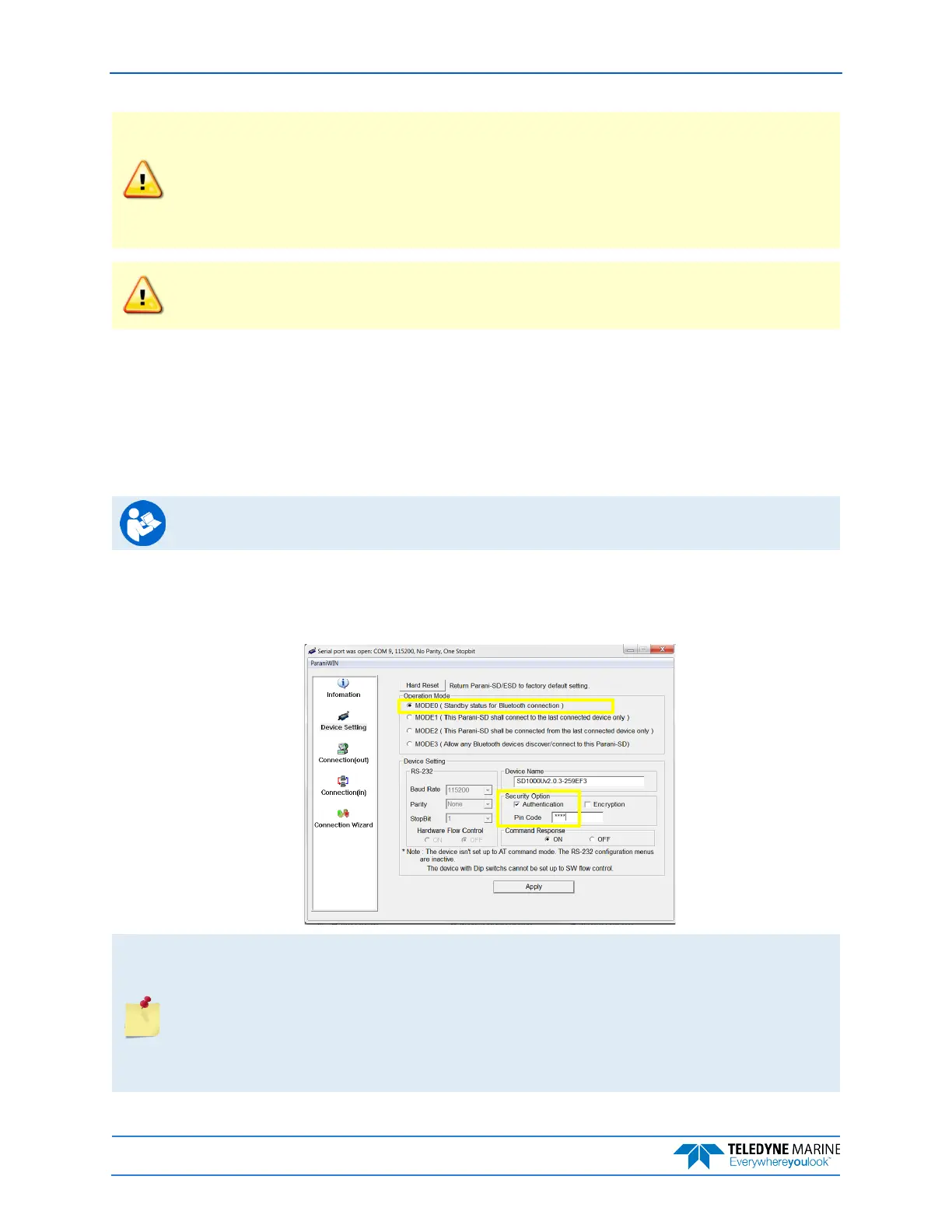
3. Run the ParaniWin program and connect to the ADCP. With the Bluetooth modules used since
August 2017 (or a repaired older unit where the Bluetooth module was replaced) you may need to
use Mode 0 and Authentication (not Encryption). The code is 0000 (four zeros) and click
Apply.
You may need to use either Authentication or no authentication when using ParaniWin with
an SD100U. Try one, and if does not work try the other. Use whichever one works going
forward.
The selection of Mode 0 or Mode 1 is independent of Authentication/no Authentication:
• Mode 1 automatically reconnects to the ADCP, but is otherwise identical to Mode 0.
• You must establish an outgoing connection before you can switch to Mode 1, but once in
Mode 1 you can connect to a different ADCP without switching back to Mode 0.



 To Next Page