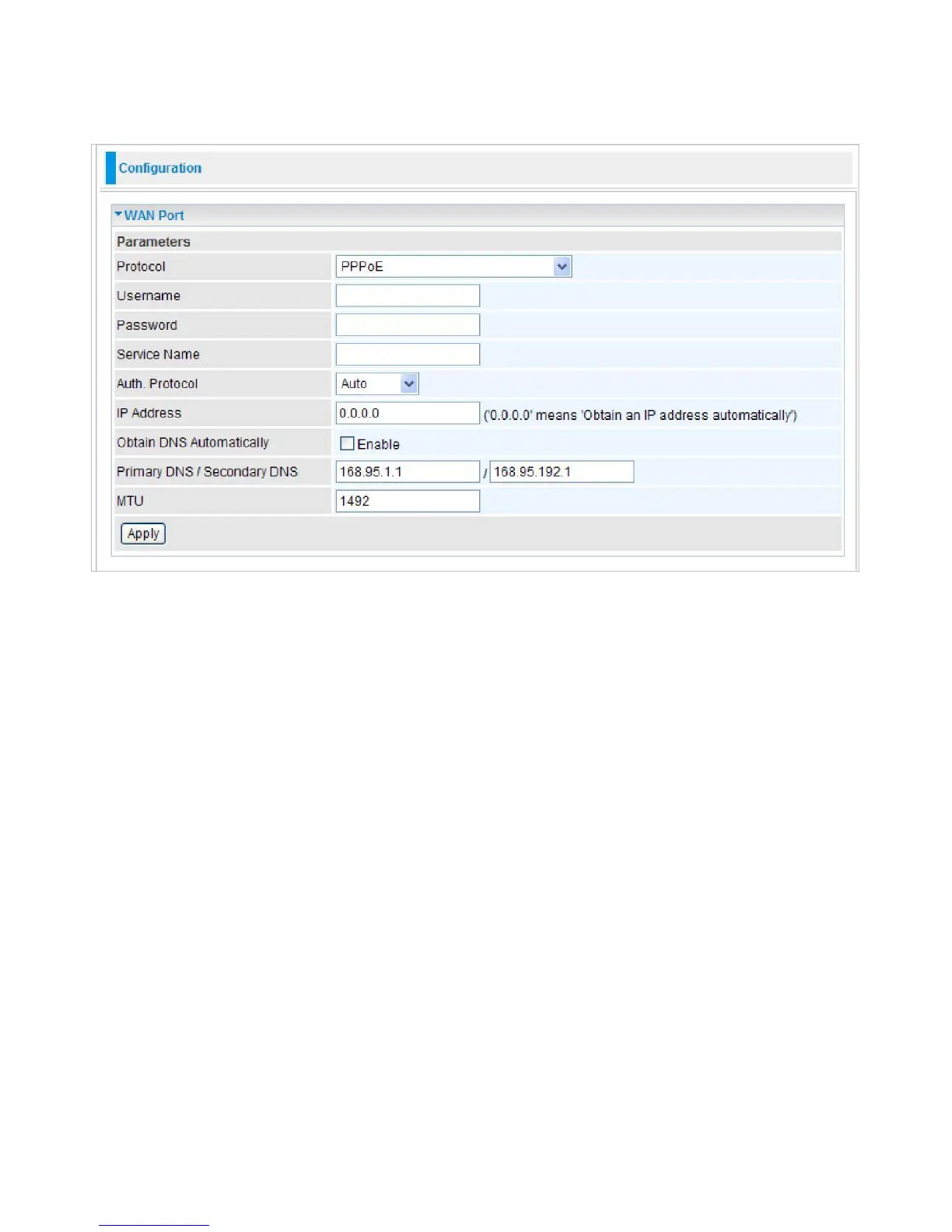
PPPoE
PPPoE (PPP over Ethernet) provides access control in a manner which is similar to dial-up services
using PPP.
Username:
Enter the username provided by your ISP. You can input up to 256 alphanumeric
characters (case sensitive).
Password:
Enter the password provided by your ISP. You can input up to 32 alphanumeric
characters (case sensitive).
Service Name:
This item is for identification purposes. If it is required, your ISP will provide you
the necessary information. Maximum input is 32 alphanumeric characters.
Auth. Protocol:
Default is Auto. Please consult your ISP on whether to use PAP, CHAP or
MSCHAP.
IP Address:
Enter your WAN IP address. Leave the IP address as 0.0.0.0 to enable the device to
automatically obtain an IP address from your ISP.
Obtain DNS automatically:
Click to activate DNS and to enable the system to automatically
detect DNS.
Primary DNS / Secondary DNS:
Available when
Obtain DNS automatically
is disable. Enter the
IP addresses of the DNS servers. The DNS servers are passed to the DHCP clients along with the
IP address and the netmask.
MTU:
Maximum Transmission Unit. The size of the largest datagram (excluding media-specific
headers) that IP will attempt to send through the interface.
Click Apply to confirm the settings.



 To Next Page