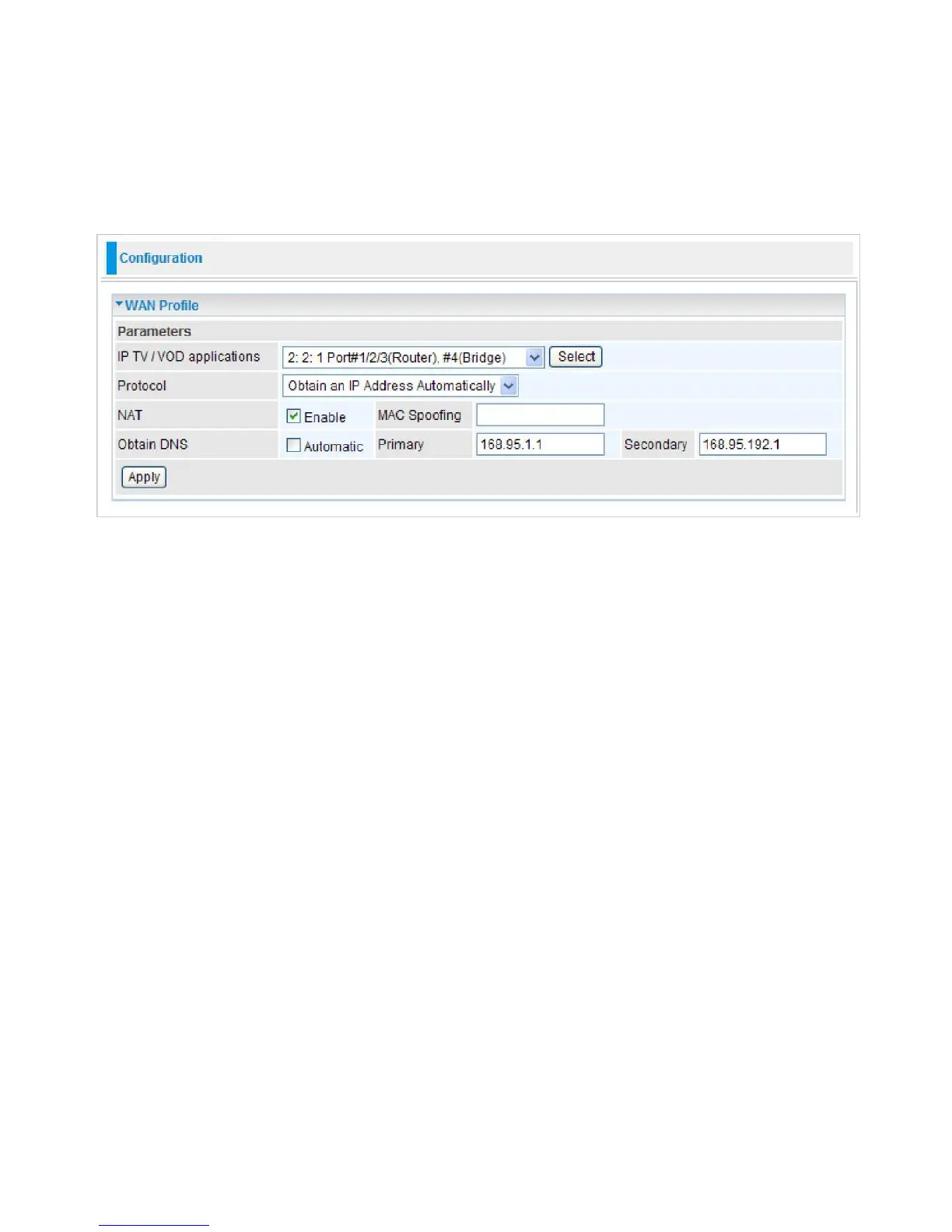
WAN - Wide Area Network
A WAN (Wide Area Network) is a computer network that covers a broad geographical area (e.g.
Internet) that is used to connect LAN and other types of network systems.
WAN Profile
Obtain an IP Address Automatically
By configuring DHCP settings, the device is able to obtain IP settings automatically from the ISP.
IP TV / VOD applications:
Select the application you will use in the device and then click Select to
save the change.
Protocol:
Select the protocol you will use in the device.
NAT:
The NAT (Network Address Translation) feature allows multiple users to access the Internet
through a single IP account by sharing the single IP address. If users on your LAN have their own
public IP addresses to access the Internet, NAT function can be disabled.
MAC Spoofing:
This option is required by some service Providers. You must fill the MAC address
specified by your service provider when this information is required. The default setting is set to
disable.
Obtain DNS:
Select this check box to activate DNS.
Primary DNS/ Secondary DNS:
Enter the IP addresses of the DNS servers. The DNS servers are
passed to the DHCP clients along with the IP address and the netmask.
Click Apply to confirm the settings.



 To Next Page