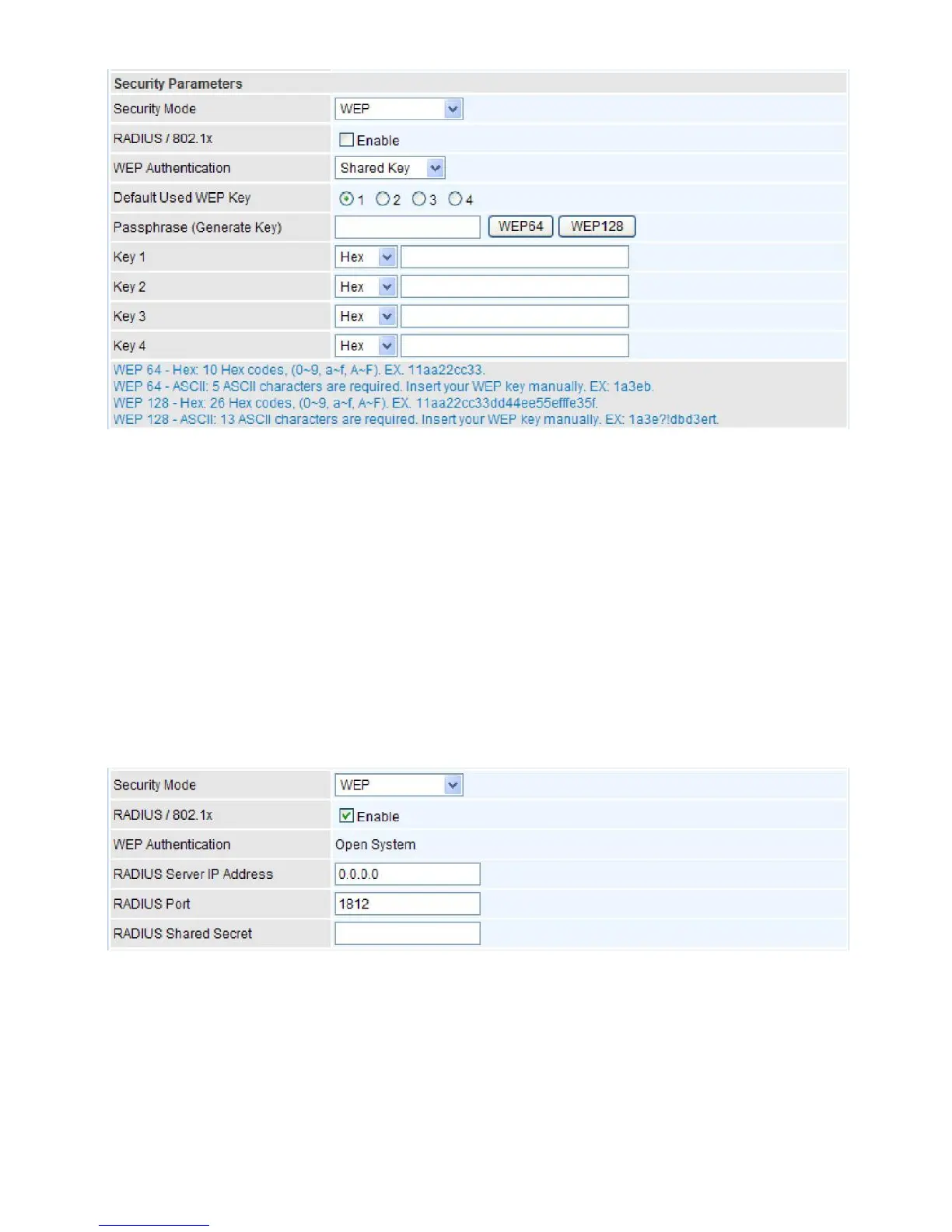
WEP
RADIUS / 802.1x:
You can disable or enable the RADIUS service.
WEP Authentication:
To prevent unauthorized wireless stations from accessing data transmitted
over the network, the router offers secure data encryption, known as WEP. If you require high
security for transmissions, there are 3 options to select from:
Open System, Share Key
and
Both
.
Default Used WEP Key:
Select the encryption key ID; please refer to
Key (1~4)
below.
Passphrase:
This is used to generate WEP keys automatically based upon the input string and a
pre-defined algorithm in WEP64 or WEP128.
Key (1-4):
Enter the key to encrypt wireless data. To allow encrypted data transmission, the WEP
Encryption Key values on all wireless stations must be the same as the router. There are four keys
for your selection. The input format is in HEX or ASCII style, 5 and 13 ASCII codes are required for
WEP64 and WEP128 or 10 and 26 HEX codes are required for WEP64 and WEP128 respectively.
If you want to enable the RADIUS function, check Enable and then do the following settings.
RADIUS Server IP Address:
The IP address of RADIUS authentication server.
RADIUS Server Port:
The port number of RADIUS authentication server here. Default value is
1812.
RADIUS Shared Secret:
The password of RADIUS authentication server.



 To Next Page