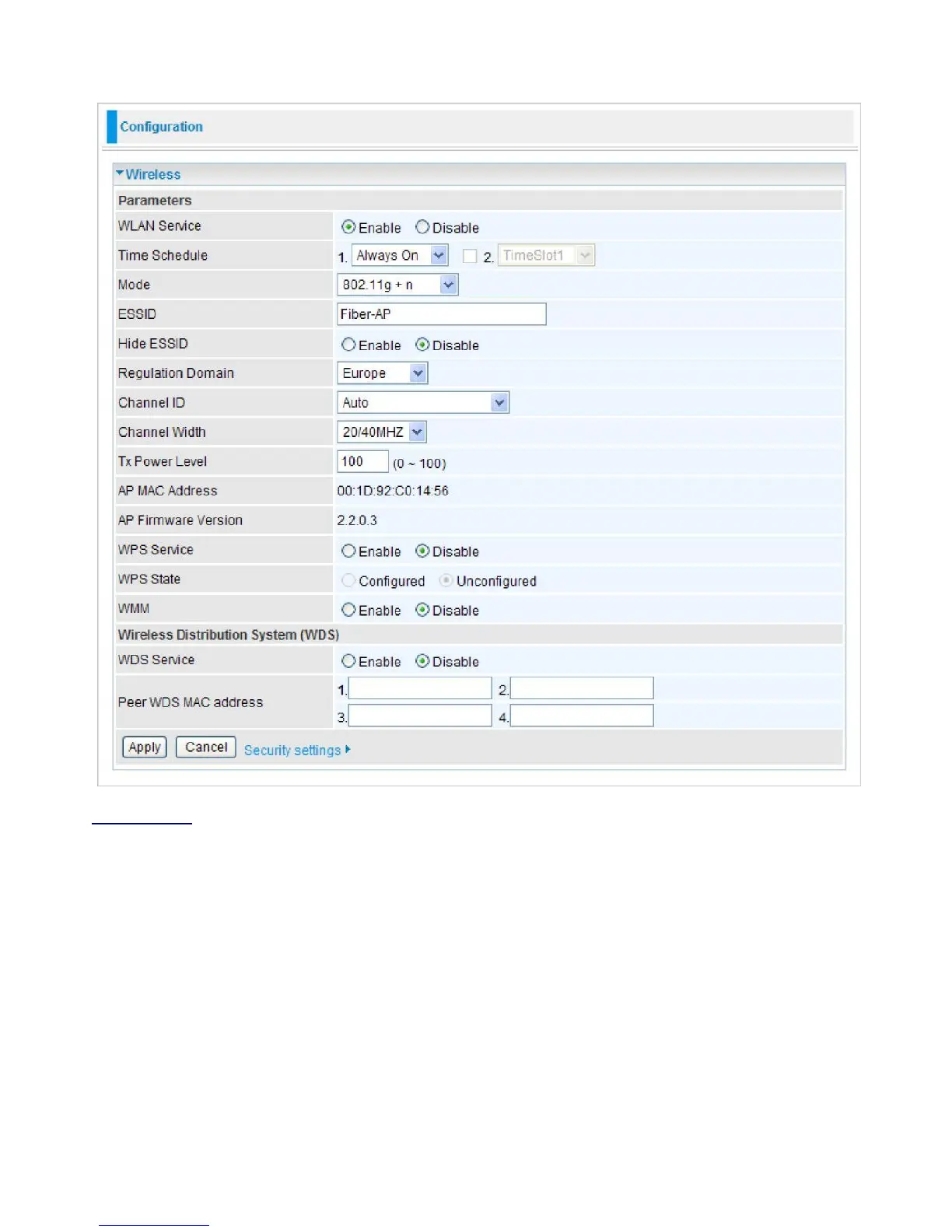
Wireless
You can disable or enable wireless security with WPA or WEP for protecting wireless network.
Parameters
WLAN Service:
Default setting is set to enable. If you do not have any wireless, select disable.
Time Schedule:
It is self-defined time period. You may specify a time schedule for your
prioritization policy. For setup and detail, refer to Time Schedule section.
Mode:
The default setting is 802.11g+n. If you do not know or have both 11g and 11b devices in
your network, then keep the default in mixed mode. From the drop-down manual, you can select
802.11g if you have only 11g card. If you have only 11b card, then select 802.11b. And if you have
11n card, you can select 802.11n.
ESSID:
The ESSID is the unique name of a wireless access point (AP) used to distinguish one
from another. For security propose, change to a unique ID name which is already built into the
router wireless interface. It is case sensitive and must not exceed 32 characters. Make sure your
wireless clients have exactly the ESSID as the device in order to connect to your network.
Hide ESSID:
This function enables the router to become invisible on the network. Thus, any



 To Next Page