23
Diagnostics
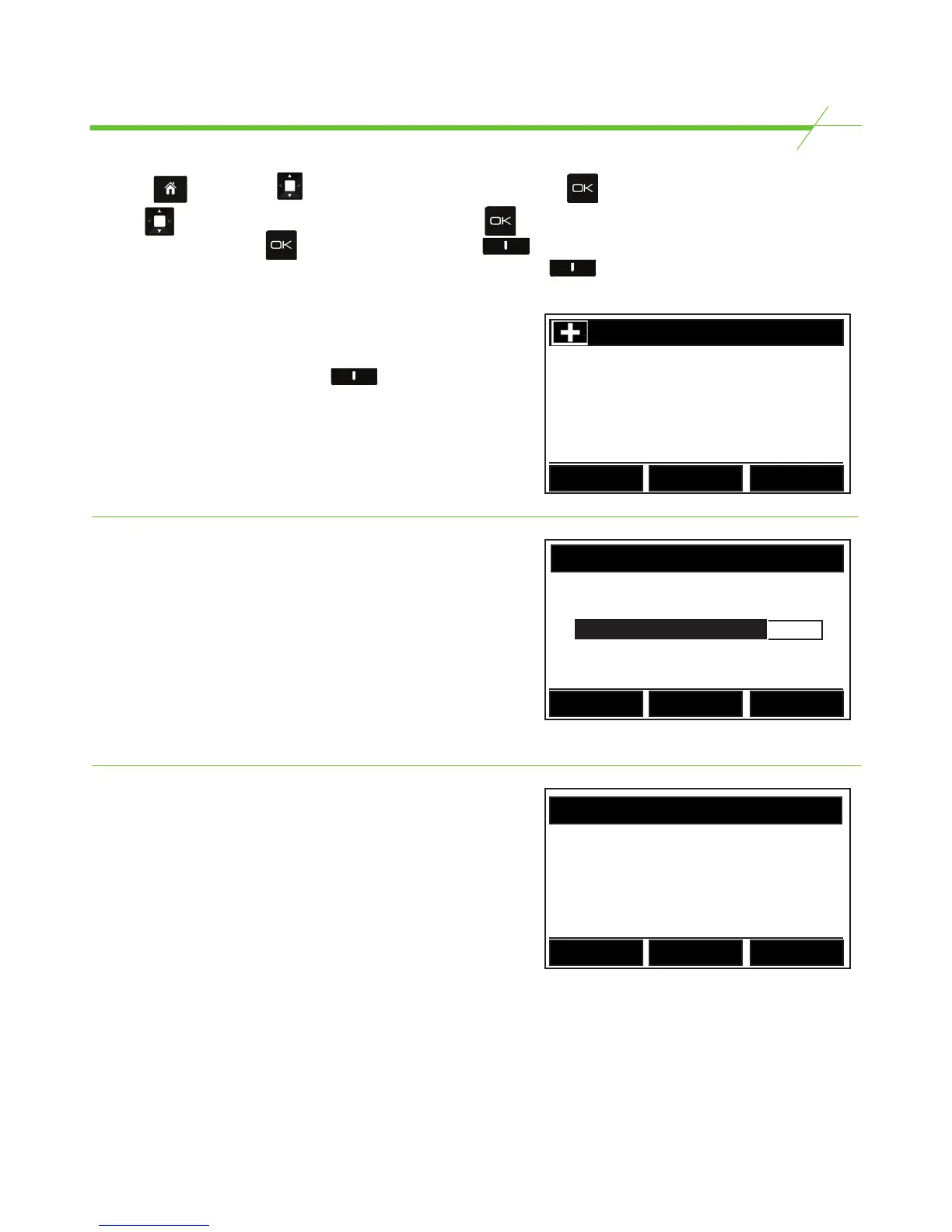
From the Page use the key to highlight Diagnostics. Now press .
Use the key to scroll through the menu items and press to enter a selection. Alternatively,
enter a selection using the key then use the right hand key to move through all
diagnostics screens consecutively. To return a step, press the left hand key.
Unit Information
Unit Information displays the time, date and software
version of the unit. Press the middle key
to enter the ‘set time and date’ function, which is also
accessible from the settings menu.
UNIT INFORMATION
TiX-3500-001-x.x-5.2-GEN-1.10.tix
Date: 01 - 24 - 2017
Time: 09 : 38 09
Back
Settings Next
Noise check
This screen monitors the level of disturbance caused
by drafts of air, vibrations and electronic interference,
which could affect the performance of the unit. If the
bar is full, cash counting conditions are optimal. If the
bar is empty, conditions are poor and the unit should
be placed in a more suitable location, away from
any possible interference. If this does not solve the
problem, the unit may need to be evaluated. Contact
your supplier for assistance.
NOISE CHECK
X
Back
Next
Check Weight
A known weight can be checked here to 1 decimal
place.
0.0
Weight on Unit
Next
Back
CHECK WEIGHT
Bill/Band/Sleeve/Clip/Coin/Bag/Container weights
These sections are provided for the use of your helpline provider.



 To Next Page