3
Introduction
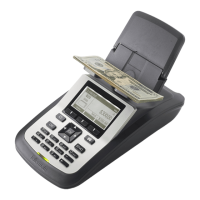
The Tellermate T-i
X
range is the leading cash management solution for your business enabling you to
quickly and eciently count and manage your cash.
Stand-alone or connected directly to business reporting systems, T-i
X
helps to increase the eciency,
security and accuracy of a wide range of cash management tasks:
• T-i
X
counts all money formats such as those contained in a typical cash drawer:
• Bills (loose, straped, clipped and sleeved bills)
• Coins (loose, bags, rolls)
• Non-cash items (Checks, credit card values, etc.)
T-i
X
comes with optional connections to printer and PC systems. This document includes instructions
on how to get started with your T-i
X
and on how to congure the model to suit your preferences.
(Please be aware that since there is a range of T-i
X
models, not all features illustrated in this
document may be present in the model that you purchased).
Caring for T-i
X
:
Using T-i
X
eectively
1. Use T-i
X
on a stable, at surface, free from vibrations and drafts* (air conditioning, fans, etc).
2. When counting bills, raise the coin tray – when counting coins, lower the coin tray.
3. When counting loose coins, use the Tellercups supplied by Tellermate
4. Place items on the unit carefully; do not throw or drop them.
5. Check the count mode carefully, eg. do not count coin rolls in the Tellercup mode.
6. Sort money before counting; mixed denominations cannot be counted.
7. Turn the unit OFF and carefully unplug all cables before carrying it in an upright position
– use the nger grips on the underside.
8. Do not leave objects on the money platform when T-i
X
is not in use. Not even a Tellercup.
9. This unit cannot identify counterfeit money.
10. Charge the battery (if supplied) for 4 hours before rst use; replace it when advised on-screen.
How to use T-i
X
in a safe manner
• Caution – Lithium battery. Risk of explosion if battery is replaced by an incorrect type.
• Keep T-i
X
clean with a dry cloth only. Do not use sprays, wet / damp products or immerse in
liquid.
• If liquid is spilled on T-i
X
, as soon as it is safe, turn o the power. Contact your supplier for
assistance.
• Do not subject T-i
X
to impacts or shocks by hitting or dropping it.
• If the casing of the power adaptor is cracked or broken. disconnect power and contact your
supplier for assistance.
• Do not place items weighing over 2kg/4.40lbs on T-i
X
.
• Always use and store T-i
X
on a at and stable surface - injury may be caused to the user if it falls.
• The power socket must be near T-i
X
and easily accessible. Do not misuse or apply force to the
cables.
• Do not disassemble T-i
X
.
• Do not use pens or tools to operate the buttons.
• Dispose of T-i
X
and batteries in accordance with local regulations.
Failure to follow these instructions may cause permanent damage to the T-i
X
unit and void the
warranty.



 To Next Page