EasyManua.ls Logo

Tellermate T-iX 2000 - Display and Button Layout; Understanding the Display; Keypad and Navigation Buttons

Default Icon
28 pages
Print Icon
To Next Page IconTo Next Page
To Previous Page IconTo Previous Page
Loading...
6
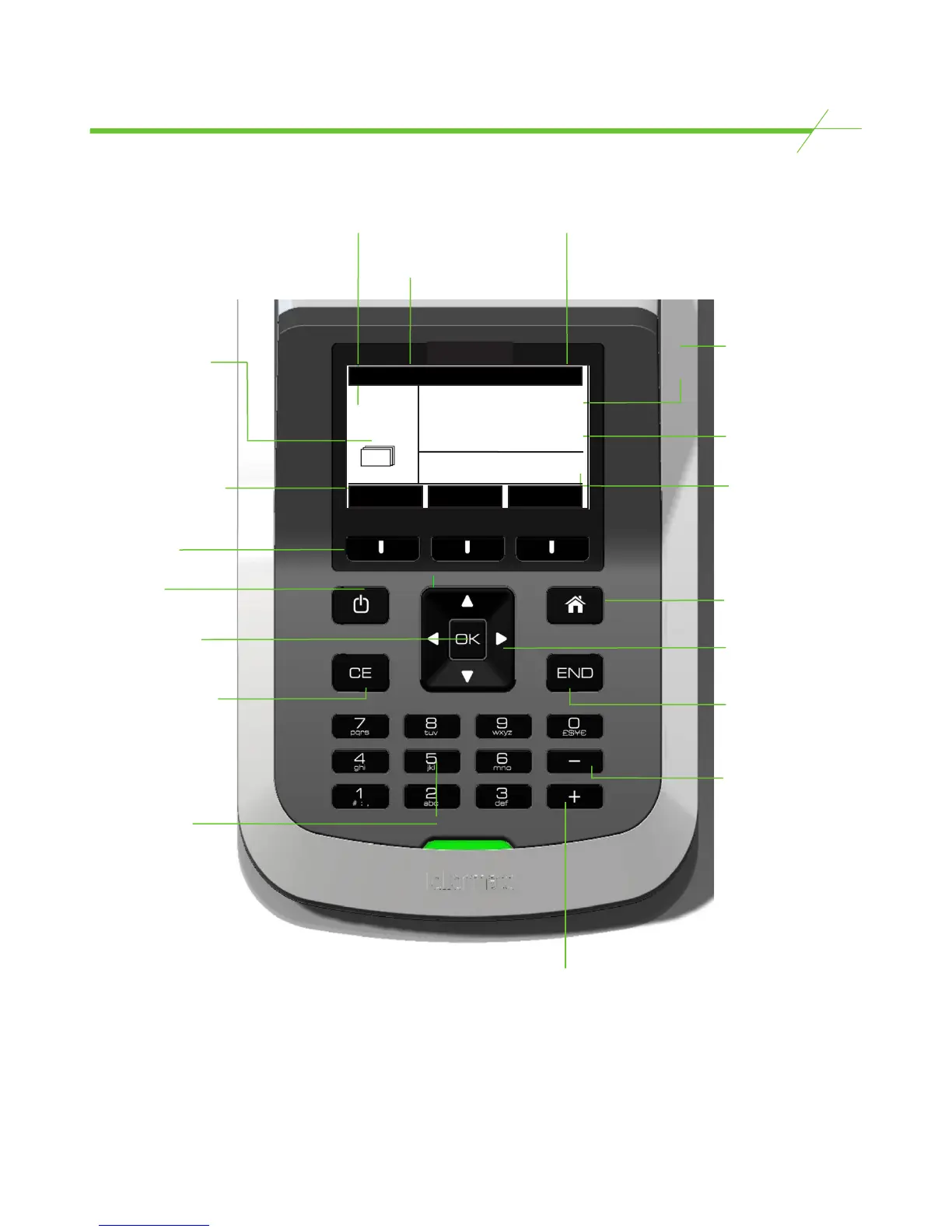
Display and Buttons
Currency and
denomination
Count type
Current count
format: Bills/
Coins/ Coupons/
Tokens or Media
Displays the count
mode in use. Bills:
loose, straped, clipped
or sleeved. Coins:
Tellercup, bag or roll.
Indicates the function
of the selection key
below, these will have
a dierent function
in dierent parts of
the count.
Selection keys
ON/OFF key
OK key - conrms /
enters a selection
CE key - Cancel Entry
Alpha Numeric
keys - for entering
alphabetic or
numeric entries
+ key, for adding
or entering positive
numeric values
Quantity of items
that are currently
on the Money
Platform
Value of items that
are currently on the
Money Platform
Running total for
items counted so
far including what
is currently on the
Money Platform
Home key - returns
user to the Home
page from any
location
Directional
navigation keys
END key - this key
is used to END a
count
- key, for
subtracting or
entering negative
numeric values
CLOSEOUT
#1 Total = $16.09
$75.00
Bills
$5
USD
x 15
Loose
6

Related product manuals