LTE Outdoor CPE | User Manual P. 81
Firewall | L3 DATA Filter
Firewall > L3 DATA Filter
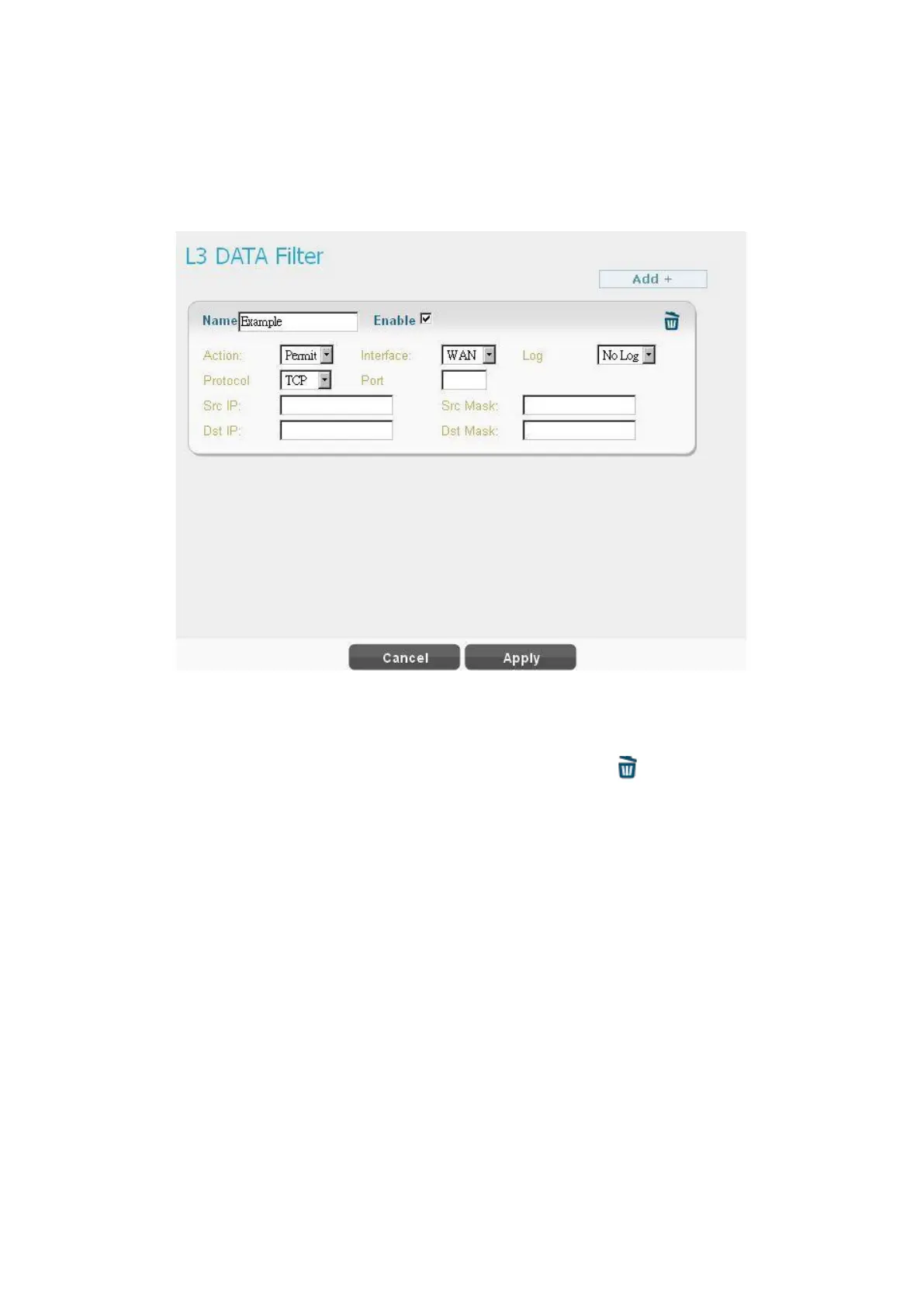
L3 DATA filter disallow/allows packets with designated ports and IP address to the device
which is not CPE.
● Click “Add +” button to add a new rule, clicking “Delete” icon ) to delete the rule.
●
Name: The name of the rule.
●
Action: “Permit” or “Deny” to allow or to reject the traffic.
●
Interface: Select which interface users want to block/allow the traffic from. Available
options are “WAN”, “LAN”, or “BOTH”.
● Log: Select “Log” to have log records, or “No Log” to disable it. ( users will not see it , the
log is printed in the console.)
● Protocol: Protocol to filter. Available options are TCP, UDP, ICMP, or ANY.
●
Port: The port number to filter.
●
Src IP: The source IP to filter.


 To Next Page