LTE Outdoor CPE | User Manual P. 83
Firewall | L2 Filter
Firewall > L2 Filter
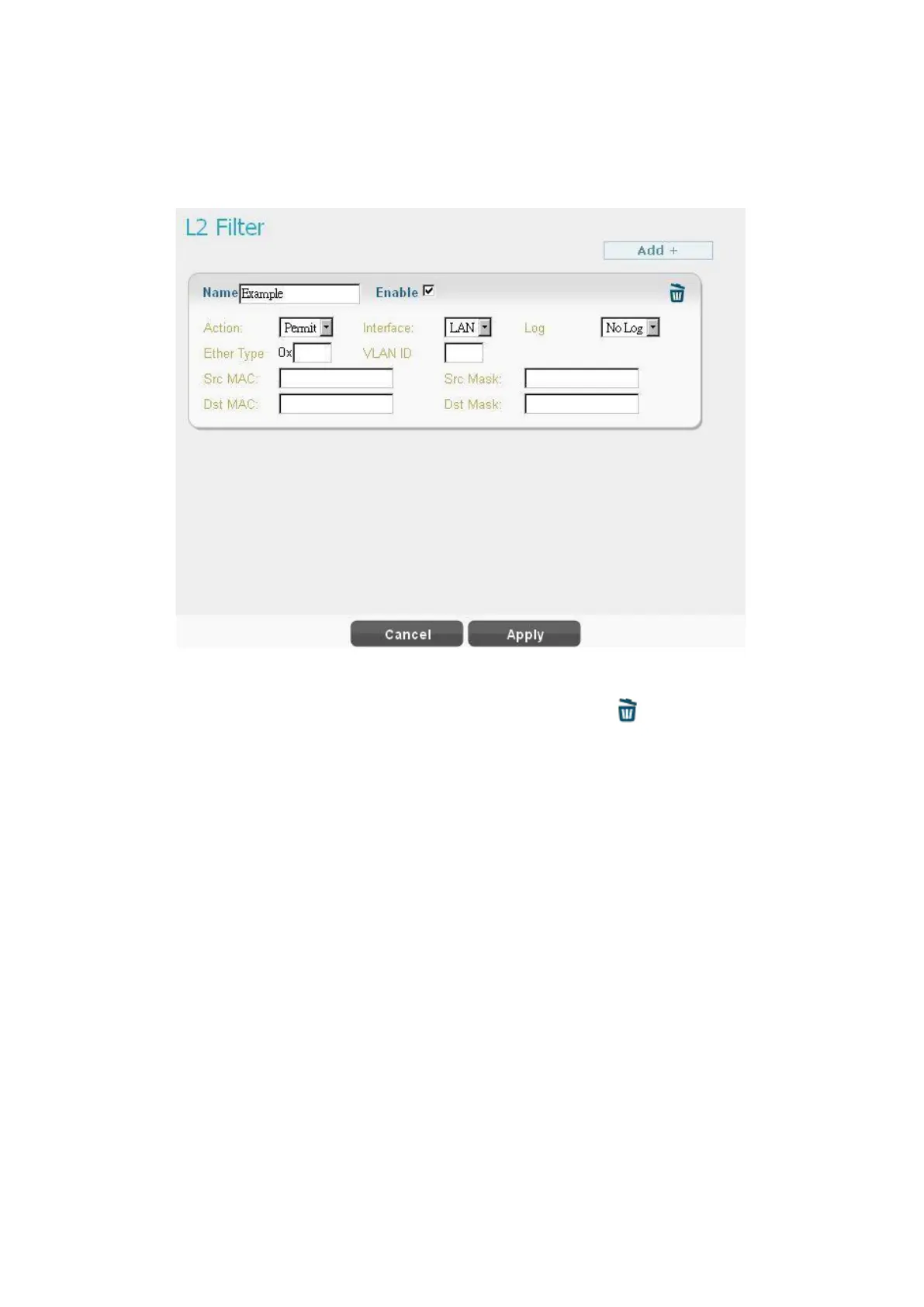
L2 filter can filter packets in layer 2 of the 7-layer OSI model of computer network.
● Click “Add +” button to add a new rule, clicking “Delete” icon ) to delete the rule.
●
Name: Enter the name of the rule.
●
Action: Select “Permit” or “Deny” to allow or reject the traffic.
●
Interface: only LAN.
●
Log: Select “Log” to have log records, or “No Log” to disable it. (Users will not see it, the
log is printed in the console.)
● Ether Type: EtherType is a two-octet field in an Ethernet frame, which is used to indicate
which protocol is encapsulated in the payload of an Ethernet frame. Enter the Ether Type
code (Range: 0600~FFFF) according to the protocol you use.
●
VLAN ID: IEEE 802.1Q is the networking standard that supports Virtual LANs (VLANs) in
Ethernet network; and VLAN ID is the identification of the VLAN. VLAN ID is a unique
VLAN identifier, the number range is from 0 to 4095.


 To Next Page