EasyManua.ls Logo

Telstra 13150 - Telephone Base Buttons

Telstra 13150
67 pages
Print Icon
To Next Page IconTo Next Page
To Previous Page IconTo Previous Page
Loading...
19
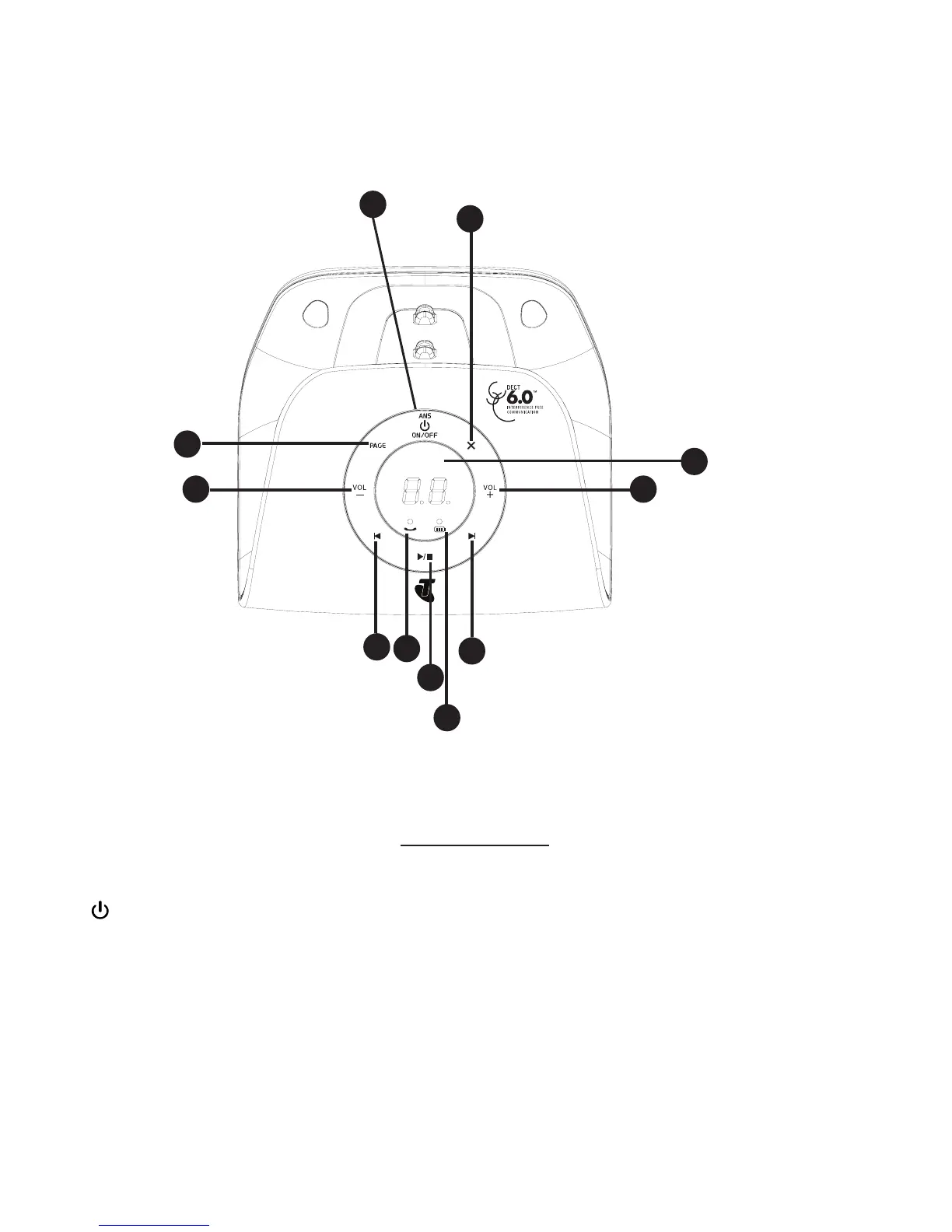
TELEPHONE BASE BUTTONS
X/DELETE
Press to delete the playing message.
When the phone is not in use, press and hold to delete all previously reviewed
messages.
ANS ON/OFF
Press to turn the answering system on or off.
PAGE
Press to page the handset.
1.
2.
3.
Telstra 13150 BK /TAM BS
80-9472-00-00
25Jul,2013
1:1
2 of 2
A3
Z.G. CHEN
R0
Silkscreen Color
Silkscreen Process
T/N
Texture / Finish
Front Cabinet
1
30-014241-xxx-100
Silkscreen
Pantone Metallic 8401 C
Pantone Cool Gray 11C
Hight Glossy
ITAD Lens
2
30-014245-xxx-100
Silkscreen
Hight Glossy
Rubber Key
3
39-008722-xxx-400
Silkscreen
SPI B-1
4
3
2
1
5
7
6
10
8
9
11

Table of Contents

Related product manuals