Quick Manual v1.0 // FMC920
6
SET UP YOUR DEVICE
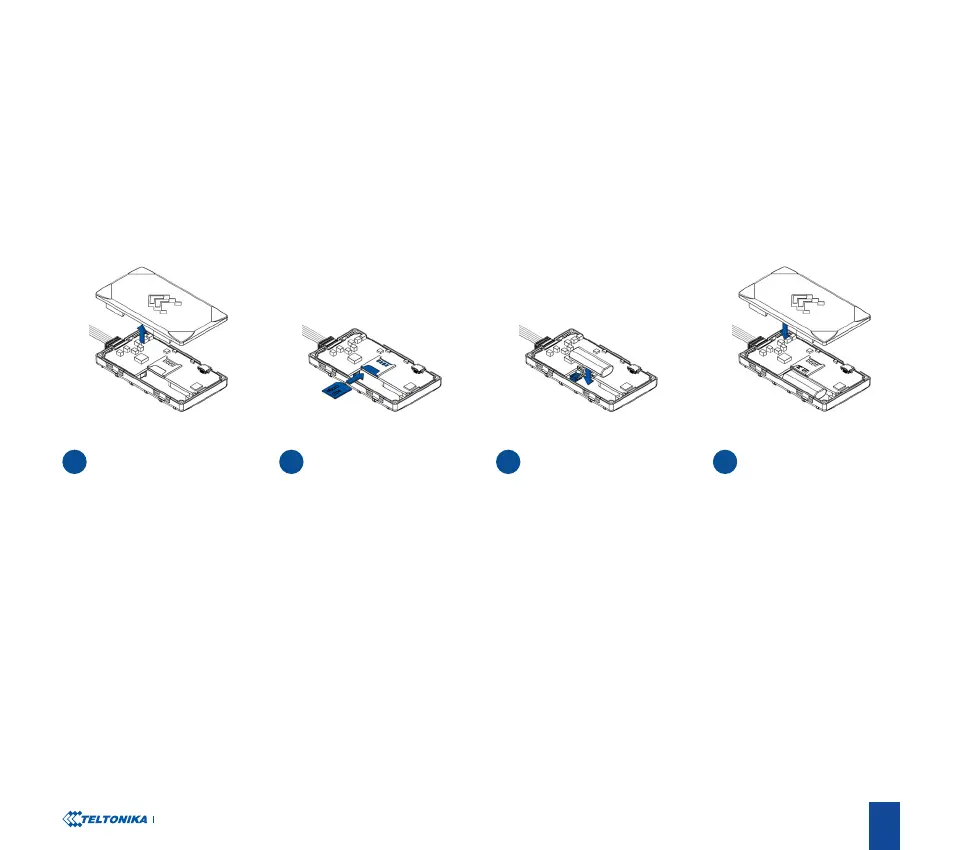
HOW TO INSERT MICRO-SIM CARD
4
1
COVER REMOVAL
3
BATTERY CONNECTION
2
MICRO-SIM CARD INSERT ATTACHING COVER BACK
Gently remove FMC920
cover using plastic pry tool
from both sides.
Insert Micro-SIM card as
shown with PIN request
disabled or read our Wiki
1
how to enter it later in
Teltonika Congurator
2
.
Make sure that Micro-
SIM card cut-o corner is
pointing forward to slot.
1
wiki.teltonika-gps.com/view/
FMC920_Security_info
2
wiki.teltonika-gps.com/view/
Teltonika_Congurator
Connect the battery as
shown on device. Position
the battery in place where
it does not obstruct other
components.
After conguration, see PC
Connection (Windows)
3
,
attach device cover back.
3 Page 7, "PC Connection
(Windows)"




 To Next Page