16
Using your Optik TV service
Using search
Use search to quickly and easily find your favourite
TV
shows, On Demand titles and PPV events.
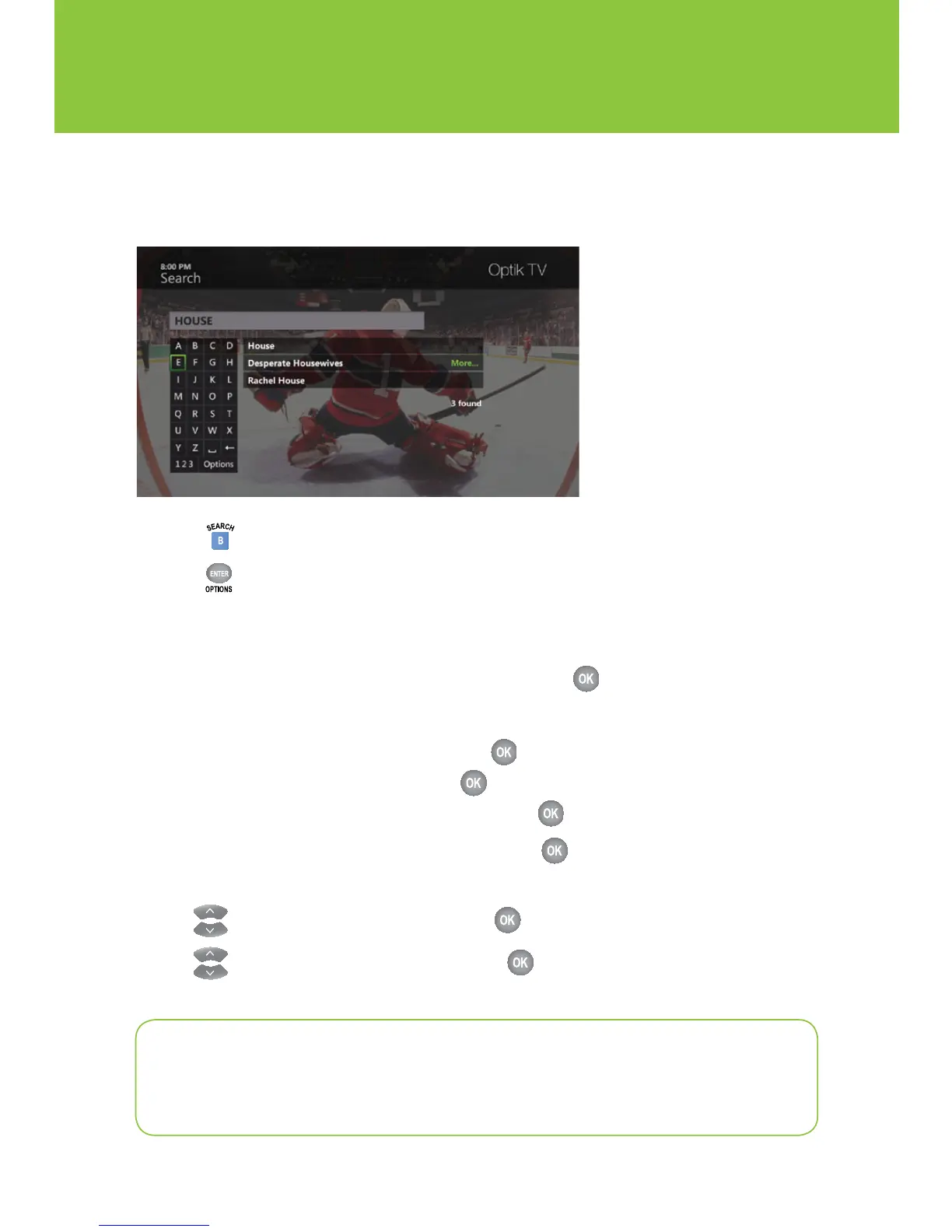
1 Press to access the search screen.
2 Press to search by one of the following:
n Title of a TV show, On Demand or PPV program
n Name of a person (actor/actress/director)
3 Navigate to highlight the first letter you are entering and press .
4 Repeat step 3 to enter more letters.
a. To enter a number, navigate to 123 and press
.
b. Navigate to highlight a number and press .
c. To return to the alphabet, navigate to ABC and press .
5 Navigate to highlight the desired search result and press to view upcoming episodes of
the same program or different programs with the same cast.
6 Use to highlight the program title and press .
7 Use to highlight the desired option and press .
Quick tip
Quickly search by using the number keypad on your remote to spell the name of the
person or program you are looking for.


 To Next Page