599 / Eagle Users manual Release 1.009 CE – April 15, 2015
Part #74447
Printed in USA 11
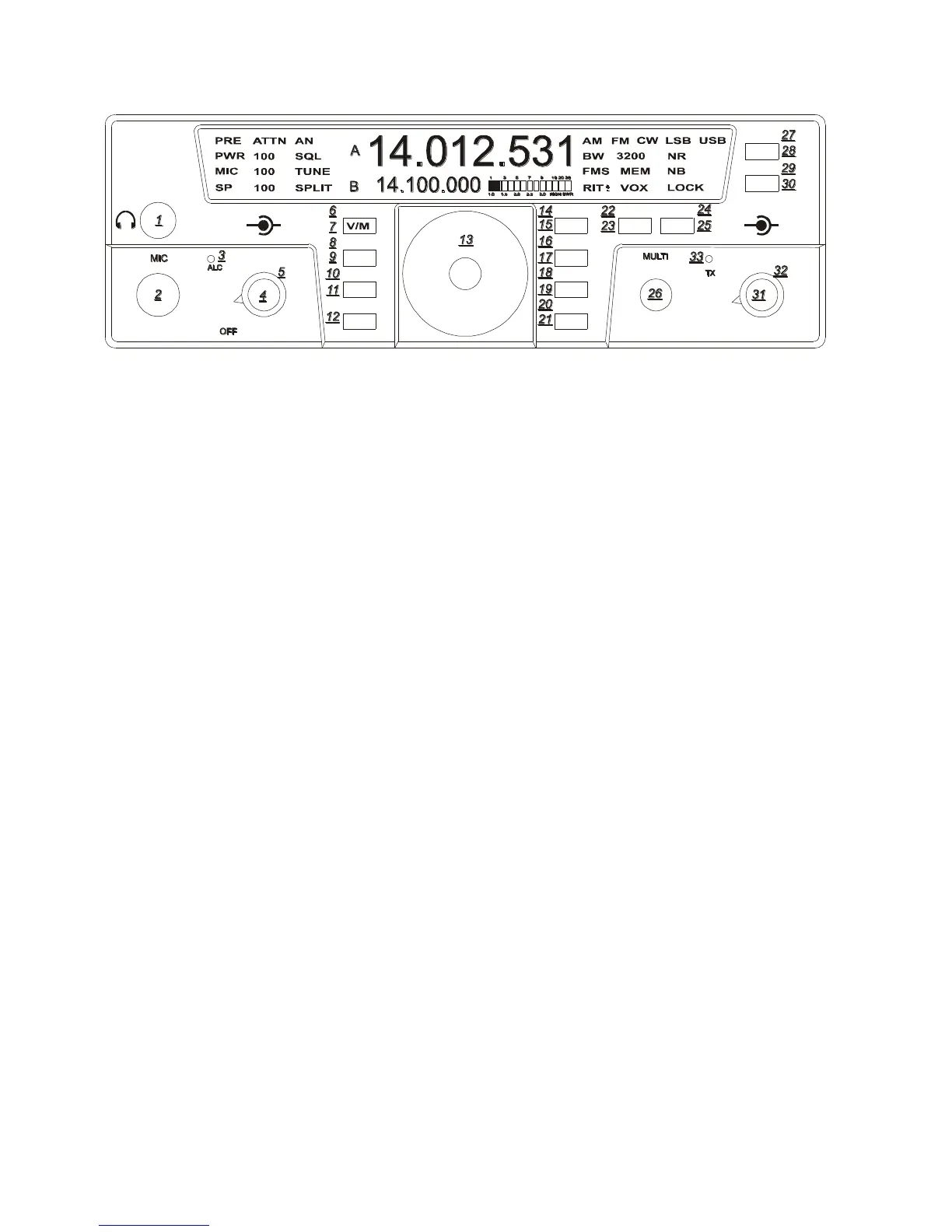
Headphones (1)
Headphones using a ¼” mono or stereo
connector can be plugged into the jack #1
located on the front of the Eagle. Headphone
Impedance from 8-32 ohms will offer
adequate audio levels.
Mode (23)
Pressing the MOD button will toggle the
modes to your desired choice. The Eagle will
change modes each time the button is pushed.
The desired mode is displayed in the top right
hand corner of the Eagle screen. The Mode
setting utilized in a given band will be
recalled when that band is used again.
Monitor (20)
When the Eagle is in a voice mode you can
monitor the transmitted audio signal.
To adjust the monitor on or off or level:
1. Enter Secondary Function Mode
2. Place the Eagle in transmit by pressing
the microphone PTT button.
3. Toggle the Monitor Function on and off
by pressing the BAN button.
4. You can now adjust the monitor level
with the MULTI knob.
The monitor will also work in tandem with
the AF gain control giving proper audio out
of the speaker. Note: there will be no
indication of the monitor being turned on or
off on the front screen. The effect of the
Speech Processor can be heard when Monitor
is on.
PBT (32)
Verify that the PBT control is at the top dead
center of rotation to begin listening in all
modes.
The PBT control will allow you to move the
passband back and forth across the desired
signal. It is beneficial in dropping QRM out
of one side or the other of the passband or it
can simply be used to improve the quality and
intelligibility of the signal. An excellent
experiment for digital communications is to
work the PBT control along with the BW
bandwidth control for the greatest selectivity
and interfering signal rejection.
BW (31)
Adjusting the BW control will allow you to
select the DSP filtering of your choice.
Larger numbers increase the band width and
smaller numbers will decrease the band
width. This control increases the selectivity
and removes close in unwanted signals. This
control will automatically select the correct
roofing filter ahead of the DSP filtering
provided a specific roofing filter is installed.
Fast (19)
To change Tuning Rate press the FAST
button to toggle between 1 Hz, 10 Hz, 100
Hz, 1kHz, 10 kHz Tuning Rates. Each press
of this button will step to the next Tuning
Rate and you will see this represented on
VFO A. Tuning Rate is recalled per mode.
TEN-TEC
AF RF
MR
AN
SP-CW
BW PBT
A=B
VOX
PWRRITAGC
PRE
SQL
MON
E
AGLE
NR
MIC
FNC
LOCK
ATTN
FAST
BAN
MOD TUNE
A/B
NB















 To Next Page