599 / Eagle Users manual Release 1.009 CE – April 15, 2015
Part #74447
Printed in USA 12
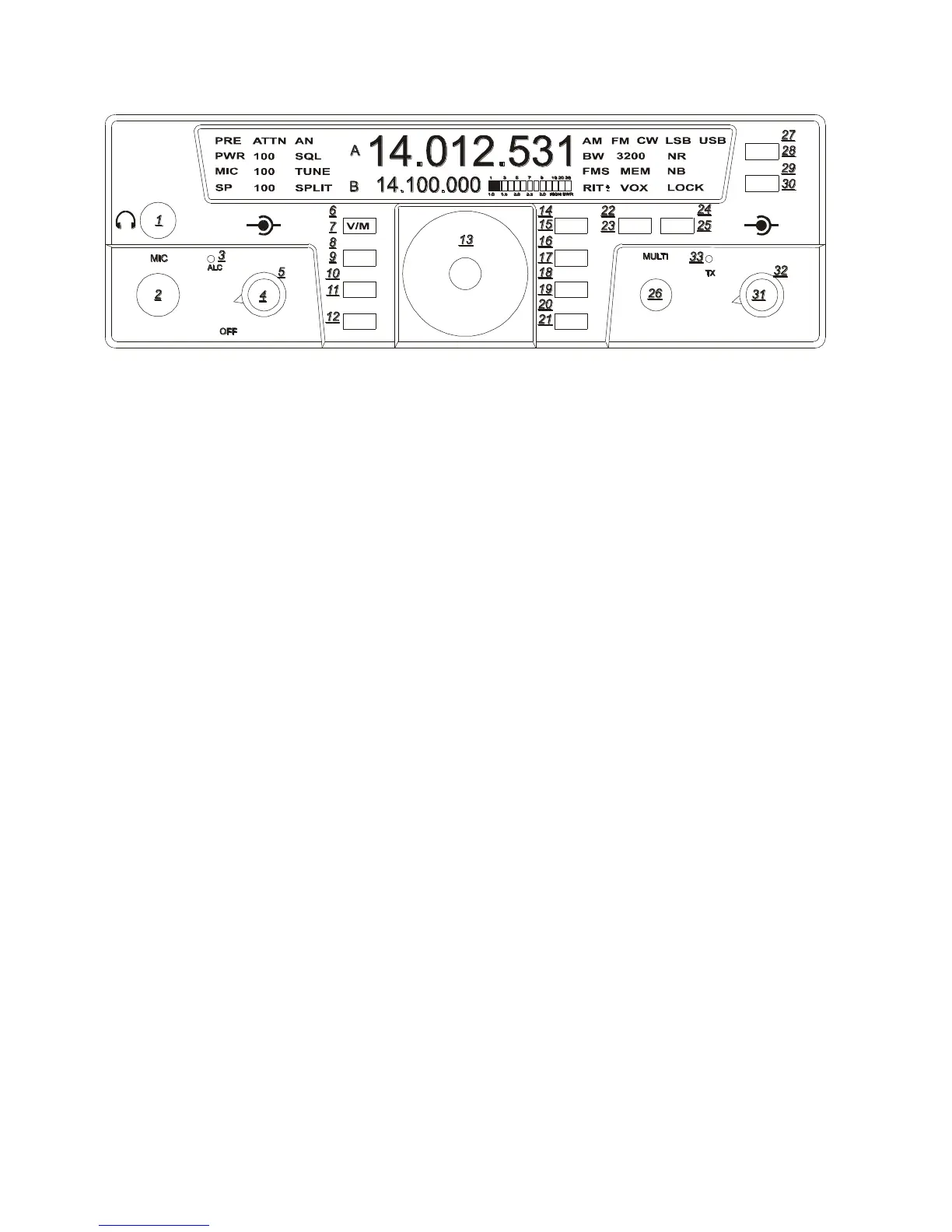
AF Gain Control (4)
Note: this is a dual concentric knob. The
inside knob controls the audio volume level
to the speaker or headphones. Turning the AF
control completely counter clockwise
removes power from the Eagle.
RF Gain Control (5)
The outer ring on this control increases or
decreases the receiver IF gain. It is a general
rule on the more modern DSP transceivers
such as the Eagle to adjust the RF gain fully
clockwise and then slowly back down the
control (counter clock wise) until you reach a
convenient signal to noise ratio. You will
discover this control will vary from band to
band. As you lower the RF gain it may be
necessary to increase the AF gain to get a
comfortable listening level.
AGC (14)
Eagle allows for 3 convenient AGC setting
FAST – MEDIUM – SLOW. For most
sideband operation a slow AGC is usually
preferred. The letters F – M or S will appear
on the screen when you toggle to your
favorite setting. To change the AGC setting,
first Enter Secondary Function Mode, then
press the LOCK/AGC button until desired
setting appears. Exit by pressing FNC.
The AGC setting utilized in a given mode
will be recalled when that mode is used again.
NR (9)
To activate the DSP noise reduction just press
the NR button to turn this feature on and off.
When turned on, NR will appear on the front
screen. NR always defaults to OFF when
power is reapplied to the Eagle. Press and
hold NR to bring on screen the settings from
1-10. The multi knob will allow you to adjust
the noise reduction value for your comfort
level. Press NR again to exit the adjustment
mode. The noise reduction system used in
the Eagle is a wonderful tool that can assist
you in hearing weak signals under noisy band
conditions. Under some conditions the NR
may affect the quality of a received signal
when certain noise and band conditions are
present. Often times experimenting with this
tool under varied signal strength and band
noise such as atmospheric noise will make for
a more pleasurable listening experience.
Most of the time you will discover that DSP
noise reduction will not be necessary
especially with strong incoming signals.
PRE (16)
The preamplifier in the Eagle is designed to
give you a 12dB increase in signal strength.
It is best suited for weak signal reception. To
activate the receiver preamp, first Enter
Secondary Function Mode, then press the
PRE/ATTN button to activate or deactivate
the preamplifier. Exit by pressing FNC.
When the PreAmp is on, PRE is shown on the
display.
TEN-TEC
AF RF
MR
AN
SP-CW
BW PBT
A=B
VOX
PWRRITAGC
PRE
SQL
MON
E
AGLE
NR
MIC
FNC
LOCK
ATTN
FAST
BAN
MOD TUNE
A/B
NB















 To Next Page