GB
English
Instruction Manual
Multi 250 - 400K - 500F - 500K - 500 MAR e Accessories
22. MIG DOUBLE PULSE
22.1 Setting From The Machine Panel- Mig Double Pulse
When the double pulse is on, relative icon blink continuosly. The double pulse
value is totally synergic and doesn’t need any adjustment.
23. SETTING WIRE FEEDER UNIT
23.1 Mig Pulse – Setting From The Remote Wire Feeder Unit
First of all, set the MIG pulse synergic mode on the generator main panel:
NOTE: material type (B) refers to the wire spool type located inside the re-
mote wire feeder unit
(4)
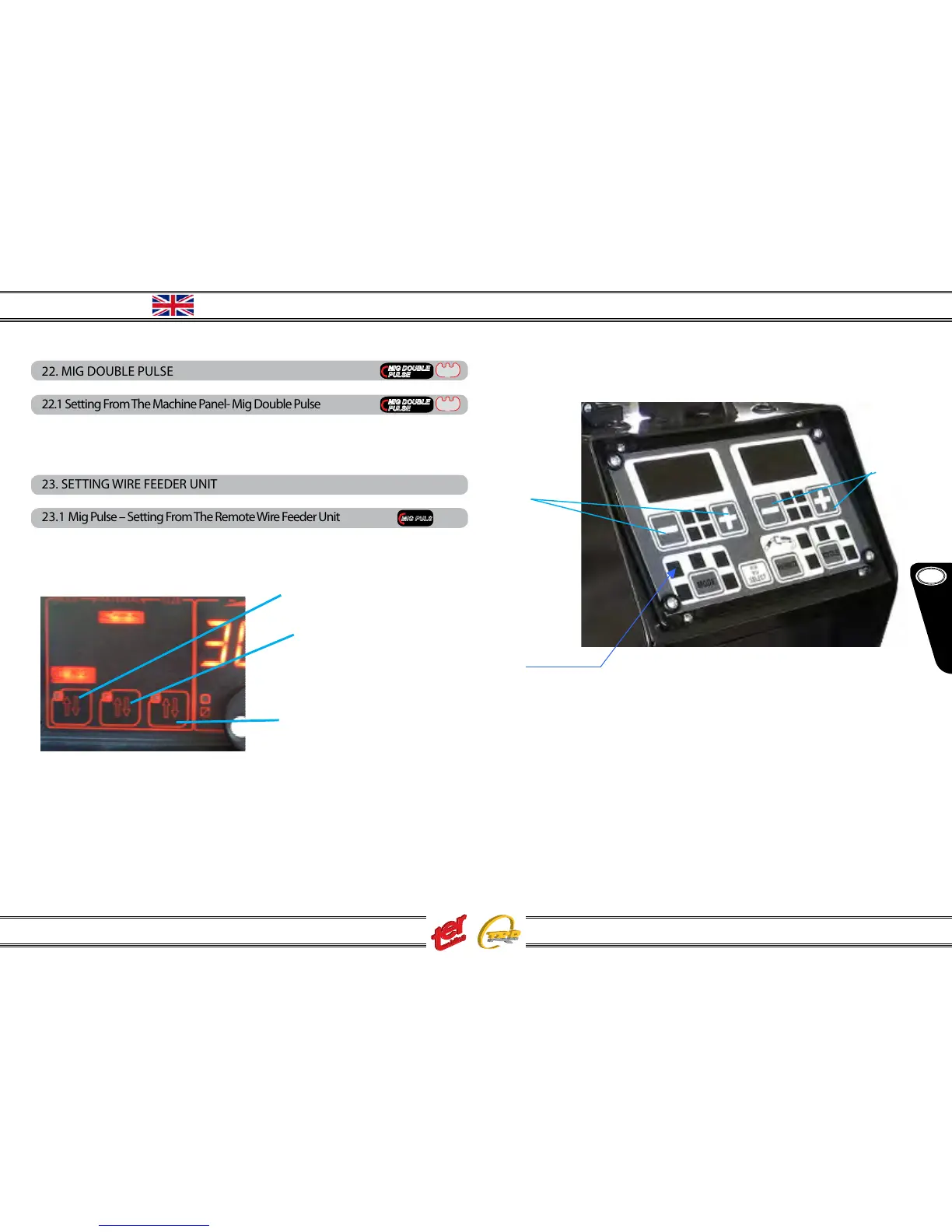
Now approach the remote wire feeder unit and set as follow:
(1) press the key MODE until icon “puls” light on
(2) with keys – and + (left side) adjust the welding current
(3) display shows the set current when icon “Iset” light on, real job welding current
with “Ireal” icon on
(4) display shows the pre-set arc lenght and, during welding job the real voltage
(5) with keys – and + (right side) adjust the arc lenght. Value equal to -0- corre
sponds to the pre-set synergic data: it can be adjusted from -20% up to + 20%.
During this setting the icon “Vreal” is o while icon “arc lenght” is on
(2)
(5)



 To Next Page