EasyManua.ls Logo

Ter Welding Multi 250K - Multi-Plus Concept and Torch Operation; Logic Torch Operation Modes

Default Icon
46 pages
Print Icon
To Next Page IconTo Next Page
To Previous Page IconTo Previous Page
Loading...
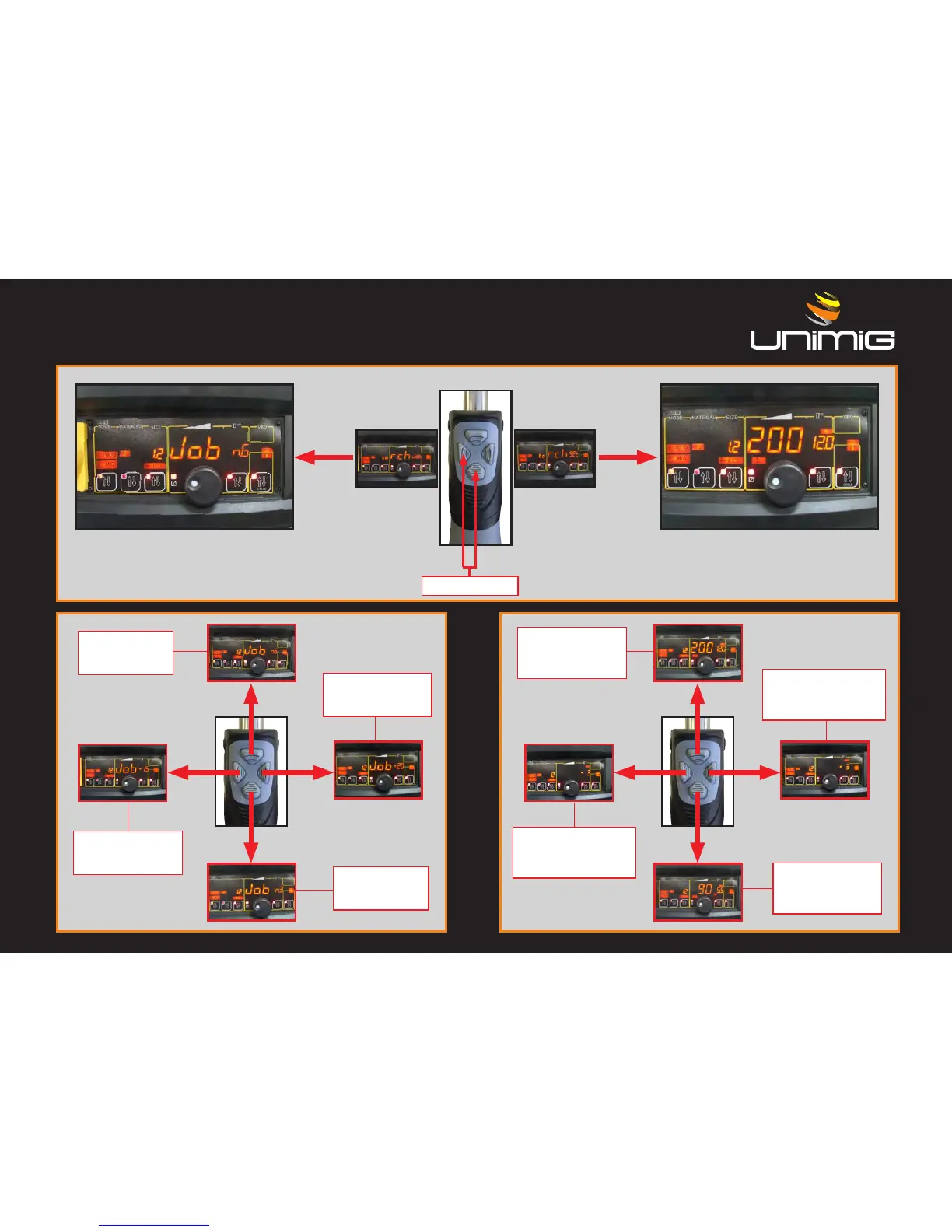
Push together
Top Button +
Selects between
jobs
Top Button +
Sets the current
(or the voltage in
MIG manual)
Right Button +
Trims Job Amps
up to +20
Right Button +
Adjust the arc length
in synergic (or the wire
speed in MIG manual)
Bottom Button -
Selects between
jobs
Bottom Button -
Sets the current
(or the voltage in
MIG manual)
Left Button -
Trims Job Amps
down to -20
Left Button -
Adjust the arc length
in synergic (or the wire
speed in MIG manual)
The digital Torch has two operational modes. SET and JOBS. To switch from on mode to another, Push the Left and Bottom together.
In
JOB mode any adjustment can be done from the front panel and is stored inside the current JOB
MULTI-Plus Concept - LOGIC TORCH OPERATION
SET MODE
JOB MODE

Table of Contents

Related product manuals