44
© 2022 Enter your company name
3. Select the audio file you want to have it on your list, the list is located on the left side of the window.
4. Then click button to add the audio file in, click button to remove it.
5. Set the [Plying Time] and [Delay(sec)] of the list.
6. Click [Save to Machine] button to complete the setting.
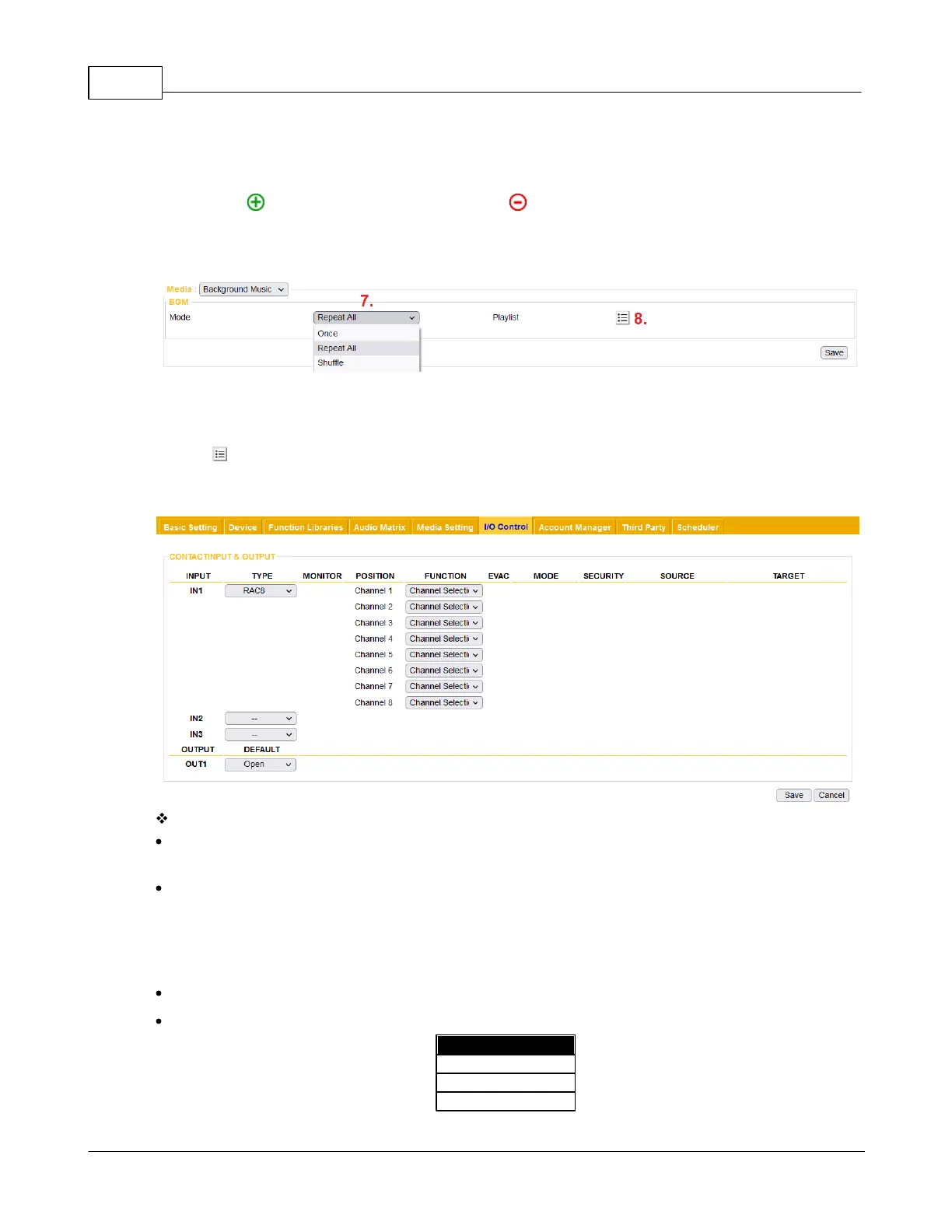
7. Choose the play mode (play once/repeat/random) and play target setting (internal/external/detect by
external). For example, set [Repeat All] mode for BGM playing.
8. Click to choose one or multiple playlists as the BGM source.
4.4.6 I/O Control
Contact Input
Input: The contact input which will be used for triggering an action, IN1 means contact input channel 1.
IN1 have the function of monitoring.
Type: Choose the type of interface which will be used for controlling the action, including logic and
remote device (RAC 5/8, RAC Analog and Logic switch).
o Logic: Switching between "open" and "close" situations.
o Logic-Click: Single click button that without "on" and "off" function.
Position:
Function: Select a function from the drop-down list, see the table as below.



 To Next Page