SoundSystem SiXPack 5.1 + 67
The Right-Click Menu
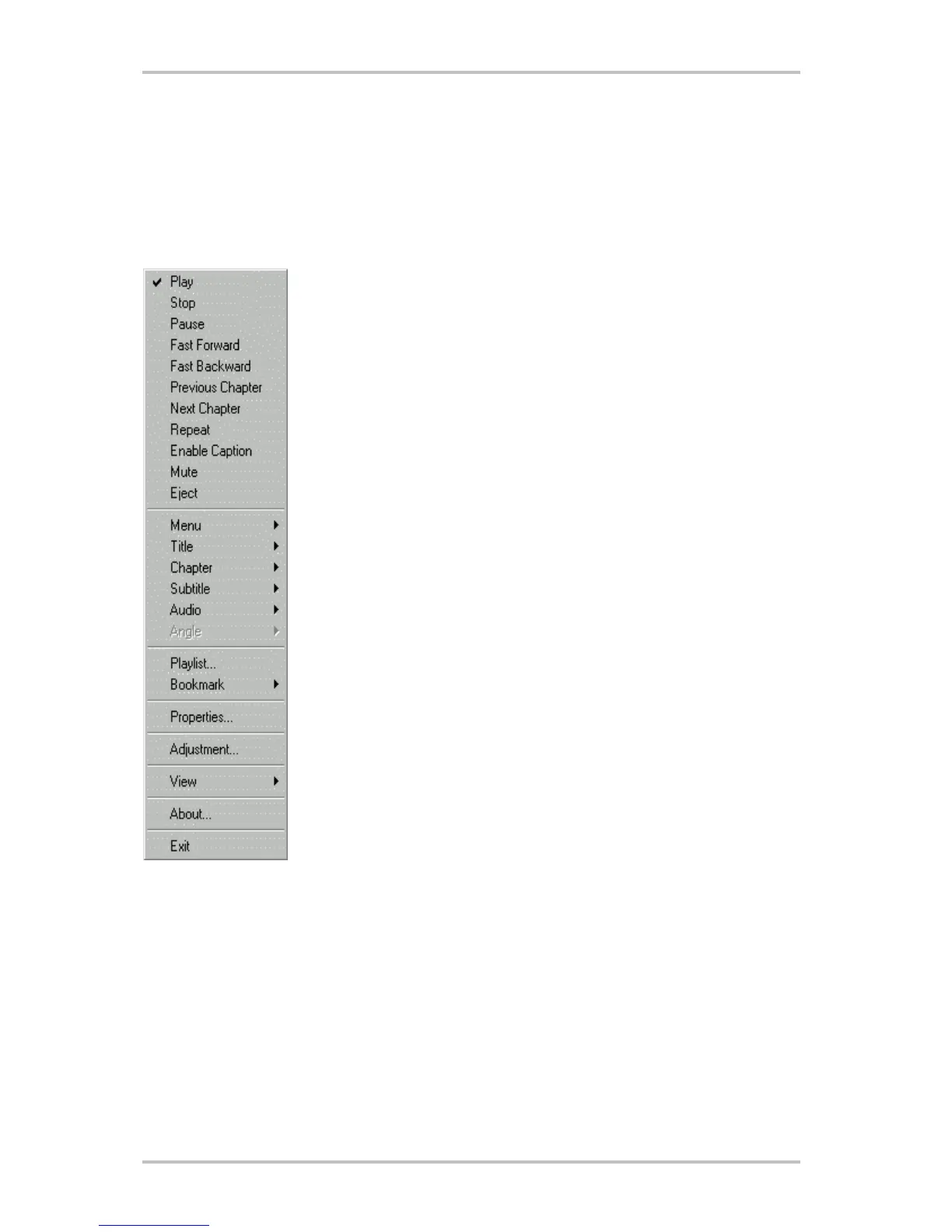
While you are viewing a movie, you can put the cursor on the display window and right-click to
see a "video menu". The commands on this menu are the same as those in the regular menu.
You can also use this window to show the main WinDVD control panel when it has been hidden
by viewing full-screen video, or as set in the Properties section. The Video menu is shown be-
low.
Play - plays the current title, restores play after a pause.
Stop - stops the current playback.
Pause - pauses the current playback.
Fast Forward - plays the disk in fast forward mode.
Fast Backward - plays the disk in fast reverse mode.
Previous Chapter - jumps to the previous chapter.
Next Chapter - jumps to the next chapter.
Repeat - repeats the disk play.
Enable Caption - enables the line 21 caption
Mute - mutes the sound on the disk currently playing.
Eject - ejects the disk from the drive.
Menu - shows menu selections.
Title - shows title information.
Chapter - shows chapter selections.
Subtitle - shows subtitle selections.
Audio - audio selections.
Angle - shows angle selections.
Bookmarks - WinDVD automatically remembers the last vewed location
of a DVD.
Properties - opens the Properties window.
Adjustment - opens panel to adjust the volume, brightness, and Color
Control 1 and 2.
View - views tool bar, status bar and player.
About - shows version and copyright information.
Exit - closes WinDVD.



 To Next Page