EasyManua.ls Logo

TESA WS2980C-PRO - Upload to Wunderground.com

TESA WS2980C-PRO
67 pages
Print Icon
To Next Page IconTo Next Page
To Previous Page IconTo Previous Page
Loading...
39
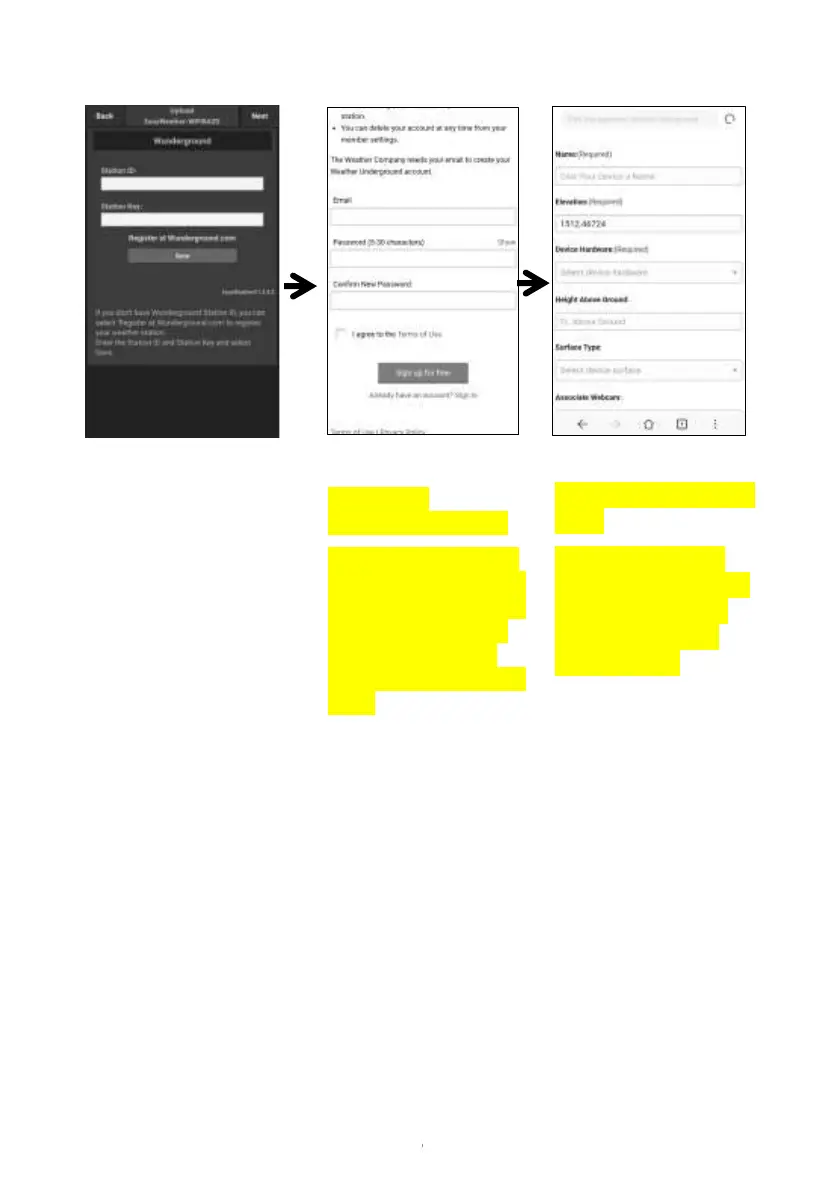
b. Upload your weather data to Wunderground.com
1)
On the Wunderground.com
uploading page, input Station
ID & Station Key, press
Save. Your station ID will be
added on the WU StationID.
then press Next. Jump to the
screen about Upload your
weather data to
Weathercloud.net
If you don’t have
Wunderground Station ID
and Key, press “ Register at
Wunderground.com” to
activating the Register with
Wunderground option

2)
Register at
Wunderground.com
Enter your valid e-mail
address and password
to register to create your
weather underground
account. You will be
presented with a form to
fill out
3)
Complete and submit the
form.
If you cant find your
model number from the
drop-down menu of
Device Hardware,
choose others

Related product manuals