13 • RADIO 3SIXTY
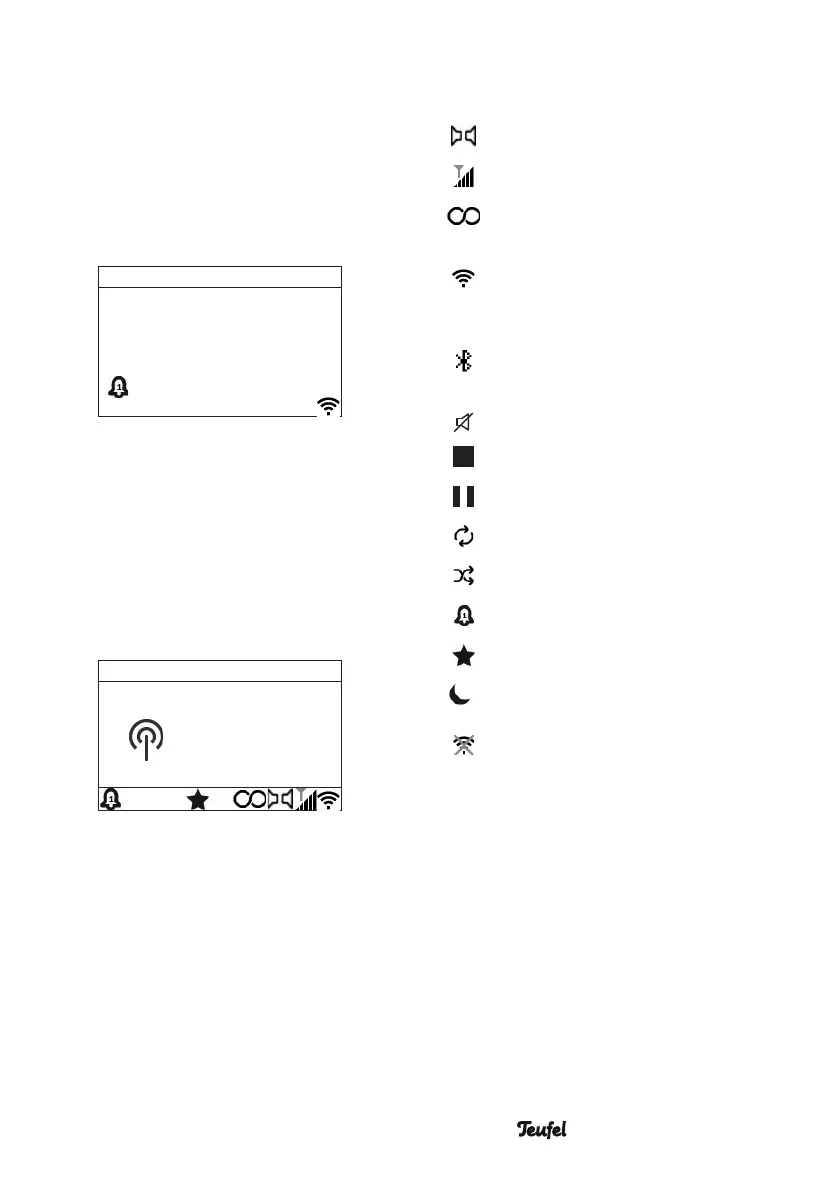
The display panel
The date and time are displayed in
standby. If enabled, the set alarm
time(s) are also displayed here. The
Wi-Fi symbol indicates that there is a
connection to the local network.
1 7 / 1 0 / 2 0 2 1
7:00
pm
6:36
pm
During playback, the display panel is
divided into three sections: At the top,
it shows the source and time, in the
middle playback information and at
the bottom, the status of the alarm
times, source and wireless connec-
tions.
FM
Station name
Radio text
6:36 p.m.
4
Symbols on the display panel
Radio: Stereo
Radio: Signal strength
Radio: RDS reception
Wi-Fi active, flashing:
Connection being estab-
lished
Bluetooth
®
active, flashing:
Connection being estab-
lished
Mute
Playback: Stop
Playback: Pause
Repeat
Random playback
Alarm time active
Favourites 1–30
15
Sleep timer (15 min.)
Network error
(see page 45)


 To Next Page