36 • RADIO 3SIXTY
Station memory
There are 30 station slots available
each for Internet Radio, DAB and FM.
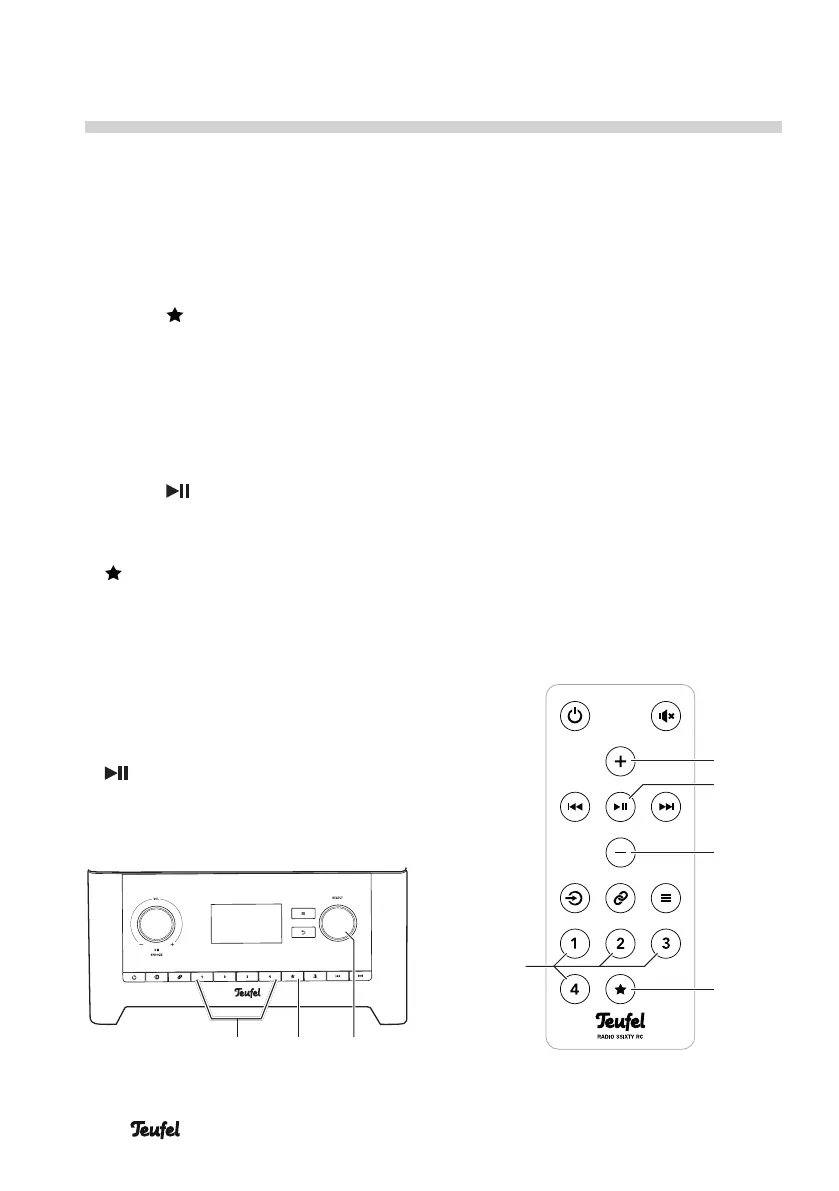
1. To save the station that you have
currently set, push and hold the
button (11)/(25) until the menu
“Save to Preset” appears on the
display panel.
2. Select the desired station memory
with the control SELECT(8) or the
buttons + (21) and – (23).
3. Push the control SELECT(8) or the
button (22).
The station has now been saved.
1. To access it, tap the button
(11)/(25). The menu “Recall
from Preset” will appear on the
display panel.
2. Select the desired station memory
with the control SELECT(8) or the
buttons + (21) and – (23).
3. To access the station, push the
control SELECT(8) or the button
(22).
Station buttons
You can easily occupy and access the
station memory slots 1–4 with the
station buttons 1–4 (12)/(26):
– To save the station that you have
currently set, push the desired
station button until the message
“Preset stored” appears on the
display panel.
– To access it, tap the desired station
button.
(8)(12) (11)
SELECTBACK
(21)
(23)
(25)
(22)
(26)
Saving and accessing stations


 To Next Page