41 • RADIO 3SIXTY
Playback
The volume setting of the
external player affects the
volume of the RADIO 3SIXTY.
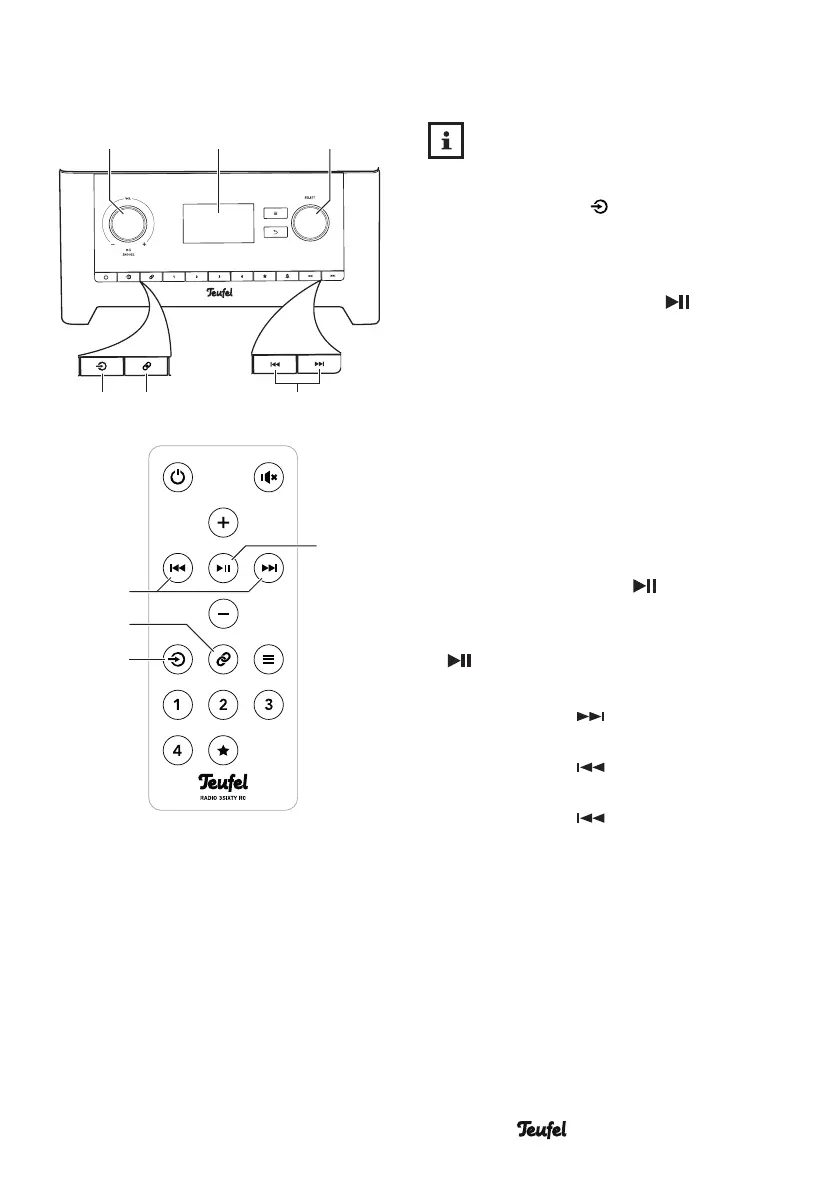
1. Push the button (14)/(27)
multiple times until “Bluetooth
Audio” appears on the display
panel (5) and push the control
SELECT(8) or the button (22).
Alternatively, select “Bluetooth” in
the “Source” menu.
2. Turn on the Bluetooth
®
function on
your source device.
3. Start playback on your source
device.
You can control playback on your
source device. You can also control
some functions on the RADIO 3SIXTY:
– Pause playback: Push the control
VOL (4) or the button (22).
– Continue playback: Push the
control VOL(4) or the button
(22) again.
– Play next track:
Tap the button (9)/(29).
– Restart the current track:
Tap the button (9)/(29).
– Play previous track:
Tap the button (9)/(29) twice.
• If your source device is a smart-
phone, the Bluetooth
®
connection
will be interrupted in the event of
an incoming call and you can make
phone calls as usual. After finishing
your phone call, the sounds will
once again be diverted and played
back by your RADIO 3SIXTY.
(5)
(13)(14)
(8)(4)
(9)
SELECTBACK
(29)
(27)
(28)
(22)


 To Next Page