35 • RADIO 3SIXTY
FM (USW)
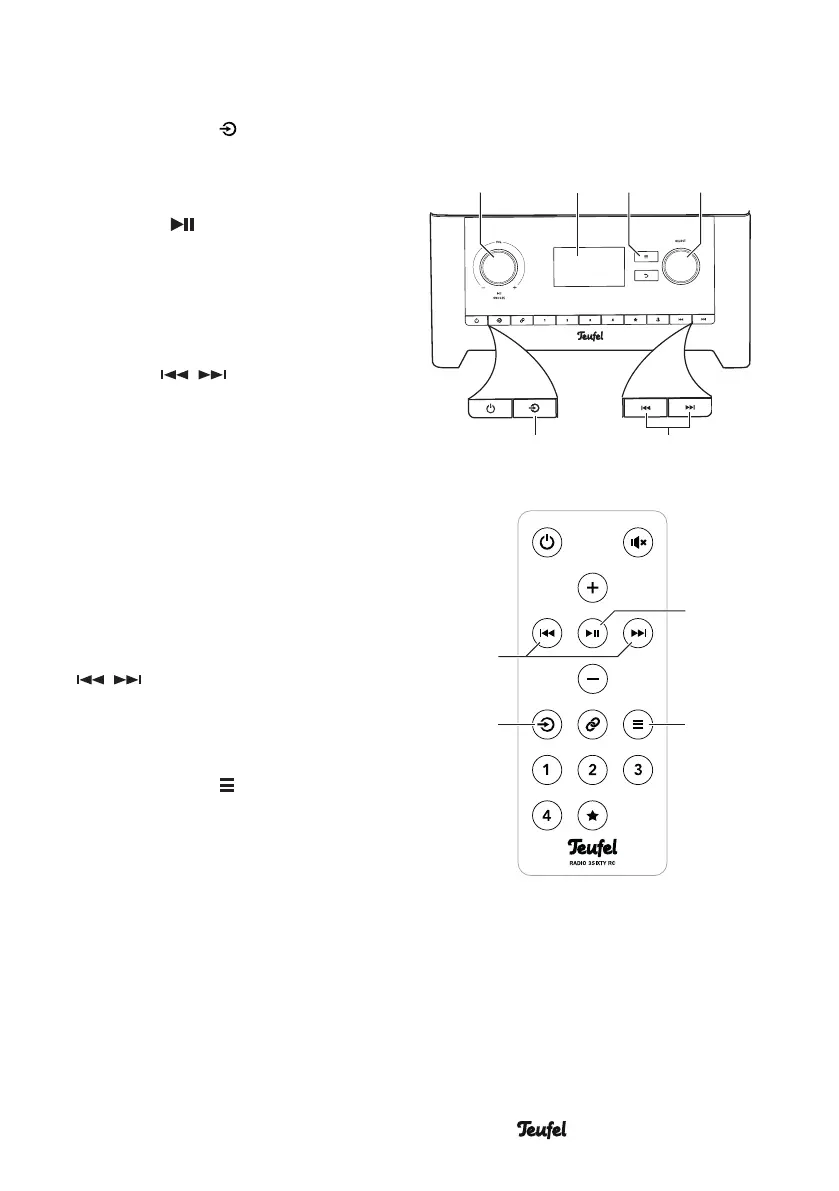
– Push the button (14)/(27)
multiple times until “FM radio”
appears on the display panel (5)
and push the control SELECT(8) or
the button (22).
Alternatively, select “FM” in the
“Source” menu.
Setting stations
Use the SELECT control(8) and
the buttons / (29) to set the
stations manually:
– Each time you turn the control
or tap the buttons, the receiving
frequency on the display panel (5)
will be decreased/increased by
50kHz.
The automatic search will find
stations that can be received in suffi-
cient quality.
– Start the automatic search by
pressing and holding the buttons
/ (9)/(29).
The name of the set station appears
on the display panel(5) after a short
time.
– Push the button (7)/(24) to
access the submenu for FM radio:
Scan setting
Only find stations with a strong signal
(Yes/No).
Audio setting
In case of stations with severe noise,
you can switch to mono mode here.
SELECTBACK
(27)
(22)
(24)
(29)
(14)
(5) (8)(4) (7)
(9)


 To Next Page