20 • RADIO 3SIXTY
Operation
You can control all important
functions of the RADIO 3SIXTY
with the Teufel Remote App (see
page30).
Selecting a source
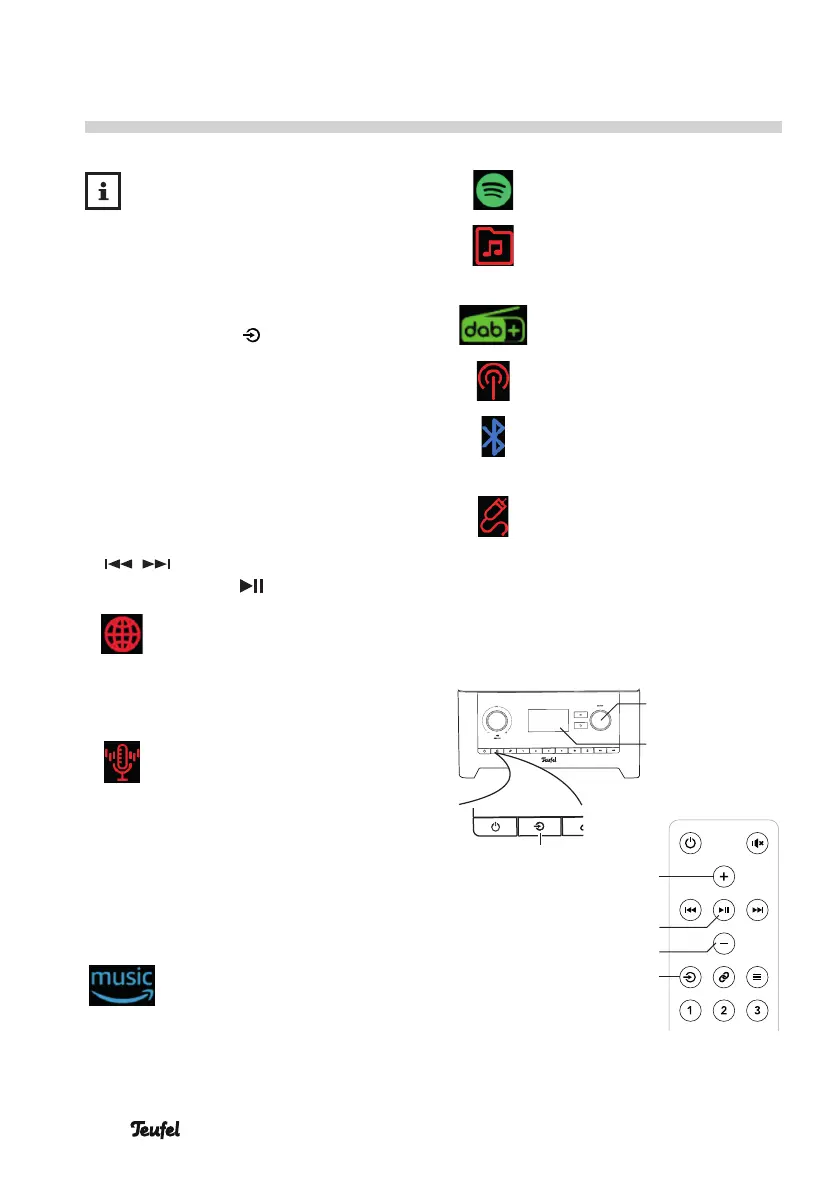
– With the button (14)/(27), you
can access the source menu: Here,
the sources are shown as symbols
on the display panel (5).
– Select the desired source with the
control SELECT(8) and briefly push
the control.
– On the remote control, select the
source with the buttons
/ (29), access the source
with the button (22).
Internet radio: Reception of
global radio stations, only
possible with an existing
Internet connection (see
page 31)
Podcasts: international
media content (e.g. news,
recordings of radio broad-
casts, music programmes,
etc.) that can be accessed
at any time on the
Internet, irrespective of
broadcasting times (see
page31)
Amazon Music
®
: a music
streaming service (see
page42)
Spotify
®
: a music streaming
service (see page 43)
USB music player: play-
back from USB storage
devices (see page37)
DAB radio: digital radio
reception (see page33)
FM radio: analogue radio
reception (see page35)
Bluetooth
®
: digital source
via wireless connection
(see page 40)
Aux In: analogue source via
the AUX IN jack(18) (see
page 43)
The selected source will appear on
the display panel (5).
– You can also select the source in
the “Source” menu.
(5)
(14)
(8)
SELECTBACK
(21)
(23)
(22)
(27)


 To Next Page