37 • RADIO 3SIXTY
USB Music player
This can be used to play MP3 audio
files from USB storage devices.
You can connect conventional USB
sticks and USB hard drives with the
specifications USB 1.0 to 3.0, which
are formatted to “FAT32” and have
a maximum capacity of 128GB, to
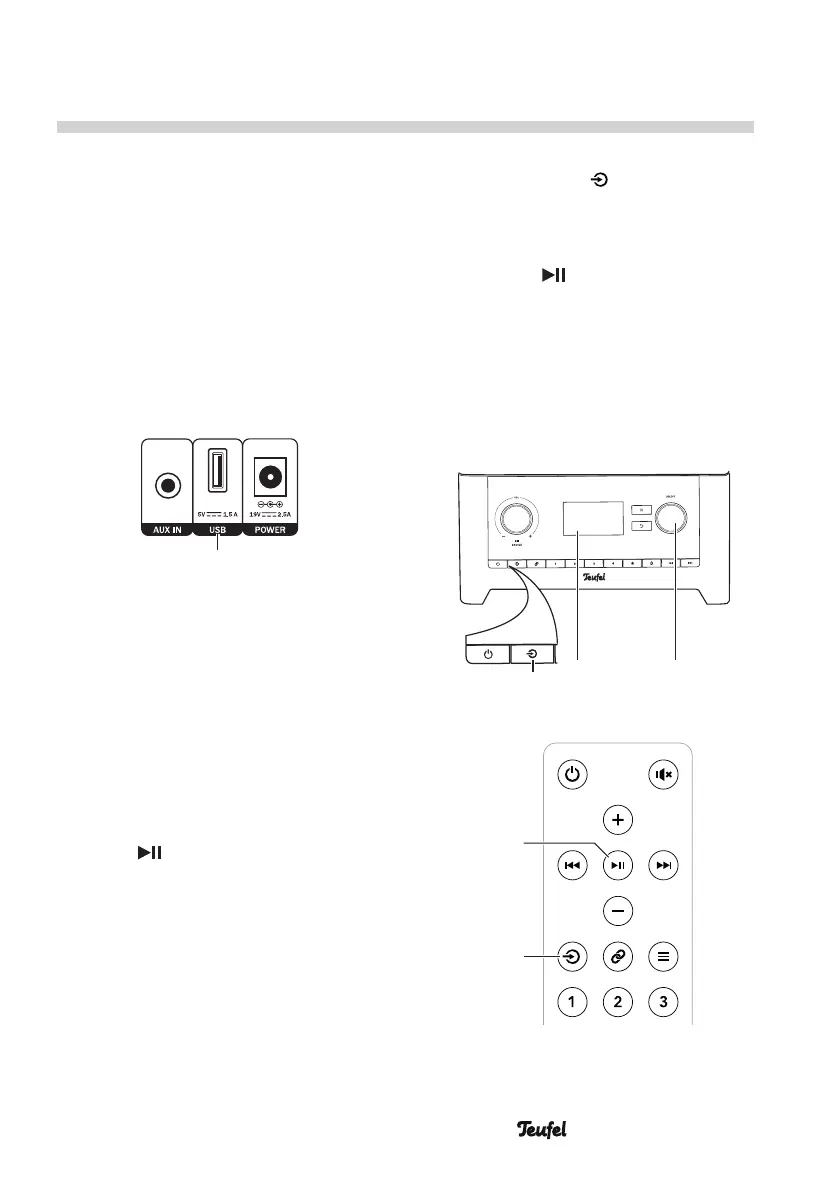
the USB port (17). Up to 5,000 files
can be saved on it in up to 8 directory
levels.
(17)
Insert the USB stick or the plug of
your USB device in the USB jack. The
plug only fits the jack in one orienta-
tion.
As soon as the RADIO 3SIXTY recog-
nises the storage device, the notice
“USB disk attached. Open folder?”
will appear on the display panel and
“Yes” is selected.
– Push the control SELECT(8) or the
button (22).
The file list for the USB storage
device will now be shown.
If the USB storage device has been
connected for a prolonged period,
you can access the file list as follows:
1. Push the button (14)/(27)
multiple times until “Music player”
appears on the display panel (5)
and push the control SELECT(8) or
the button (22).
Alternatively, select “USB” in the
“Source” menu.
2. In the menu, select the “USB play-
back” item. The file list for the USB
storage device will appear after a
short time.
(5)(14) (8)
SELECTBACK
(27)
(22)


 To Next Page