17 • RADIO 3SIXTY
Power supply
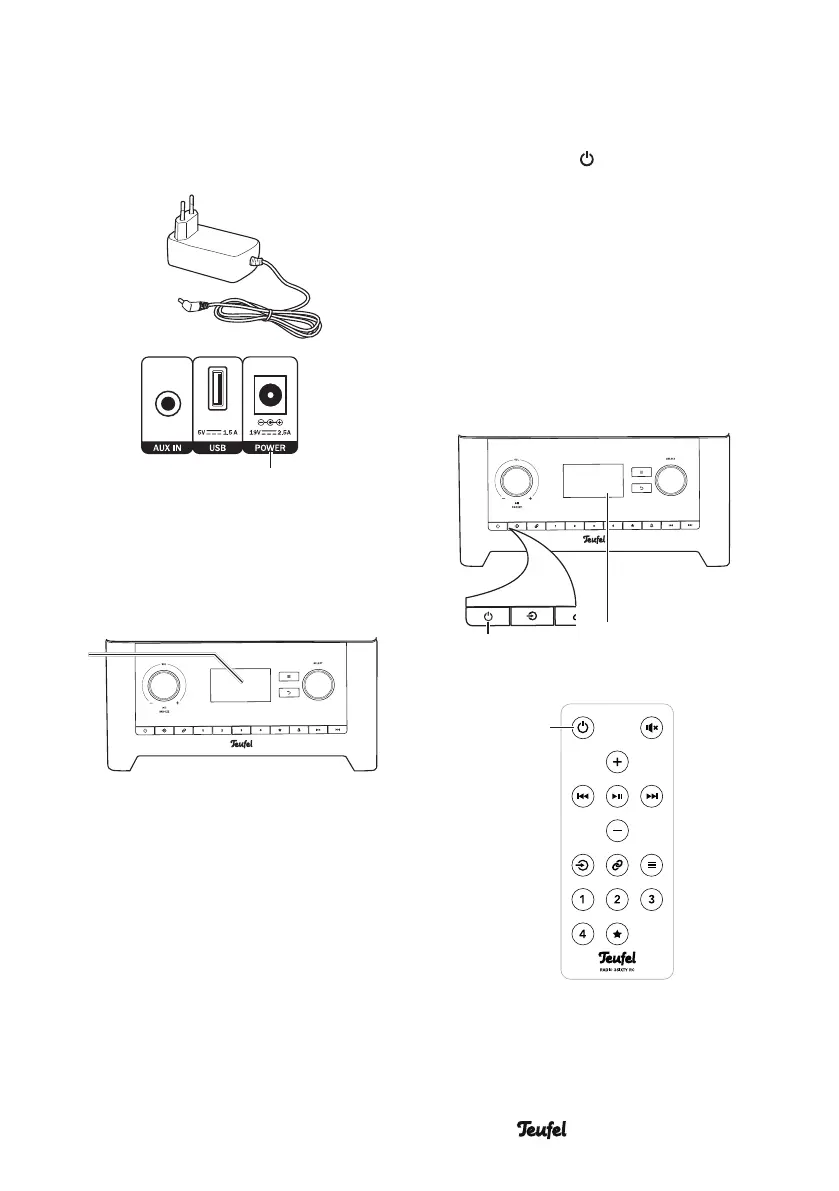
1. Insert the small plug of the
enclosed mains adapter (2) in the
POWER jack (16).
(2)
(16)
2. Connect the mains adapter to a
mains power socket.
The lettering “TEUFEL” will appear
briefly on the display panel (5).
(5)
3. When you switch on the device for
the first time, the setup wizard will
start (see the next page).
Activating and
deactivating
– Use the button (15)/(30) to
switch the RADIO 3SIXTY on or to
standby.
• After switching the device on,
the last active audio source and
volume will be set.
• If the RADIO 3SIXTY does not
receive an audio signal for
20minutes, it will automatically
switch to standby.
(5)(15)
SELECTBACK
(30)


 To Next Page