-11-
BASIC CONNECTION
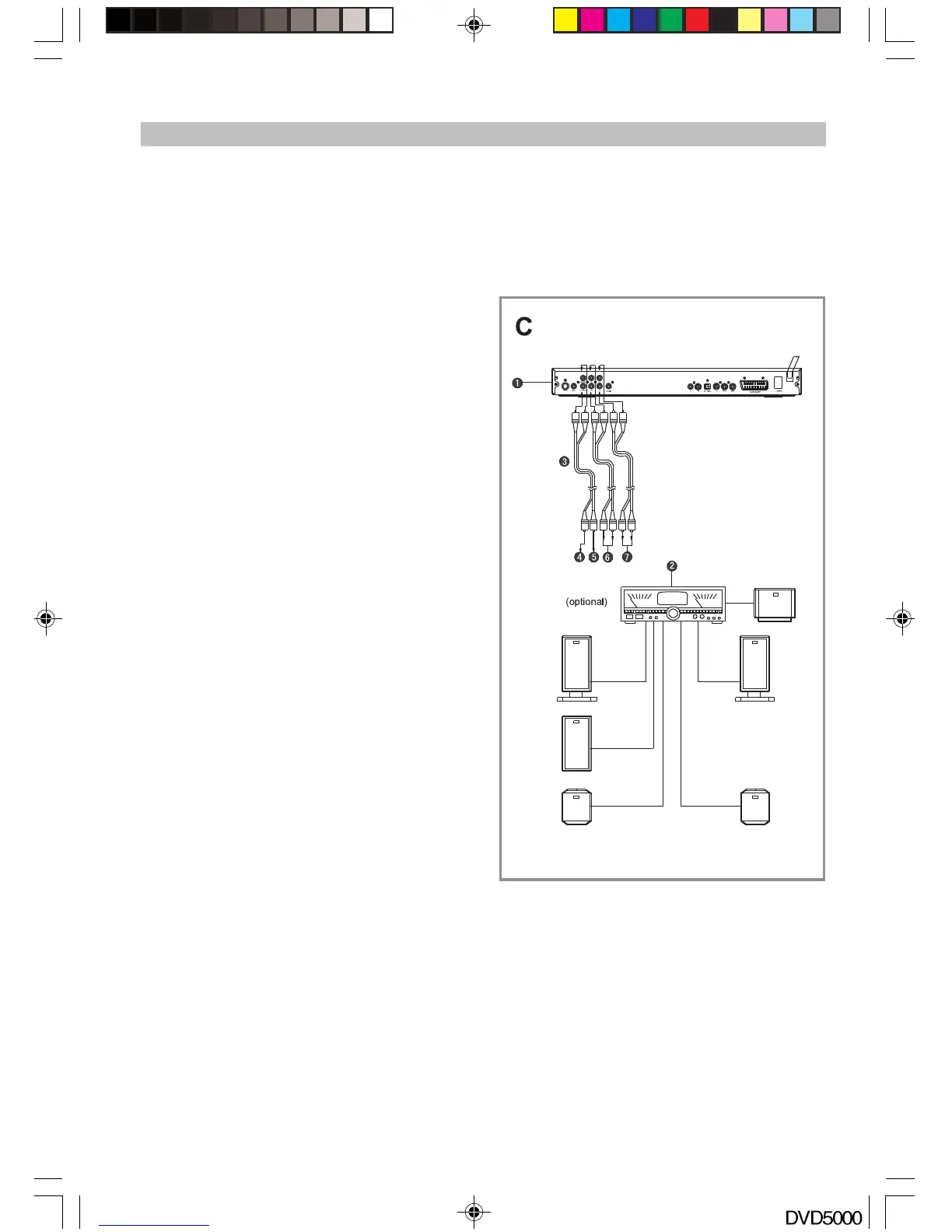
Connecting to AV amplifier with 5.1 channel (See Fig. C)
This player contains a Dolby Digital or MPEG2 decoder. This enables the playback of a DVD disc
recorded in Dolby Digital, MPEG1/2 audio or linear PCM without external decoder support. When the
DVD player is connected to an AV amplifier with 5.1 channel input connectors, theater quality audio can
be enjoyed at your home when you are playing a DVD disc recorded in Dolby digital, MPEG1/2 audio or
linear PCM.
1. DVD Player with DivX playback + Card Reader
2. Amplifier with 5.1 channel input connectors
3. Audio cords (not supplied)
4. To audio input connector (subwoofer)
5. To audio input connector (center)
6. To audio input connector (surround L, R)
7. To audio input connector (front L, R)
Recommendation:
Set the speaker size in the “Audio” menu to either:
Front/Centre/Rear: Large, Subwoofer: ON,
or
Front/Centre/Rear: Small, Subwoofer: ON.
Notes:
u Select the correct “audio” settings for this
player according to your audio system
requirements after connection has been made.
u If the type of speaker connected does not
correspond to the channels recorded then the
disc will not play all channels; only the front 2
channels.
u DVDs recorded in Linear PCM/96kHZ sampling
will play back as only 2 channels.
DVD5000_IB.p65 05-10-22, 23:1611



 To Next Page