
 Need help?
Do you have a question about the Texas Instruments BQ24800EVM and is the answer not in the manual?
Details the features and operational capabilities of the BQ24800 Evaluation Module (EVM).
Lists and describes the input/output jacks and their functions on the EVM.
Explains the controls and key parameter settings available on the EVM for operation.
Provides the minimum, typical, and maximum values for operating parameters like voltage and current.
Lists the required power supplies, loads, meters, and computer for EVM testing.
Details the step-by-step procedure for setting up the necessary equipment for EVM evaluation.
Outlines the steps to test and verify the AC adapter detection threshold settings.
Guides on setting key charge parameters like current and voltage regulation thresholds.
Describes how to measure and verify charge current and AC current regulation (DPM).
Provides steps to enable and test the hybrid boost mode functionality of the EVM.
Details the setup and procedure for testing the battery-only boost mode.
Explains how to configure and test different power path selection scenarios.
Presents the PCB layout diagrams for the BQ24800EVM, showing component placement and traces.
Provides the electrical schematic diagram for the BQ24800EVM circuit.
Lists all components used in the BQ24800EVM, including their designator, value, and manufacturer.
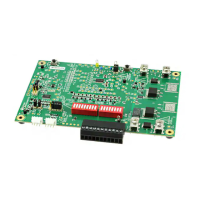
The BQ24800 evaluation module (EVM) is a sophisticated battery charge controller designed for research and development in a laboratory setting. This device is primarily intended for product and software developers to facilitate feasibility evaluation, experimentation, or scientific analysis of Texas Instruments semiconductor products. It is not a finished product and should not be directly or indirectly assembled as part of any finished product or subassembly. The EVM is compatible with SMBus 1- to 4-cell hybrid power boost mode battery charge controllers and includes features for battery-only boost and processor hot monitoring.
The BQ24800 EVM functions as a battery charge controller, managing the charging process for 1- to 4-cell batteries. It supports a wide input voltage range and offers programmable output charge voltage and current. A key feature is its hybrid power boost mode, which allows the system to draw power from both the AC adapter and the battery simultaneously when the system load exceeds the AC adapter's capability. This ensures continuous power delivery to the system even under high load conditions. The device also supports a battery-only boost mode, where the system can operate solely from battery power, boosting the battery voltage to meet system requirements. Additionally, it incorporates processor hot monitoring, a critical safety feature that helps prevent overheating of the processor during operation. The EVM allows for precise control over charger parameters, including charge current and charge voltage regulation thresholds, enabling developers to fine-tune the charging behavior for various battery chemistries and system demands. The power path selection feature allows for dynamic management of power sources, ensuring efficient power delivery to the system and optimal battery charging.
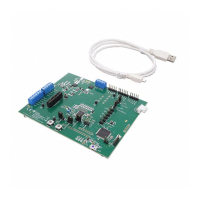
To use the BQ24800 EVM, developers need to connect it to a computer with at least one USB port and a USB cable. The EV2400 USB driver and BQStudio software must be properly installed on the computer. The EVM is compatible with both the EV2400 and EV2300 hardware kits, with the EV2400 kit being recommended. The BQStudio software provides a graphical user interface for configuring and monitoring the BQ24800. This includes setting AC adapter detection thresholds, adjusting charger parameters like charge current and voltage regulation, and observing real-time system measurements.
The setup procedure involves connecting power supplies, electronic loads, and multimeters to various jacks on the EVM. Power Supply #1 (PS#1) is used for the AC adapter input, while Power Supply #2 (PS#2) can simulate a battery or provide additional power for testing. Electronic loads are used to simulate system and battery loads. Multimeters are essential for measuring voltages and currents at different test points on the board. The EVM provides specific test points (TPs) for easy measurement of key parameters such as VCC, ACDET, ACOK, SYS, REGN, ILIM, IBAT, IADP, and IIDCHG.
The EVM supports two methods for detecting battery presence via the BATPRES pin: using the BQ24800's independent comparator or an external TPS3898A Voltage Monitor. Jumpers (JP1, JP2, JP3, JP4, JP5) are used to select between these options. Proper jumper configuration is crucial for correct operation.
The hybrid boost mode is enabled by setting a specific value in the ChargeOption3 register, allowing the system to draw power from both the AC adapter and the battery. Battery-only boost mode is activated by disconnecting PS#1 and setting specific values in the ChargeOption2 and MinSysVoltage registers. The power path selection feature allows for testing different power delivery scenarios.
The BQ24800 EVM is designed for a research and development environment, and as such, maintenance primarily involves careful handling and adherence to recommended operating conditions. The PCB layout guidelines provided in the manual are critical for minimizing switching loss, preventing electrical and magnetic field radiation, and avoiding high-frequency resonant problems. These guidelines emphasize proper placement of input and output capacitors, switching MOSFETs, inductors, and current sensing resistors. They also detail how to route sense leads, connect ground planes, and place decoupling capacitors to ensure stable and reliable operation.
It is crucial to ensure that the exposed power pad on the backside of the IC package is properly soldered to the PCB ground, with sufficient thermal vias directly under the IC to connect to the ground plane on other layers. This helps in thermal management, which is vital for the longevity and performance of the device.
The EVM is sensitive to electrostatic discharge (ESD), so it should always be stored in a protective ESD bag when not in use. Users must operate the EVM within the recommended specifications and environmental considerations to prevent personal injury, property damage, or permanent damage to the EVM. Exceeding specified performance ratings for input/output voltage, current, power, and environmental ranges can lead to circuit component overheating. Regular checks of component temperatures during operation are advised.
In case of non-conformity or defects, users are required to notify Texas Instruments within a specified timeframe. TI's sole liability is to repair or replace EVMs that fail to conform to the warranty, or to credit the user's account. Any alterations or modifications by entities other than TI, improper installation or testing, or use outside of recommended guidelines will void the warranty. Software updates and drivers for the EV2400 and BQStudio software are provided by TI and should be kept current to ensure optimal functionality and access to the latest features and bug fixes.
 General
| Part Number | BQ24800EVM |
|---|---|
| Battery Charging | Yes |
| Operating Temperature | -40°C to 85°C |
| Category | Evaluation Module |
| Charge Current | Up to 8A |
| Supported Battery Chemistry | Li-Ion, Li-Polymer |
| Description | The BQ24800EVM is an evaluation module for the BQ24800, a synchronous buck battery charge controller |









 To Next Page