Evaluation Board Setup
www.ti.com
4
SNAU210–March 2017
Submit Documentation Feedback
Copyright © 2017, Texas Instruments Incorporated
LMX2594 EVM Instructions – 15-GHz Wideband Low Noise PLL With
Integrated VCO
2 Evaluation Board Setup
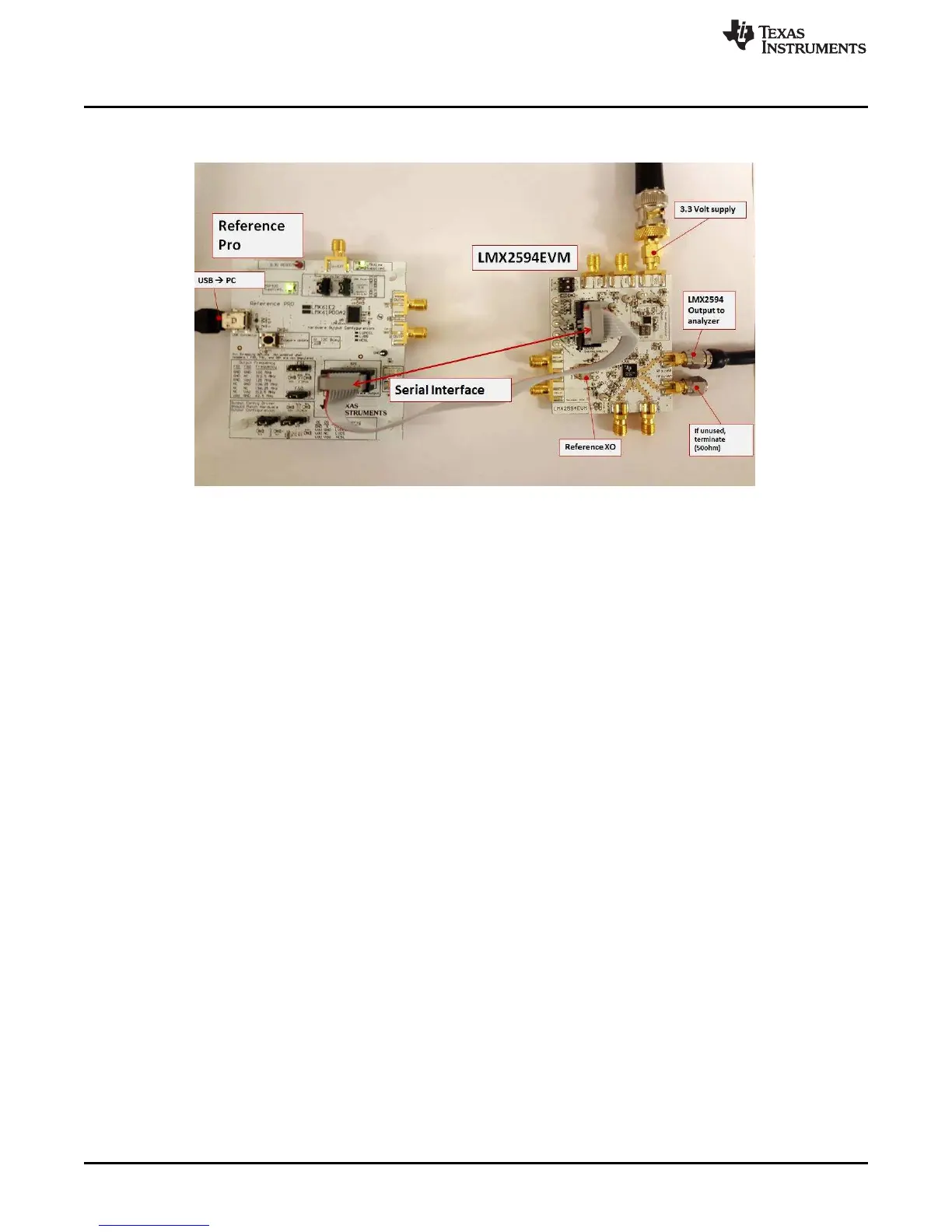
Figure 2. LMX2594EVM Setup
SPACER
1. Power:
a. Set power supply to 3.3 V with 600-mA current limit and connect to V
CC
SMA.
2. Input Signal:
a. VC-708 100-MHz on-board oscillator enabled (default). To use another reference, see Appendix D.
3. Programming Interface:
• Reference Pro will provide SPI interface to program LMX2594:
a. Connect USB cable from laptop or PC to USB port in Reference Pro. This provides power to
Reference Pro Board and communication with TICS GUI
b. Connect 10 pin ribbon cable from Reference Pro to LMX2594EVM as shown above.
4. Output:
a. Connect RFoutAM or RFoutAP to a phase noise Analyzer. Connect a 50-Ω on the unused output if
you are using only single-ended. Use a balun if you are using differential.










 To Next Page