Software
www.ti.com
5 Software
5.1 Installation
Access to the PurePath™ Console (PPC2) can be requested here: www.ti.com/tool/purepathconsole.
Once access is granted, download the PurePath Console here: http://cc.ext.ti.com.
After downloading the zip file containing the PPC2 release for PCM186X, unzip the contents. Inside the
zip file is an executable to install PPC2 and a .ppc2 file, this is the PCM186X plugin. Save the plugin in a
file to access later, start the PPC2 installation.
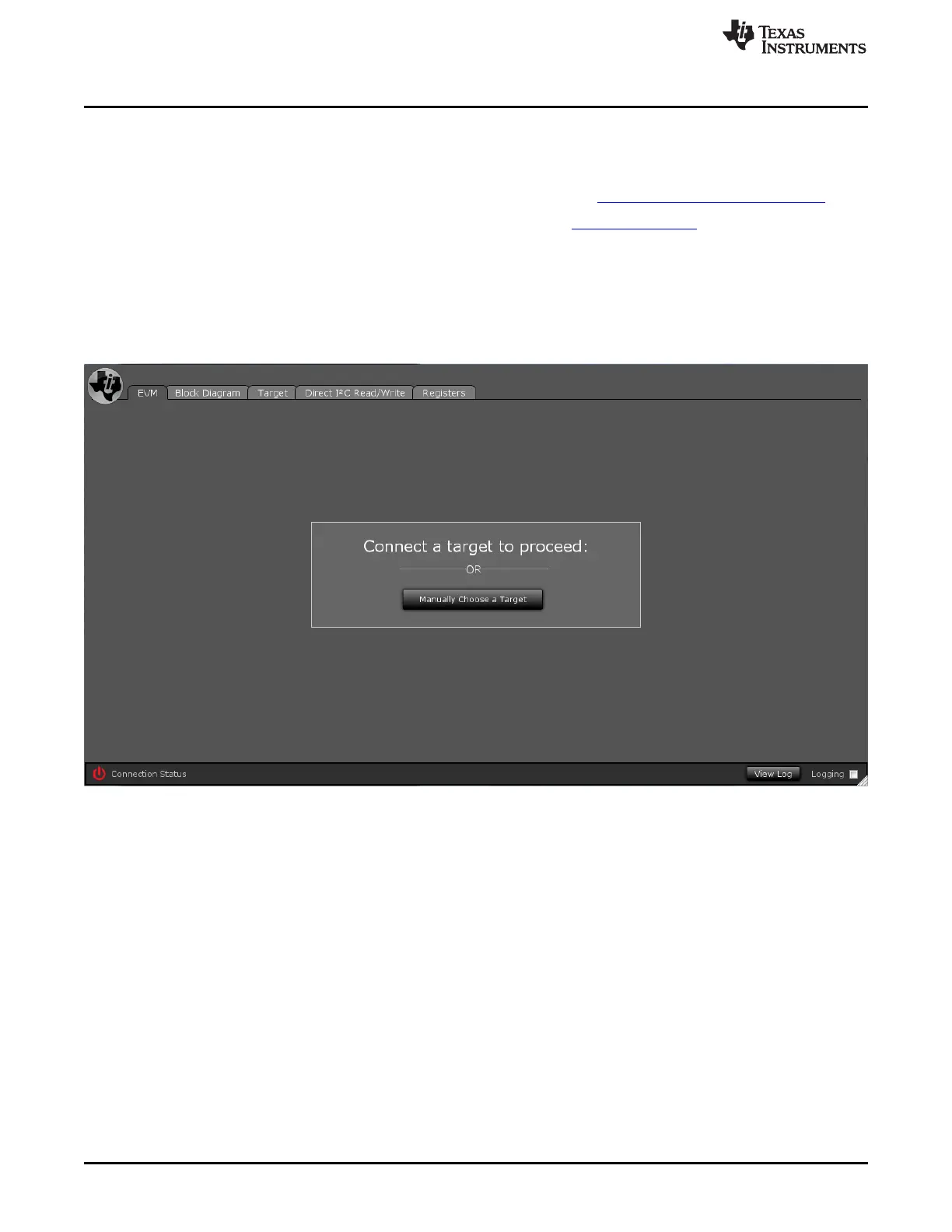
Once the installation is complete, start PPC2. Plug in the USB cable connected to the USB-I2X board,
which should be connected to the PCM186X EVM. If the GUI does not automatically load the PCM186X
GUI, you must manually select the plugin.
Figure 10. PCM186X EVM GUI
Select Manually Choose a Target, a menu should appear that will show the list on installed plugins and
the option to add a target.
10
PCM186xEVM SLAU615–December 2014
Submit Documentation Feedback
Copyright © 2014, Texas Instruments Incorporated







 To Next Page