Installation Guide
4
6
5
J
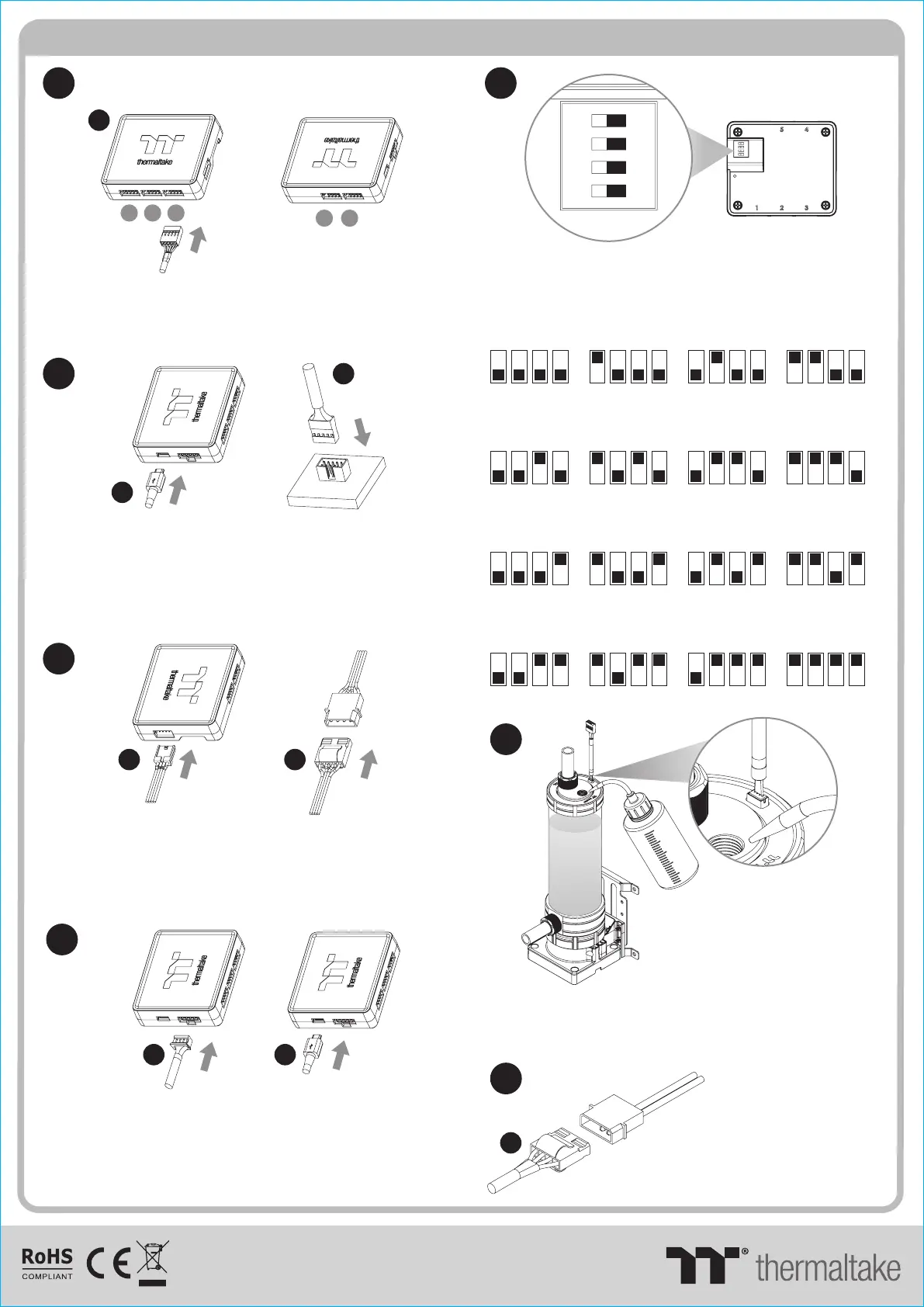
Connect the reservoir cable onto the controller.
Set the DIP switch on the back side of the controller
to assign the number of the controller
7
123
45
J
NO.1
ON
1 2 3 4
NO.3
ON
1 2 3 4
NO.2
ON
1 2 3 4
NO.4
ON
1 2 3 4
NO.9
ON
1 2 3 4
NO.11
ON
1 2 3 4
NO.10
ON
1 2 3 4
NO.12
ON
1 2 3 4
NO.5
ON
1 2 3 4
NO.7
ON
1 2 3 4
NO.6
ON
1 2 3 4
NO.8
ON
1 2 3 4
NO.13
ON
1 2 3 4
NO.15
ON
1 2 3 4
NO.14
ON
1 2 3 4
NO.16
ON
1 2 3 4
Connect the controller cable onto the mainboard
(USB 2.0 9 pin) and controller.
9
10
8
If you want to connect two or more connectors,
you can use the bridge cable to connect the
controllers.
Connect the power cable to the 4pin Molex
connecter and controller.
K K
K
M M
© 2020 Thermaltake Technology Co., Ltd. All Rights Reserved.
www.thermaltake.com
After adding the recommended coolant, remember to
fill the reservoir to only 80% and leave the fill port cap
off. This will help stabilize your internal loop pressure
Keep the reservoir cap dry!
Do not allow coolant to
access the wire and
the LED module
Caution!
I
Connect the Pump power cable to
the 4pin Molex connecter.




 To Previous Page