
 Need help?
Do you have a question about the Thermaltake Pacific W7 Plus and is the answer not in the manual?
Lists all included components: water block, mounting clips, screws, washers, wrench, and thermal grease.
Step-by-step diagrams for installing the water block on Intel LGA 1700, 1200, and 115X sockets.
Diagrams illustrating the installation process for Intel LGA 2066, 2011-3, and 2011 sockets.
Visual guide for mounting the water block on AMD AM4, AM3, AM2, FM2, and FM1 CPU sockets.
Installation diagram for the water block on AMD AM5 CPU sockets.
Lists all components of the controller, including the controller unit, cables, and Velcro.
Details steps for connecting the controller to the mainboard, power, and setting DIP switches for numbering.
Explains connecting the water block with compatible addressable LED products like the Temp Controller.
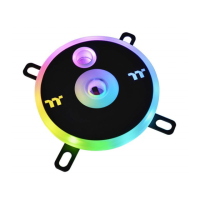
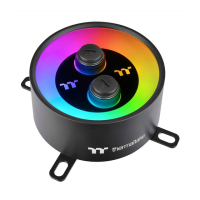
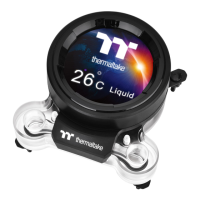
The Thermaltake Pacific W7 Plus CPU Water Block is a high-performance cooling solution designed for expert users seeking efficient thermal management for their CPU. This product is intended for installation by qualified technicians to prevent potential damage to the equipment. Before installation, users are advised to carefully read the instruction manual and remove their graphics card from the motherboard to ensure a safe process. It is also strongly recommended to use market-proven pre-mix coolants, such as those from the Thermaltake Coolant Series, for optimal performance and longevity.
The primary function of the Pacific W7 Plus CPU Water Block is to dissipate heat generated by the CPU, maintaining optimal operating temperatures and enhancing system stability. It achieves this by circulating coolant through a micro-fin copper base that makes direct contact with the CPU. The heat absorbed by the coolant is then transferred to a radiator (sold separately), where it is dissipated into the ambient air. This liquid cooling method is significantly more effective than traditional air cooling, especially for high-performance CPUs and overclocked systems, ensuring consistent performance and preventing thermal throttling.
The water block is designed with compatibility in mind, supporting a wide range of Intel and AMD CPU sockets. For Intel, it is compatible with LGA1200, 1156, 1155, 1151, 1150, 1700, 2066, 2011-3, and 2011 sockets. For AMD, it supports AM3, AM2, FM2, FM1, AM4, and AM5 sockets. This broad compatibility ensures that the water block can be integrated into various system builds, offering a versatile cooling solution.
Beyond its core cooling function, the Pacific W7 Plus CPU Water Block incorporates addressable RGB lighting, allowing users to customize the aesthetics of their build. The RGB lighting can be controlled via a dedicated controller, offering a wide array of colors and lighting effects. This feature not only enhances the visual appeal of the PC but also allows for synchronization with other addressable LED components within the system, creating a cohesive and dynamic lighting theme.
The installation process for the Pacific W7 Plus CPU Water Block is detailed with specific instructions for different CPU sockets. The package includes all necessary mounting hardware, such as screws, washers, AMD clips, and a backplate, ensuring a secure and stable fit for both Intel and AMD platforms. A wrench and thermal grease are also provided, simplifying the application of thermal interface material and the tightening of mounting screws.
For Intel platforms, the installation varies slightly depending on the socket type. For LGA1200/115X sockets, the backplate is positioned behind the motherboard, and screws are inserted through the motherboard holes to secure the water block. For LGA1700, a specific set of mounting hardware is used to accommodate the larger socket. Similarly, for LGA2066/2011-3/2011 sockets, the mounting process involves specific standoffs and screws that attach directly to the integrated mounting points on the motherboard.
For AMD platforms, the installation process is also tailored to the socket type. For AM4/AM3/AM2/FM2/FM1 sockets, the water block utilizes the existing AMD retention bracket or a specific AMD clip provided in the kit, which hooks onto the motherboard's mounting posts. For AM5 sockets, a dedicated mounting mechanism ensures compatibility with the latest AMD CPUs. The detailed illustrations in the manual guide users through each step, from applying thermal grease to securing the water block firmly onto the CPU.
The RGB lighting functionality is managed by a dedicated controller, which is a crucial component for customizing the visual effects. The controller connects to the water block via a conversion cable and then to the motherboard via a USB 2.0 9-pin header. Power for the controller is supplied through a 4-pin Molex connector. The controller features DIP switches on its backside, allowing users to assign a unique number to each controller in a multi-controller setup. This is particularly useful for systems with multiple addressable LED components, enabling individual control or synchronized effects across various devices.
The controller also supports connectivity with other addressable LED products, including Thermaltake's TEMP Controller, Plus Controller, and Trio Controller. This interoperability allows for the creation of complex and synchronized lighting ecosystems within a PC build. The Pacific W7 Plus is specifically compatible with the TEMP controller, and multiple controllers can be connected in series, with the water block's controller cable connecting to the TEMP controller, and subsequent controllers daisy-chained. This modular approach provides extensive customization options for lighting enthusiasts.
Maintaining the Pacific W7 Plus CPU Water Block primarily involves ensuring the cleanliness of the cooling loop and the proper functioning of the coolant. Regular inspection of the coolant level and clarity is recommended. Over time, coolant can degrade or become contaminated, which can reduce cooling efficiency and potentially damage components. Therefore, periodic coolant replacement, typically every 6 to 12 months, is advisable. When replacing coolant, it is crucial to use high-quality, pre-mixed coolants, such as those from the Thermaltake Coolant Series, to prevent corrosion and biological growth within the loop.
The water block itself requires minimal direct maintenance once installed. However, it is good practice to periodically check for any signs of leaks around the fittings and connections. While the product is designed for durability and leak-free operation, vigilance can help prevent potential issues. If any leaks are detected, the system should be immediately shut down, and the affected components should be inspected and repaired or replaced as necessary.
Cleaning the exterior of the water block and any visible parts of the cooling loop can help maintain optimal aesthetics and prevent dust buildup. A soft, dry cloth can be used for this purpose. It is important to avoid using harsh chemicals or abrasive materials, as these can damage the finish or components.
For optimal performance, ensuring good airflow within the PC case is also important, as this indirectly affects the efficiency of the entire liquid cooling system. A well-ventilated case helps dissipate heat from the radiator more effectively, contributing to lower CPU temperatures.
In summary, the Thermaltake Pacific W7 Plus CPU Water Block offers a robust and aesthetically pleasing liquid cooling solution for high-performance PCs. Its broad compatibility, detailed installation instructions, customizable RGB lighting, and integration with other addressable LED products make it a versatile choice for expert users. Proper installation and adherence to maintenance guidelines, particularly regarding coolant management, will ensure long-term performance and reliability.
 General
| Suitable location | Processor |
|---|---|
| Supported processor sockets | LGA 1150 (Socket H3), LGA 1151 (Socket H4), LGA 1155 (Socket H2), LGA 1156 (Socket H), LGA 1200 (Socket H5), LGA 1366 (Socket B), LGA 2011 (Socket R), LGA 2011-v3 (Socket R), LGA 2066, LGA 775 (Socket T), Socket AM2, Socket AM2+, Socket AM3, Socket AM3+, Socket AM4, Socket FM1, Socket FM2 |
| Pulse-width modulation (PWM) support | No |
| Screws included | Yes |
| Illumination color | Multi |
| Base plate material | Copper |
| Type | Water block |
 Weight and Dimensions
| Weight | 670 g |
|---|---|
| Waterblock width | 93.4 mm |
| Waterblock height | 22 mm |


 To Next Page