
 Need help?
Do you have a question about the Thermaltake Pacific W5 and is the answer not in the manual?
Identifies all included components such as water block, clips, screws, washers, and thermal grease.
Visual guide for installing the water block on Intel LGA 775, 115x, 1366, and LGA 2066, 2011-3, 2011 sockets.
Visual guide for installing the water block on AMD sockets, including specific hardware references.
Lists the controller, cables (controller, power, conversion, bridge), and accessories like Velcro.
Step-by-step instructions for connecting the water block, controller, and mainboard, including DIP switch settings.
Guidance on connecting other addressable LED products with Temp, Plus, or Trio Controllers in series.
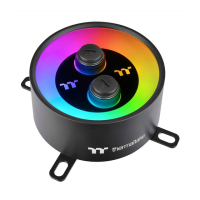
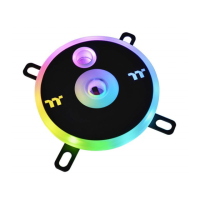
The Thermaltake Pacific W5 CPU Water Block is a high-performance cooling solution designed for expert users, featuring patented RGB lighting with 16.8 million colors. This product is intended to provide efficient thermal management for CPUs, ensuring stable operation and enhancing the aesthetic appeal of a custom liquid cooling system.
The primary function of the Pacific W5 CPU Water Block is to transfer heat away from the central processing unit (CPU) to the liquid coolant circulating within a custom liquid cooling loop. This process helps maintain optimal CPU temperatures, preventing thermal throttling and ensuring consistent performance, especially during demanding tasks like gaming, content creation, or heavy computational workloads. The water block is designed to be a critical component in a custom liquid cooling system, working in conjunction with a pump, radiator, reservoir, and tubing to dissipate heat effectively.
A key feature of the Pacific W5 is its integrated RGB lighting system. This allows users to customize the illumination of the water block with a vast spectrum of 16.8 million colors, offering extensive personalization options to match their build's theme or mood. The RGB lighting is addressable, meaning individual LEDs or sections of the lighting can be controlled independently, enabling dynamic lighting effects and intricate patterns. This not only serves an aesthetic purpose but also allows for visual feedback, potentially indicating system status or temperature changes through color variations.
The water block's design incorporates a micro-fin internal structure, which maximizes the contact surface area between the coolant and the copper base. This design is crucial for efficient heat transfer, as it allows the coolant to absorb heat from the CPU more effectively. The copper base, known for its excellent thermal conductivity, is precisely machined to ensure a flat surface that makes optimal contact with the CPU's integrated heat spreader (IHS), further enhancing heat absorption.
The Pacific W5 is compatible with a wide range of Intel and AMD CPU sockets, making it a versatile choice for various PC builds. This broad compatibility is achieved through a modular mounting system that includes different backplates, screws, and clips tailored to specific socket types. This ensures a secure and stable installation, crucial for effective cooling and preventing damage to the CPU or motherboard.
Before installation, users are strongly advised to read the instruction manual carefully. This ensures a smooth installation process and helps prevent potential damage to components. It is recommended to remove the graphics card from the motherboard during installation to provide ample working space and minimize the risk of accidental damage to the CPU or motherboard.
The installation process involves several steps, starting with preparing the CPU and motherboard. This typically includes cleaning the CPU's IHS and applying thermal grease to ensure optimal heat transfer between the CPU and the water block's copper base. The manual provides specific instructions for applying thermal grease, often recommending a small dot in the center or a thin, even spread.
Mounting the water block requires securing it to the motherboard using the appropriate backplate, screws, and clips for the specific CPU socket. The manual details the correct orientation and tightening sequence for the screws to ensure even pressure distribution, which is vital for effective cooling and to prevent warping of the motherboard or damage to the CPU. A wrench is provided for tightening the screws, ensuring they are adequately secured without over-tightening.
Once the water block is physically installed, the next step involves connecting the RGB lighting and control cables. The Pacific W5 comes with a dedicated controller and various cables, including a controller cable, power cable, conversion cable, and bridge cable. The controller allows users to manage the RGB lighting effects and colors. The installation guide emphasizes connecting the plugs in numerical order, starting with plug one, to ensure proper functionality.
The controller features DIP switches on its back side, which are used to assign a unique number to each controller in a multi-controller setup. This is particularly useful when integrating multiple RGB-enabled Thermaltake products into a single system, allowing for synchronized lighting effects and centralized control. The manual provides a detailed table illustrating the DIP switch settings for different controller numbers (NO.1 to NO.16).
The controller connects to the motherboard via a USB 2.0 9-pin header, enabling software control and synchronization with other system components. The power cable connects the controller to a 4-pin Molex connector from the power supply, providing the necessary power for the RGB lighting and controller functions.
For users integrating the Pacific W5 with other addressable LED products, the manual outlines how to connect the controller to different types of Thermaltake controllers, such as the TEMP. Controller, Plus Controller, and Trio Controller. It specifies that the Pacific W5 is compatible with the TEMP. Controller and instructs users to connect the controller cable to the TEMP. Controller first, then connect any additional controllers in series. This ensures seamless integration and synchronized lighting across all compatible devices.
Proper maintenance is crucial for the longevity and performance of a liquid cooling system. One of the most important maintenance features is the recommendation to use market-proven pre-mix coolant, such as Thermaltake Coolant 1000. Using high-quality coolant helps prevent corrosion, algae growth, and particle buildup within the cooling loop, which can degrade performance and potentially damage components. Regular inspection of the coolant level and clarity is advised, and coolant replacement should be performed according to the coolant manufacturer's recommendations, typically every 6 to 12 months.
The design of the water block, with its robust construction and high-quality materials, contributes to its durability and ease of maintenance. The copper base and acrylic top are designed to withstand the operating conditions of a liquid cooling system. While the water block itself generally requires minimal direct maintenance beyond ensuring clean coolant, periodic checks for leaks around fittings and connections are essential.
Disassembly of the water block for cleaning is possible for advanced users, although it should be done with care to avoid damaging the internal components or O-rings. If disassembly is performed, it is important to reassemble the water block correctly, ensuring all screws are tightened evenly and the O-rings are properly seated to prevent leaks.
The modular mounting system also aids in maintenance and upgrades. If a user decides to upgrade their CPU or motherboard, the water block can be easily unmounted and remounted with the appropriate hardware for the new socket type, extending the product's lifespan and value. The provision of a wrench for installation also implies that users have the necessary tool for secure mounting and potential future adjustments or disassemblies.
Overall, the Thermaltake Pacific W5 CPU Water Block is a sophisticated and user-friendly component for custom liquid cooling systems, offering both exceptional cooling performance and extensive aesthetic customization through its RGB lighting. Its design and accompanying instructions emphasize ease of installation, broad compatibility, and straightforward maintenance, making it a reliable choice for enthusiasts and expert builders.
 General
| Type | CPU Water Block |
|---|---|
| Material | Copper |
| Compatibility | Intel: LGA 2066/2011/1366/1156/1155/1151/1150 AMD: AM4/FM2/FM1/AM3+/AM3/AM2+/AM2 |
| Inlet/Outlet | G 1/4 |
| Thread | G 1/4 |


 To Next Page
