Status & Tuning Parameters
Checking Mass Alignment
Thermo Fisher Scientific Prima PRO & Sentinel PRO Mass Spectrometers User Guide 8-13
To display minor peaks, increase the gain range by clicking on the
down arrow button next to the intensity axis. For an air sample, the
principle peak will be at mass 28 due to 78.08% of nitrogen (N
2
= 2 x
14, where 14 is the atomic weight of nitrogen), and the second
biggest peak will be at mass 32 (oxygen at 20.95% O
2
= 2 x 16).
There should also be a peak at mass 14; this is produced by both
atomic nitrogen (N)
+
and doubly-charged nitrogen ions (N
2
)
++
. The
mass spectrometer separates the sample ions according to their mass
/ charge ratios and some molecular fragmentation occurs in the ion
source together with ionization of the gas molecules.
Further peaks of interest include 16, 17, and 18 (due to O
+
from
oxygen and water, OH
+
and H
2
O
+
from water), 40 (0.94% Argon),
and 44 (350 ppm CO
2
12 + 2 x 16).
If alignment is poor, the simplest approach is to delete the locked
peak table by stopping the scan and clicking on the Delete Locked
Peak Table button: .
To create a new mass table, add a cursor to the display using the
following button: .
Position the cursor on mass 14 peak and lock this as mass 14.00.
Click the Peak Lock button: .
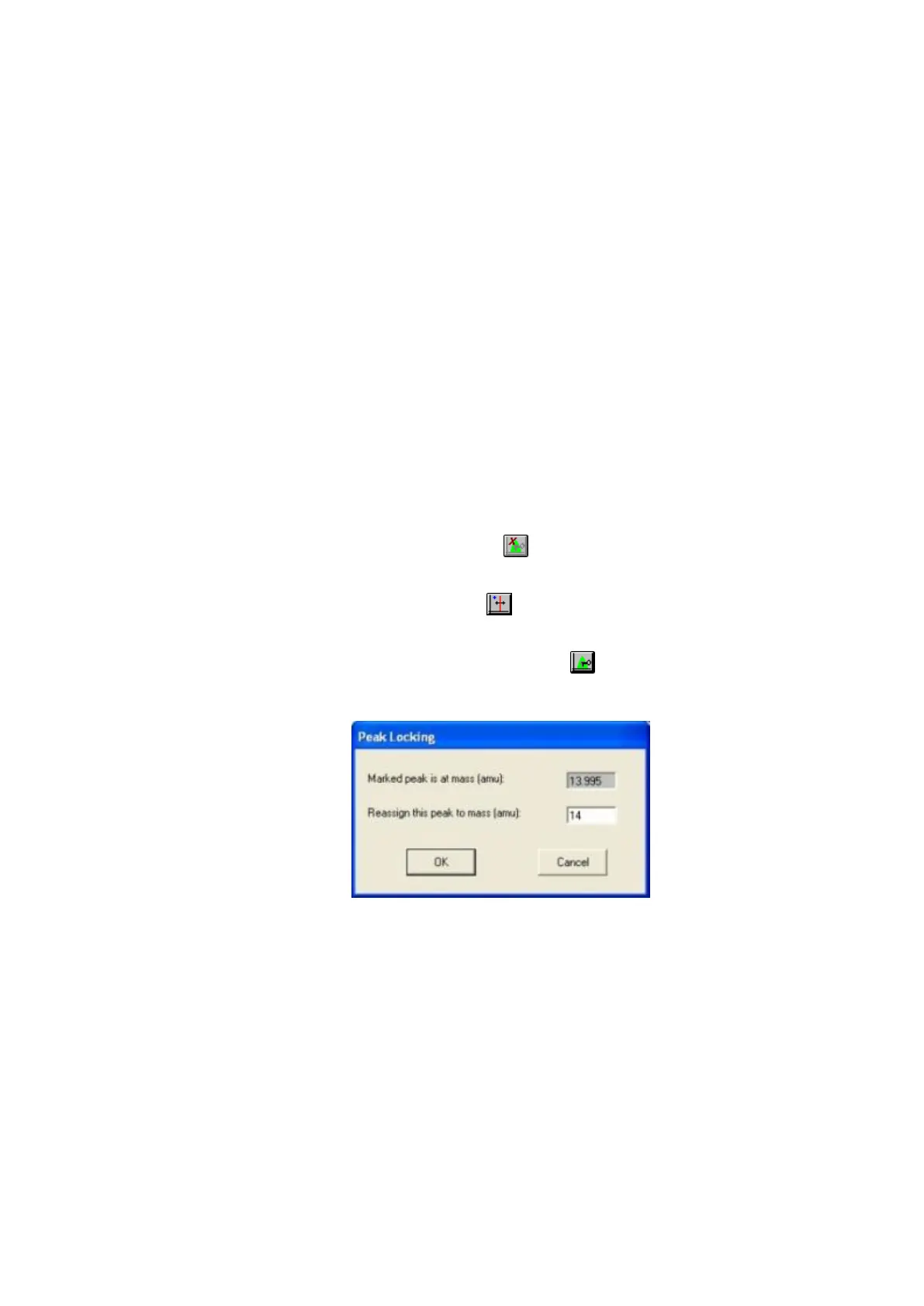
Enter 14.00 in the Peak Locking dialogue box (Figure 8–3).
Figure 8–3. Peak Locking dialogue box
The value shown in the marked peak window is the Cursor position.
Reposition the scan to mass 44 by changing the scan start and stop
values and lock this peak to mass 44.00 as before.
The zoom-in facility can greatly facilitate accurate mass setting.
If a gas (or gases) other than air are used, knowledge of its
composition will be needed to correctly identify which peaks are
which masses.
The approach is as above and should use two or three masses which
span the required analysis range.







 To Next Page