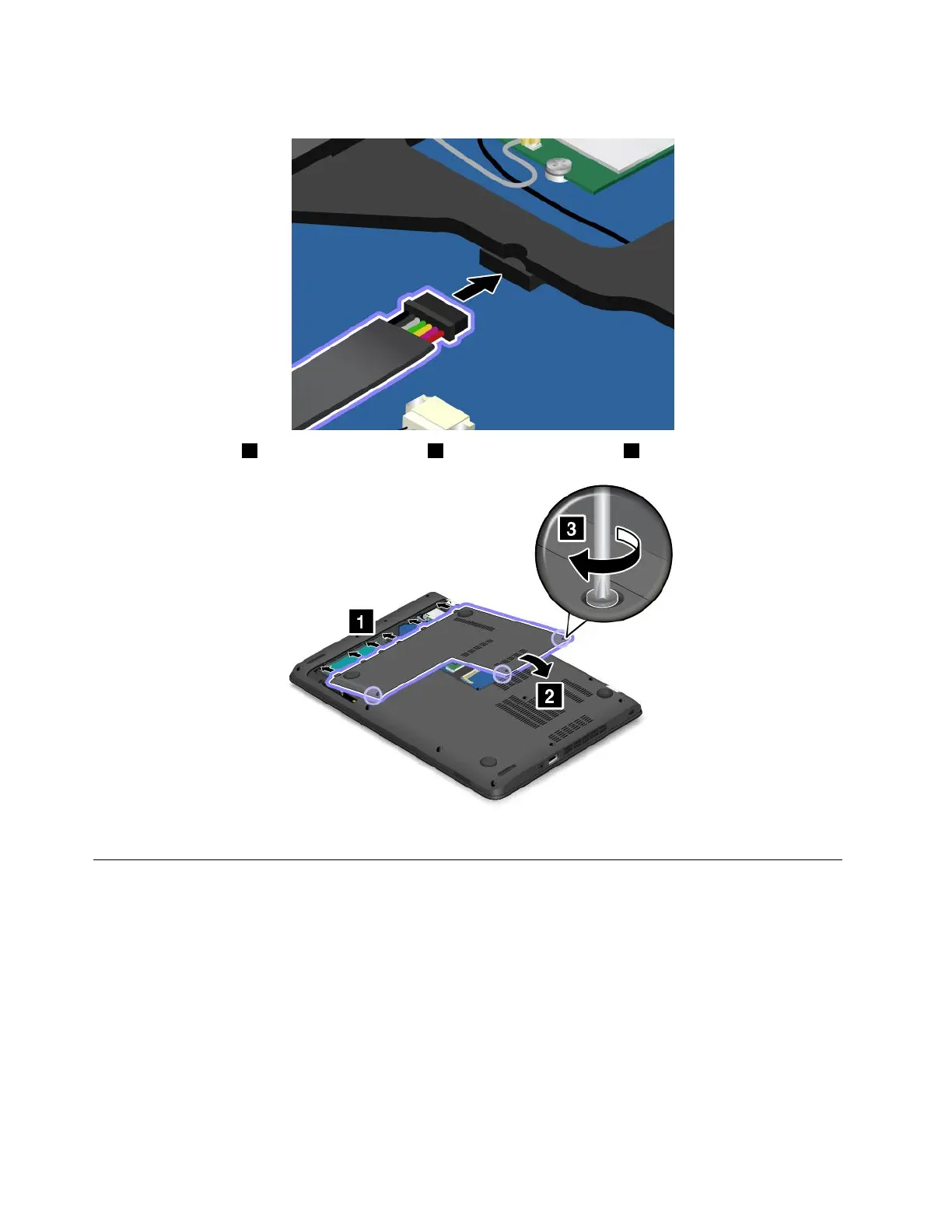
9.Connectthebatterycable.
10.Attachthecover1andpivotitdownwards2.Thentightenthescrews3.
11.Turnthecomputerover.Connecttheacpoweradapterandallcables.
Replacingthememorymodule
Beforeyoustart,printtheseinstructionsandread“Importantsafetyinformation”onpagevi.
Increasingmemorycapacityisaneffectivewaytomakeprogramsrunfaster.
Note:Theoperatingspeedofthememorymodulehasdependencyonthesystemconfiguration.Insome
conditions,thememorymoduleinyourcomputermightnotbeabletooperateatthemaximumspeed.
Attention:Beforeyoustartinstallingamemorymodule,touchametaltableoragroundedmetalobject.This
actionreducesanystaticelectricityfromyourbody.Thestaticelectricitycoulddamagethememorymodule.
Toreplacethememorymodule,dothefollowing:
114UserGuide



 To Next Page