4Power-statusindicator
Yourcomputerhasapowerstatusindicatortoshowtheacpoweradapterstatusofyourcomputer.For
moreinformation,see“Powerstatusindicator”onpage7.
5Powerconnector
Connecttheacpoweradaptertothepowerconnectortoprovideacpowertothecomputerandcharge
thebattery.
Anindicatortotheleftoftheconnectorshowsthestatusofacpower.Whentheacpoweradapteris
connected,theindicatorislit.Ifabatteryisinstalledinthecomputer,theindicatorisgreenwhenthe
batterycharges.
6Security-lockslot
Purchaseasecuritycablelockthattsthiskeyholetolockyourcomputertoastationaryobjecttoprotect
yourcomputerfromtheft.
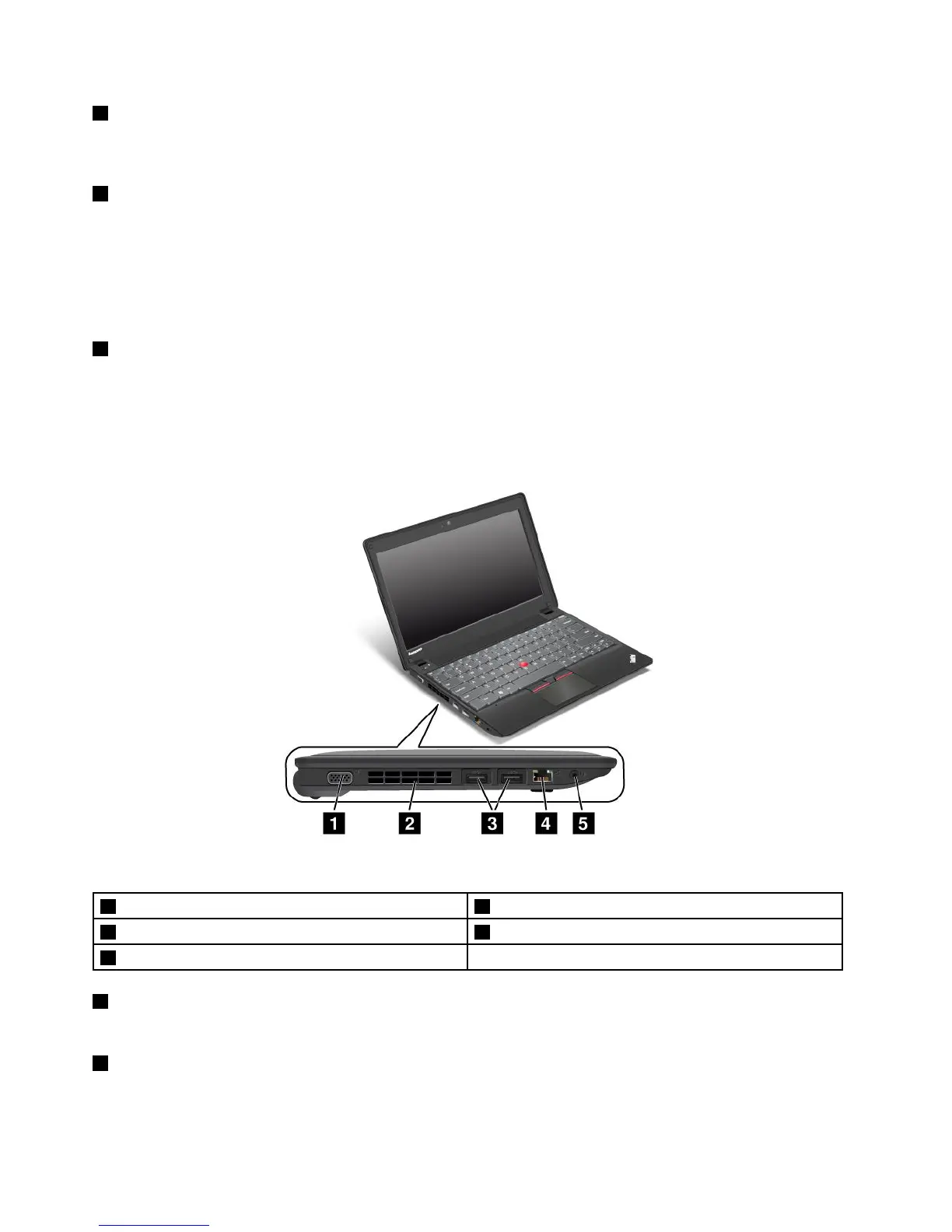
Left-sideview
Figure3.ThinkPadX140eleft-sideview
1Videographicsarray(VGA)connector
4Ethernetconnector
2Fanlouver
5Comboaudioconnector
3USB3.0connectors
1Videographicsarray(VGA)connector
AttachaVGAcompatiblemonitororprojectortoyourcomputertodisplaythecomputeroutput.
2Fanlouver
Thefanlouversandtheinternalfanenableairtocirculateinthecomputertoensurepropercooling,
especiallythecoolingofthemicroprocessor.
4UserGuide



 To Next Page