30
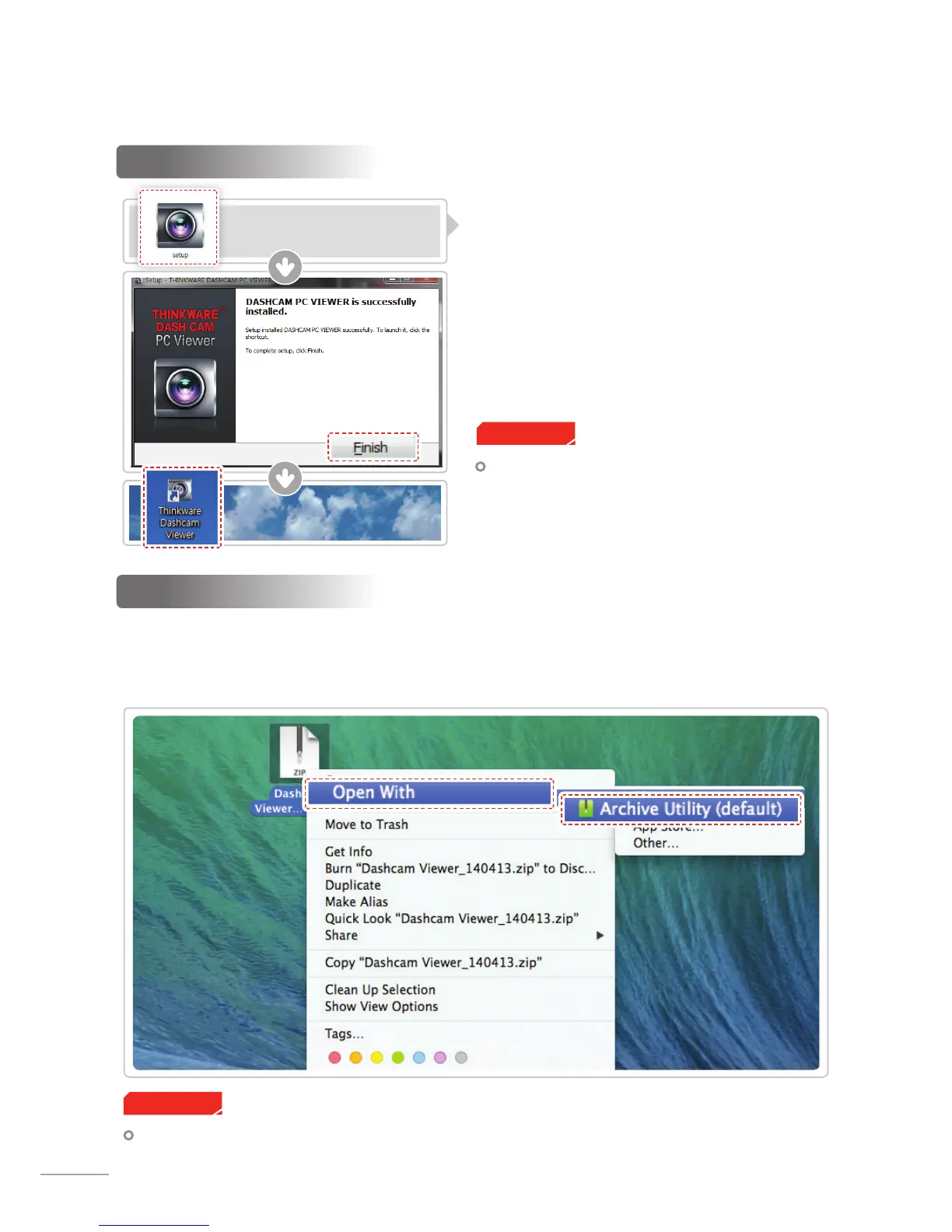
4-1-2. Installing Thinkware Dash Cam PC Viewer
Windows
①
Double-click the Thinkware Dash Cam PC Viewer
setup le saved in the MicroSD card to initiate
program installation.
②
Double-click the application icon once PC Viewer
installation completes and the application main
screen will then appear.
MAC
Cautions
System requirements : MAC OS X 10.8 Mountain Lion or later (OS X 10.9 Mavericks, OS X 10.10 Yosemite)
Cautions
System requirements : Windows XP SP3 (32bit),
Windows 7 (32/64bit), Windows 8.x (32/64bit)
①
Move the le named “Dashcam Viewer.zip” stored in the MicroSD card to the desktop.
②
Right click on the mouse and select “Open With” > “Archive Utility” to launch the Thinkware Dash cam
PC viewer application.



 To Next Page