25
PC Viewer Software
04
MAC
System requirements : MAC OS X 10.8 Mountain Lion or later (OS X 10.9 Mavericks, OS X 10.10 Yosemite)
Cautions
①
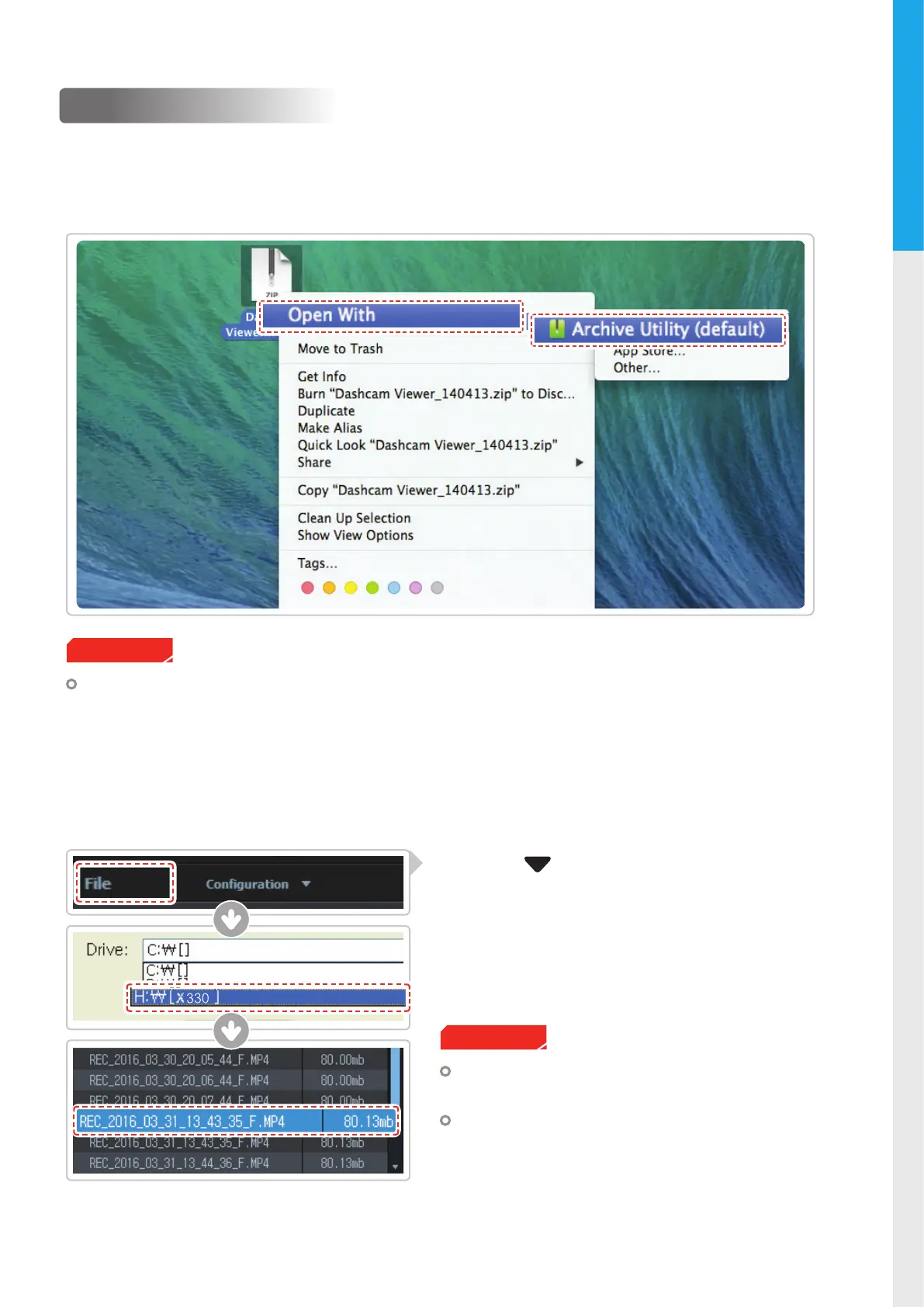
Move the le named “Dashcam Viewer.zip” stored in the MicroSD card to the desktop.
②
Right click on the mouse and select “Open With” > “Archive Utility” to launch the Thinkware Dash Cam
viewer application.
4-1-2. Select the Device Drive for X330
The MicroSD card will not be recognized by the PC
Viewer until it has been used in the dash cam.
It is recommended that the user record at least one
video clip on the MicroSD card with the dash cam
unit before accessing the Thinkware Dash Cam PC
Viewer.
Cautions
①
Click File from menu and select the drive for
the portable storage drive for the connected
MicroSD card.
②
Select any le from the list to load entire video
playlist in the memory card.



 To Next Page