Need help?
Do you have a question about the Thinkware U1000 and is the answer not in the manual?
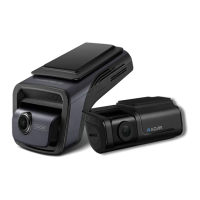
This manual provides basic steps for U1000 dash cam installation.
Records videos during operation for reference in incidents or road accidents.
Explains hazard symbols like Warning, Caution, and Note for safe operation.
Covers driving, power supply handling, and child safety precautions.
Details temperature limits, handling, cleaning, and avoiding water ingress.
Details FCC rules, RF exposure, and interference guidelines for the device.
Instructions for correctly inserting the microSD card into the dash cam slot.
Identifies buttons, LEDs, and ports on the front of the dash cam unit.
Identifies ports and connectors on the rear of the dash cam unit.
Provides steps for windshield mounting and adjusting the camera angle.
Instructions for connecting the car charger and managing the power cable.
Explains continuous and incident recording modes and their LED indicators.
Instructions on how to manually record events and their storage location.
Information on downloading and updating the dash cam firmware.
Steps to connect the dash cam to a smartphone using the THINKWARE CLOUD app.
Detailed steps for connecting the dash cam to a smartphone via Wi-Fi.
Detailed steps for connecting the dash cam to a smartphone via Wi-Fi hotspot.
Guidance on troubleshooting and contacting support for warranty service.
Lists conditions and damages that are excluded from the product warranty.
Specifies the 6-month warranty for the included MicroSD card.
 General
| Wi-Fi | Yes |
|---|---|
| Operating Temperature | -10°C to 60°C (14°F to 140°F) |
| Storage | MicroSD card up to 128GB |
| Power Supply | DC 12/24V |
| Resolution | 4K UHD (3840 x 2160) |
| Front Camera Sensor | Sony STARVIS |
| Rear Camera Sensor | Sony STARVIS |
| GPS | Yes |
| Viewing Angle | 150° |
| Parking Mode | Motion Detection |
| Frame Rate | 30fps |
| G-Sensor | Yes |
| Super Night Vision | Yes |
| Rear Camera Resolution | 2K QHD (2560 x 1440P) |
| Bluetooth | No |


 To Next Page