8 Functions
8.1 Rehearsal songs
8.1.1 Selecting, playing and stopping rehearsal songs
The digital piano offers 60 rehearsal songs for practising in total (see
Ä
Chapter 9
‘Rehearsal and demo songs’ on page 31).
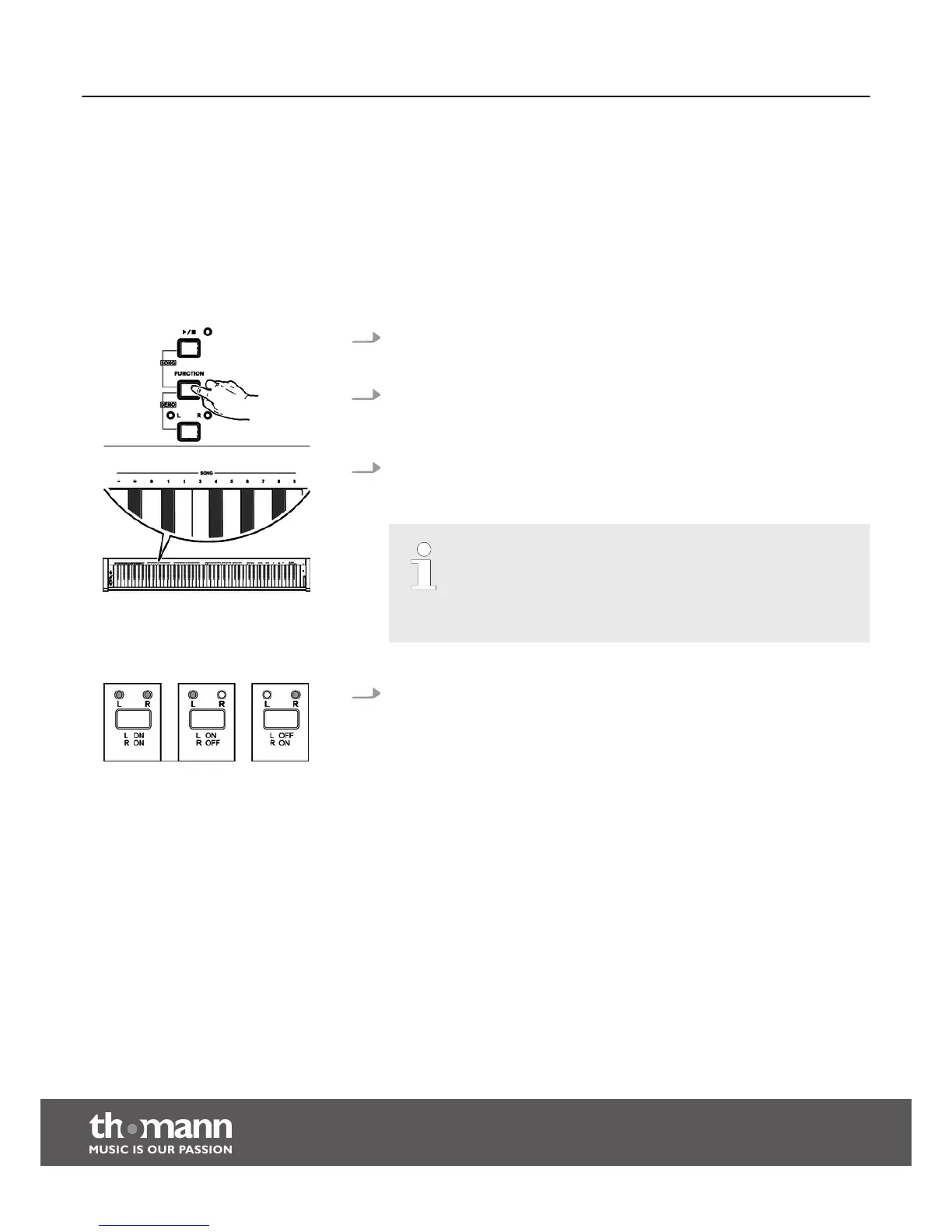
1. Keep the button [FUNCTION] pressed and press the [ START/STOP] button, to
enter the playback mode for rehearsal songs. All rehearsal songs are played in
an endless loop.
2. Press the [START/STOP] button, to stop the currently playing rehearsal song.
This will not quit the mode for rehearsal song playback [SONG]. If you press the
[START/STOP ] button again, this song is repeated in an endless loop until you
press the [START/STOP] button again.
3. Selecting rehearsal songs
Keep the [FUNCTION] button pressed and press the respective piano key in the
[SONG] area to select the desired rehearsal song.
– Press the piano keys [+] and [–] simultaneously to select the first
rehearsal song.
– To select the rehearsal song with the numeric keys, always enter
the number in two-digit format. If you want to select the eighth
rehearsal song, for example, press the piano keys [0] [8].
4. Practising left and / or right hand.
In [SONG] mode, you can repeatedly press the [L – R] buttons, to select either
both tracks of the rehearsal songs for playback, or only the left or right track, so
that you can practise your hands individually or both together. The setting is
indicated by the LEDs.
Functions
digital piano
20



 To Next Page