8.2.7 Metronome
1. Turning the metronome on / off
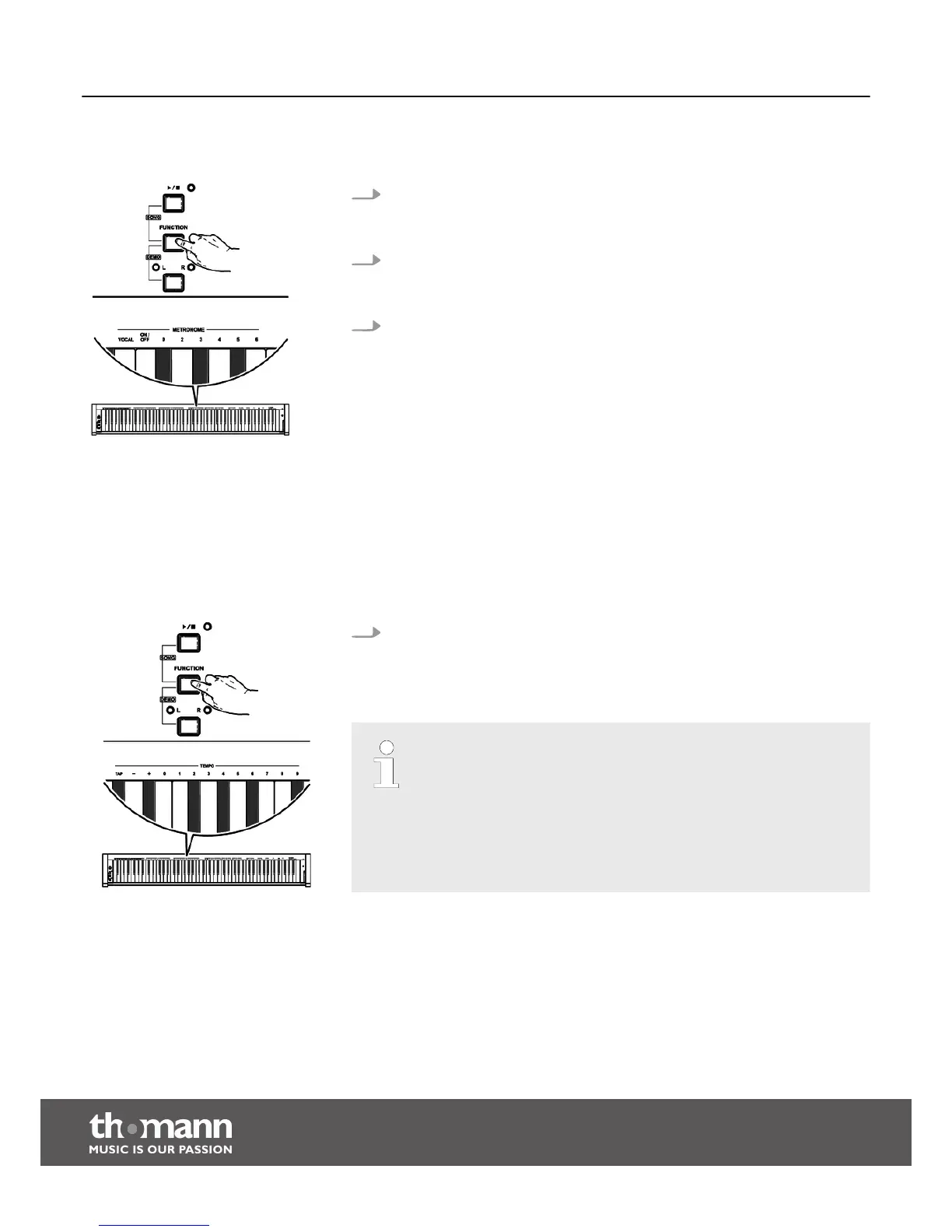
Keep the [FUNCTION] button pressed and press the piano key [ON/OFF] in the
[METRONOME ] area to turn the metronome on or off.
2. Setting the time signature
Keep the [FUNCTION] button pressed and press one of the piano keys [0], [2],
[3], [4], [5], [6] in the [METRONOME ] area to set the desired time signature.
3. Setting the metronome sound
Keep the [FUNCTION] button pressed and press the piano key [VOCAL] in the
[METRONOME ] area to set a human voice or the click sound as the metronome
sound.
8.2.8 Tempo
Keep the [FUNCTION] button pressed and press the respective piano key in the
[TEMPO] area to set the desired Tempo. You can set the Tempo by pressing the
piano key [TAP] twice, or using the piano keys [+] and [–] or using the piano
keys [0] to [9].
– If you press the buttons [+] and [–] in the [TEMPO] area simultaneously,
the Tempo will be reset to the default standard value (120 beats per
minute).
– The tempo can be adjusted in a range from 30 to 280 bpm.
– If you want to change the tempo with the piano keys [0] to [9], you
always have to enter it in three-digit format. For example, to set tempo
85, you have to press the piano keys [0][8][5] in a row in the [TEMPO]
area.
Functions
digital piano
26



 To Next Page