7
EN
EN
MOTORISED 720P HD WIFI IP CAMERA
C - INSTALLATION
1 - INSTALLING THE CAMERA
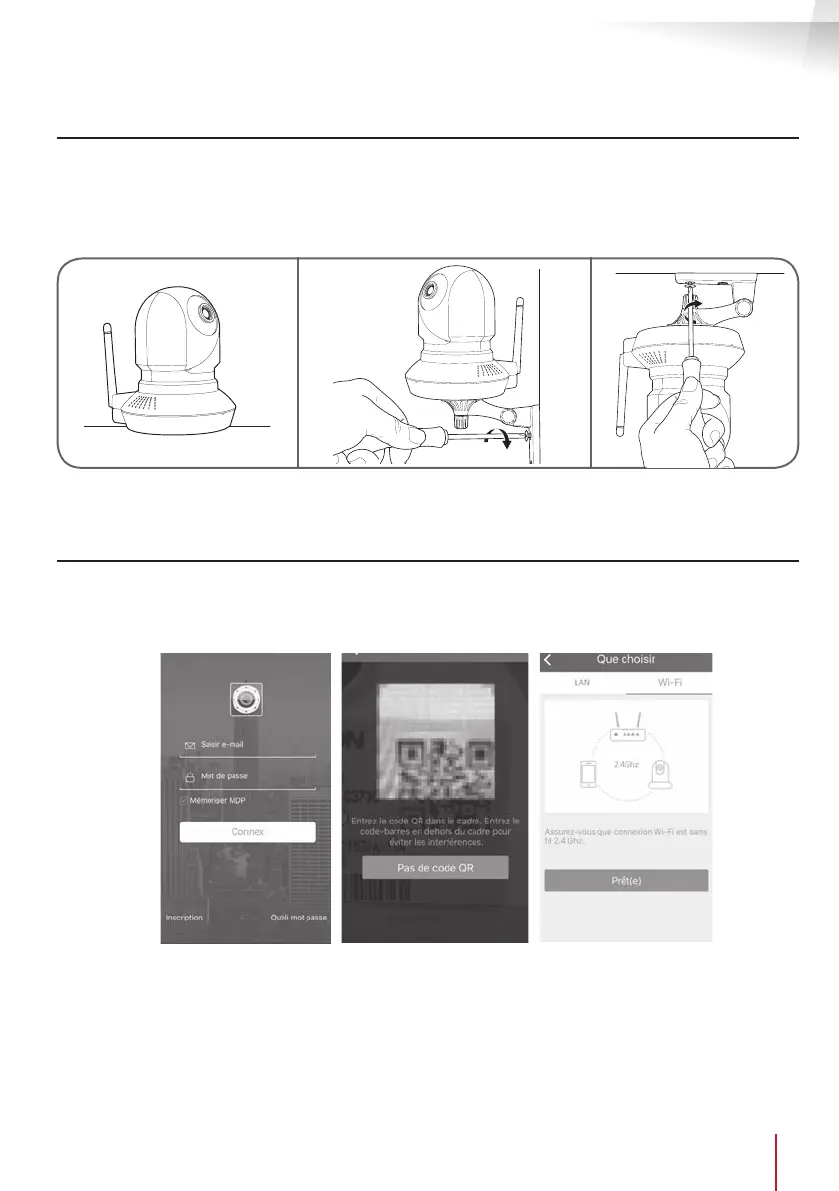
• Connection tests are recommended before tting the camera to its nal location.
• Mount the camera using suitable screws and wall plugs for the type of surface (the screws and plugs
supplied are suitable for solid walls).
• The camera can also be tted to a at surface.
Make sure the camera is properly secured to prevent it from falling.
Note: the camera can be tted upside down: the different software and applications can return
the image obtained.
2 - CONNECTING THE CAMERA
• Access from your camera to the network and to the Internet can be established using a wired connection
via a network cable or wireless WiFi connection.
• Download then install the ThomView application on your smartphone or tablet.
Create a user account by clicking "Inscription" (Register). If you already have an account, log into it.


 To Next Page