EN
18
MOTORISED 720P HD WIFI IP CAMERA
D - CONFIGURATION AND USE
Select the display language, then enter the
username and password for connecting to your
camera. The default user name is "admin", and
the password is left blank. At the rst connection,
the camera will immediately ask you to replace the
default username and password to improve security:
When you have nished changing the username
and password, you will be asked to log back in.
Once you have logged in with your new username
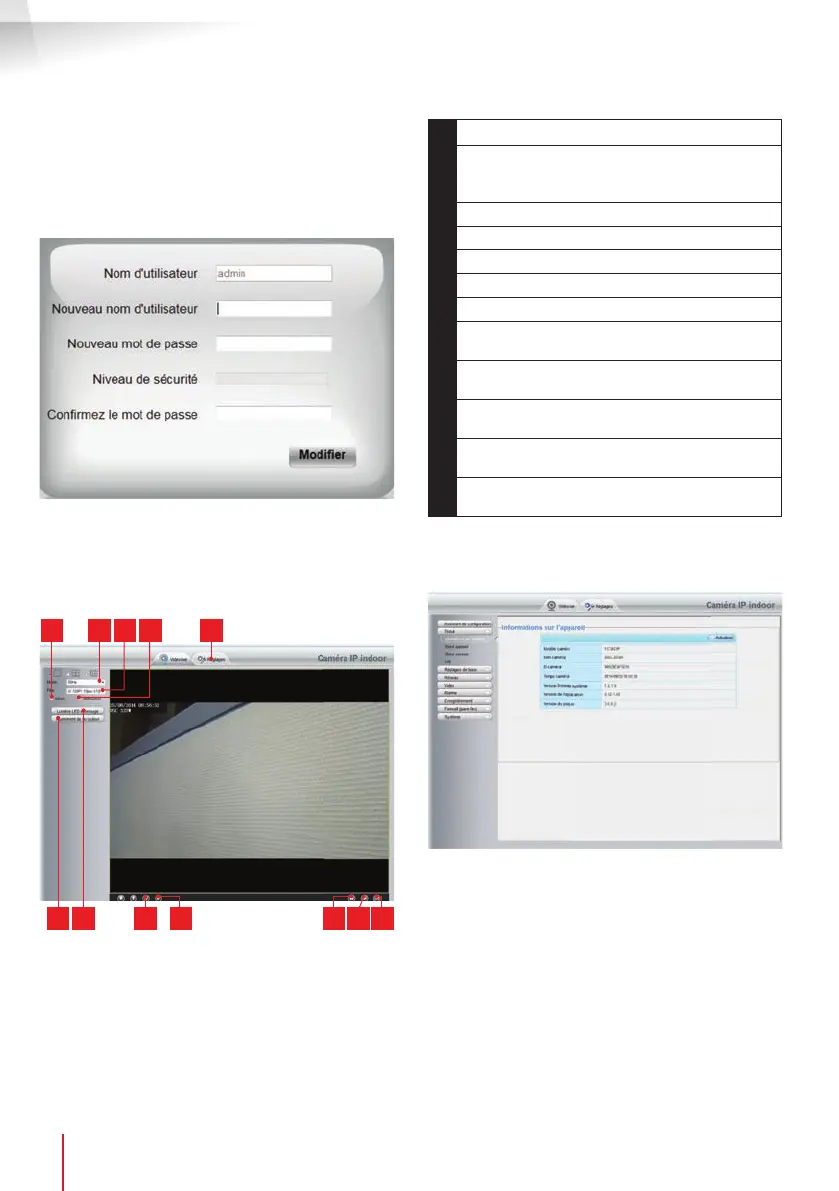
and password, the camera feed will be displayed:
86 7 11
521 3 4
9 1210
1
Vertical image inversion
2
Anti- icker: If the image lighting is arti cial,
select 50 Hz. If the image lighting is natural,
select "extérieur [outdoor]".
3
Quick quality and frame rate selection
4
Horizontal image inversion
5
Access to camera con guration tab
6
Brightness, contrast and colour settings
7
Manual activation of night vision
8
Activate computer microphone if present: lets
you speak through the camera's speaker
9
Activate the camera microphone: lets you
listen to the camera surroundings
10
Take a snapshot of the camera image on the
computer
11
Take a video of the camera image on the
computer
12
Display the image in full screen (double-click
to revert)
Access your camera settings by clicking on "Réglages
[Settings]" at the top of the window:
Here you will nd the same functions as those
accessible from the ThomView software. Refer to the
previous paragraph to see these functions.
NOTE: if you use your browser to switch your camera
from a wired to a wireless network, the connection
will be lost because the camera IP address will
change. You must restart the IP Camera Search Tool
to detect the camera again.


 To Next Page