Playing a disc
30
Indications concerning the
channel sound and the
selection of audio channels.
Selection is possible with the
key on the remote control.
Time elapsed since the
beginning of the recording.
Remaining recording time available
on the disc according to the quality
selected (pages 20-53).
Press
REC once.
To select recording time press the key
several times (while banner is displayed) to
extend recording time by 30 minutes up to
a total of 3 hours.
Recording
under way
(page 20).
0h301h001h30
3h002h302h00
Interactive banners
In addition to menus, your DVD recorder has interactive information banners with icons
representing functions or information. Some banners provide access to disc playback functions
(for DVDs, CDs,VCDs, etc.) while others give you information on the channels and related
functions.
In TELEVISION mode (Operating principle)
1. Turn on your TV set and your DVD recorder.
2. In the Main Menu of your DVD recorder, (Watch TV line selected) press OK.
The picture of the last channel selected appears.An information banner is displayed along
with the picture for a few seconds.To view it again, press the yellow
INFO.
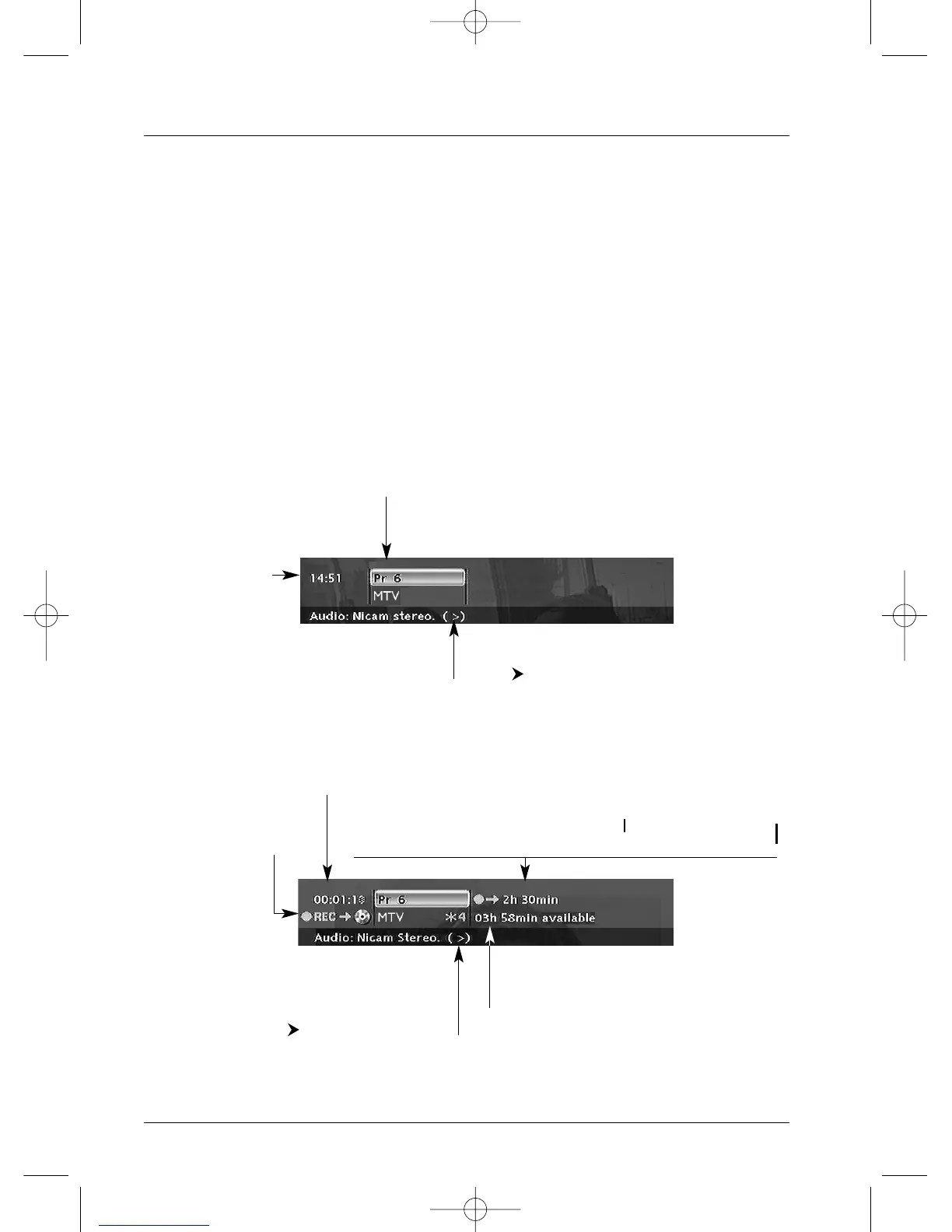
Information on the TV channel being watched
Recording the channel being watched (here, channel 6)
Current time
(Time set page 6).
No. and name of the channel
selected on the DVD recorder
(page 19).
Indications concerning the channel sound and the
selection of audio channels. Selection is possible
with the key on the remote control.



 To Next Page