E-DOC-CTC-20060609-0001 v2.0
Chapter 7
Thomson Gateway Wireless Configuration
74
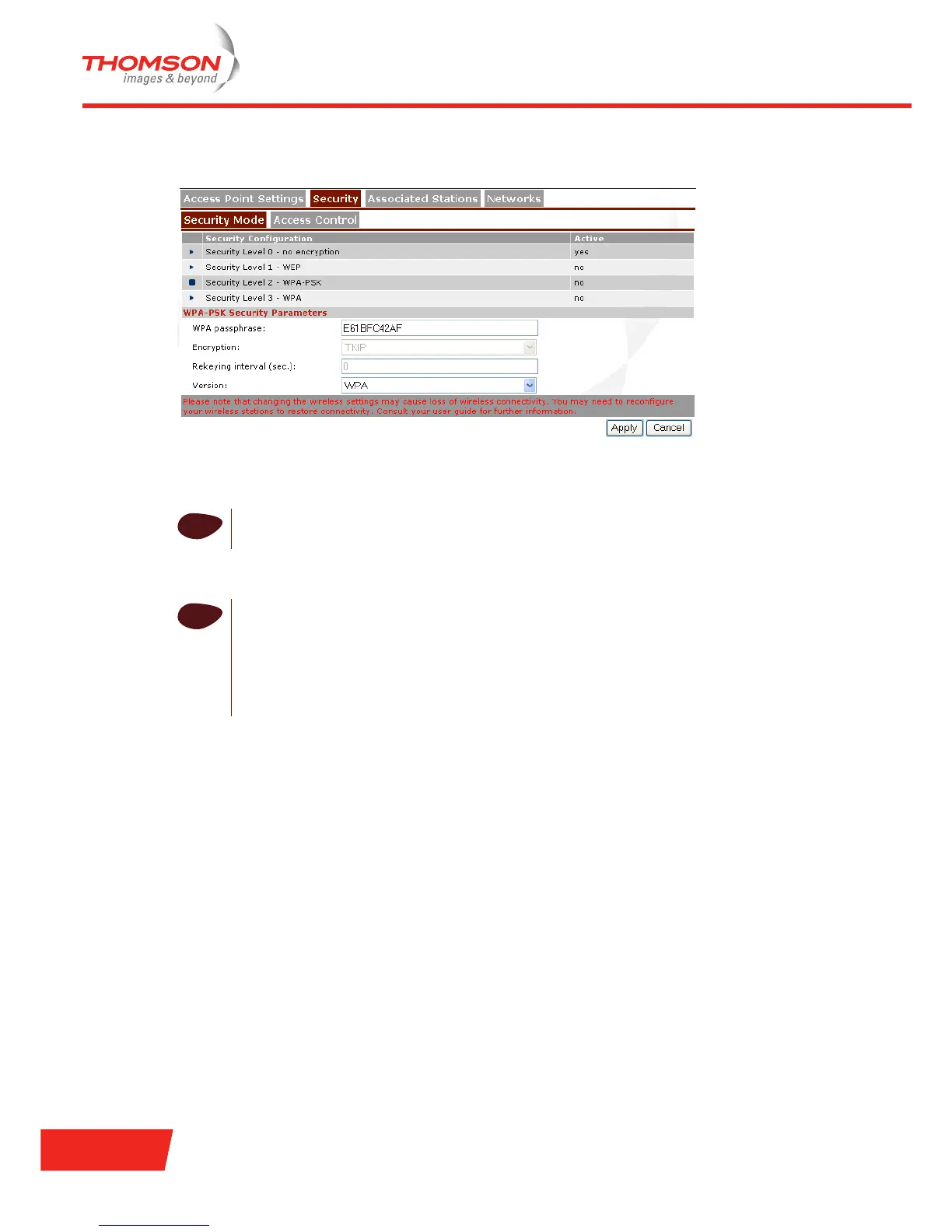
To enable level2 - WPA-PSK:
1 Select Security Level 2 - WPA-PSK (WPA Personal).
2 In the WPA passphrase box, type a passphrase (also known as Pre-shared key) of your choice. The
passphrase must consist of 8 to 63 ASCII characters or 64 HEX digits.
3 In the Encryption list, click the desired Encryption method (either TKIP or AES).
4 Optionally, select the rekeying interval.
5 In the Version list, click the desired WPA-PSK version.
6 Click Apply to immediately apply your changes.
7 Configure your wireless station(s) with the same settings.
i
AES is not yet implemented in most wireless stations but AES is already implemented in the
Thomson Gateway.
i
Depending on the WPA-PSK version you choose, one of the following WPA-PSK encryption will
be set automatically:
> WPA: TKIP
> WPA2: AES
> WPA+WPA2: TKIP+AES
Note that AES is not yet implemented in most wireless stations.













 To Next Page