E-DOC-CTC-20060609-0001 v2.0
Chapter 7
Thomson Gateway Wireless Configuration
63
7.1.5 Configuring your Thomson Gateway with WDS
Preconditions
Before configuring your WDS, make sure that:
> The wireless repeater is WDS enabled.
> Both your Thomson Gateway and the wireless repeater use:
The same WEP key when WEP is enabled.
The same fixed channel.
Configuring WDS
To configure your Thomson Gateway with WDS:
1 Go to the Thomson Gateway Web pages.
2 In the menu, select Home Network.
3 Click your WLAN.
4 In the upper right corner, click Configure.
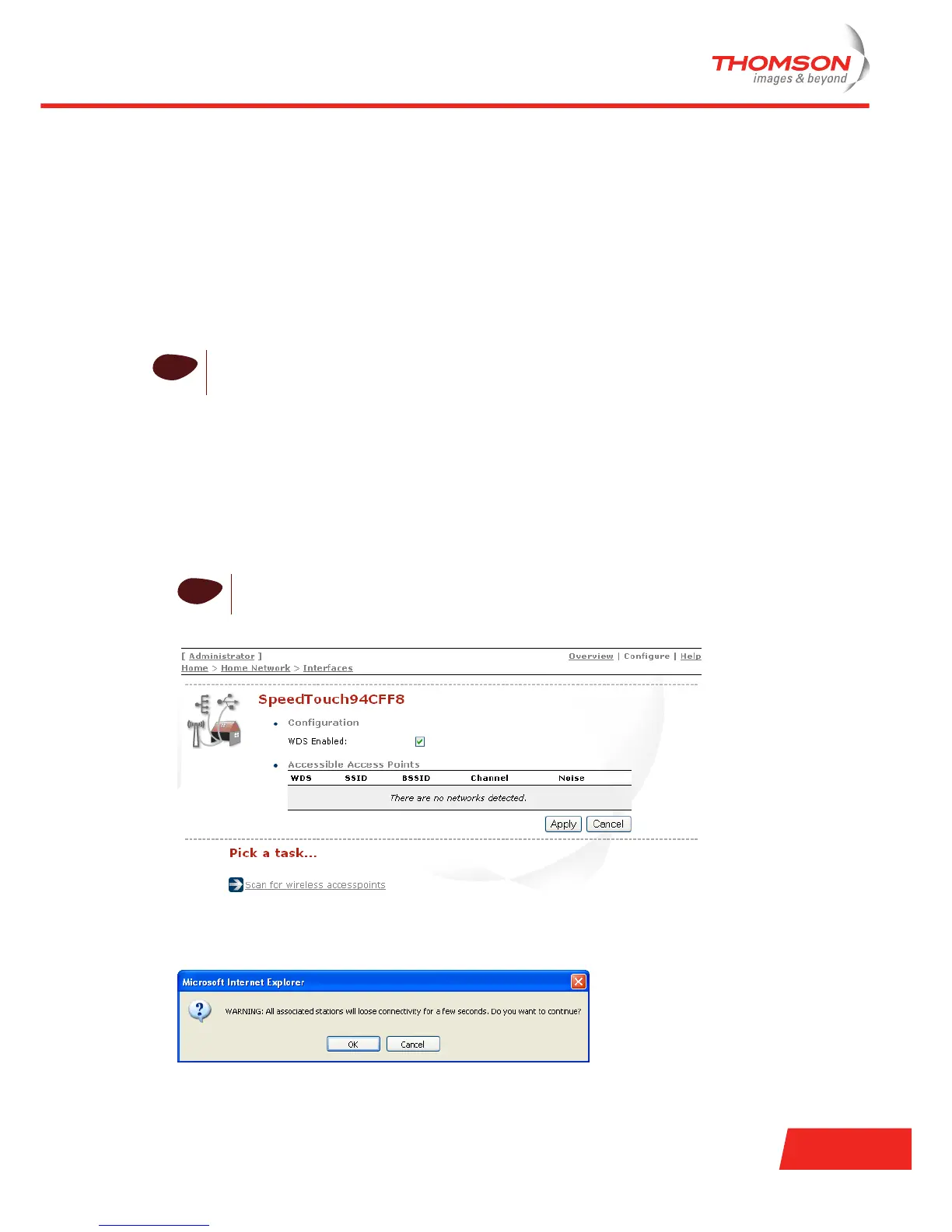
5 On the Wireless Access Point page, in the Pick a task list, click Configure WDS.
6 Select WDS Enabled.
7 In the Pick a task list, click Scan for wireless access point.
Following warning will be displayed:
i
The Thomson Gateway and the wireless repeater do not necessarily need to use the same SSID.
Using different SSIDs allows you to force the wireless stations to use either the AP of the Thomson
Gateway or the one of the wireless repeater.
i
If not already done, set a fixed channel and check whether the security settings (WEP
encryption or no encryption) on your Thomson Gateway are the same as on the repeater.













 To Next Page