14
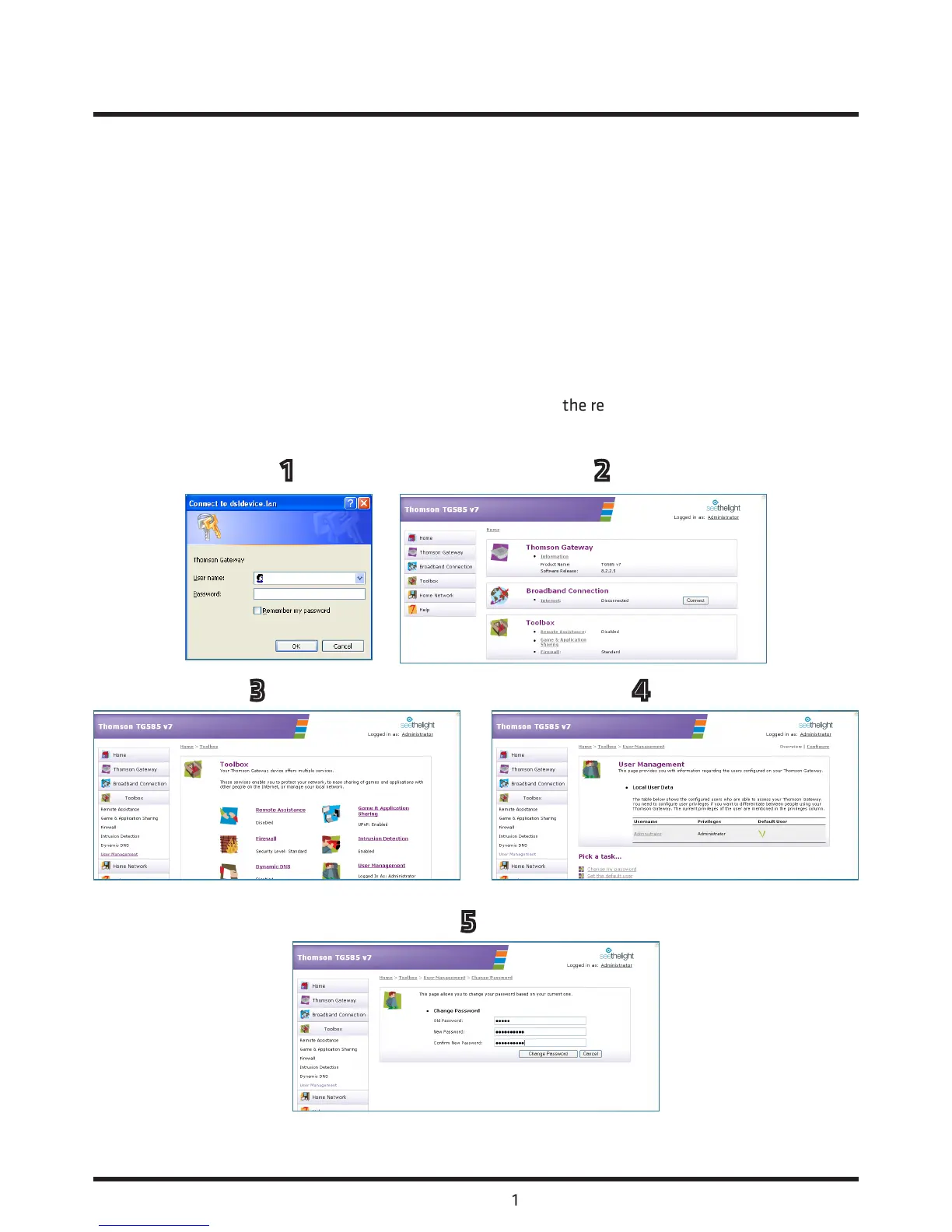
3.3 Changing the admin password
Seethelight recommend that you change your router’s default password (quick) to something else to help
keep your computer safe online. Use the following procedure to change your password and ensure that
you make a note of your new password.
1. Launch your web browser and type http://192.168.1.254 into your web browser’s address bar, then press
enter. Enter the username admin and the default password quick into the following dialogue box. Please
note that if you have already changed your password you will need to enter the new password at this step.
2. Now select ‘Toolbox’ from the link on the left-hand side of router’s homepage.
3. Next click the ‘User Management’ link.
4. Within the user management page click the ‘Change my password’ link.
5. Enter your old password (quick) and your new password within the relevant boxes as illustrated and
then click ‘Change Password’.
3. About your Router continued...
1 2
3 4
5














 To Next Page