EasyManua.ls Logo

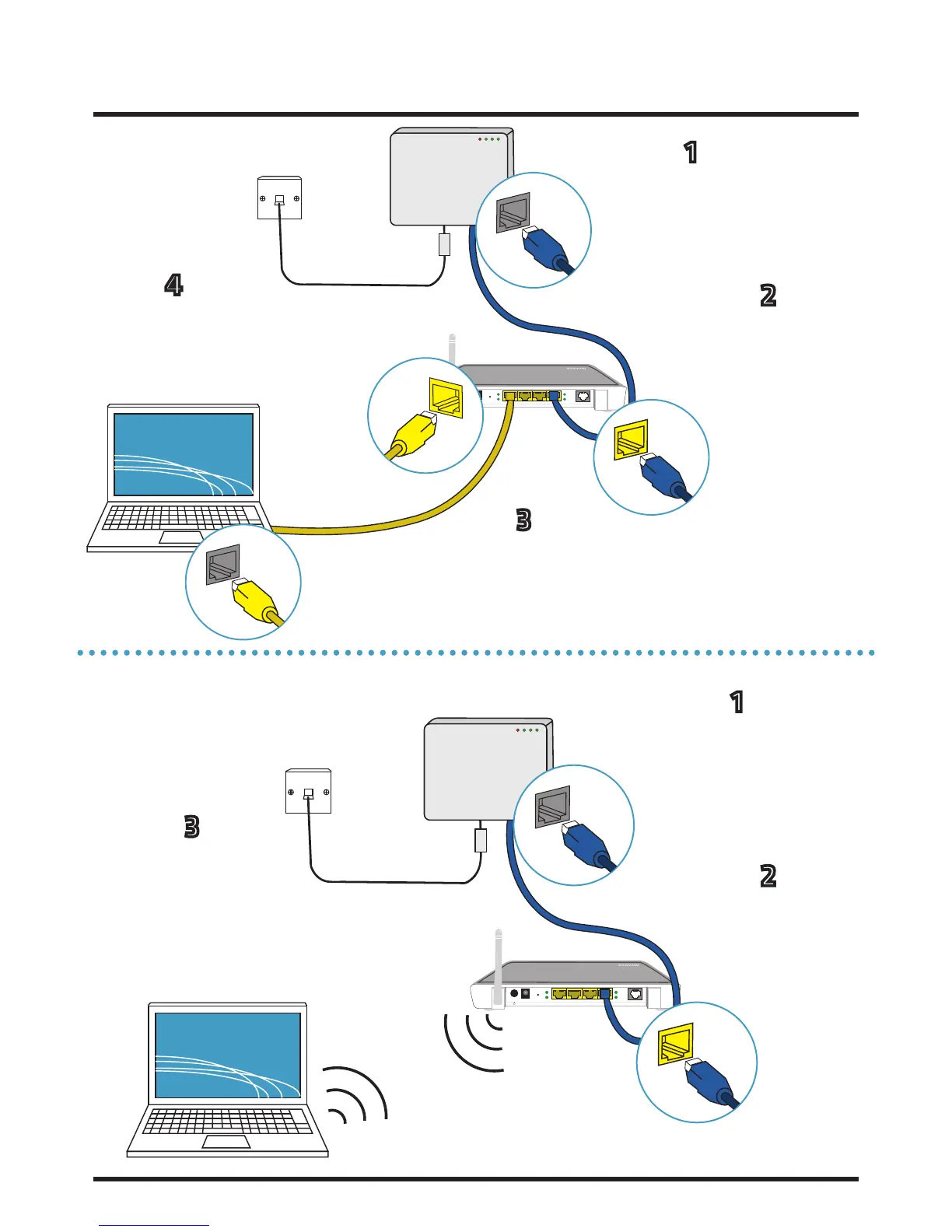
THOMSON TG585 - 2.1 Wired Connection; 2.2 Wireless Connection

THOMSON TG585
20 pages
Print Icon
To Next Page IconTo Next Page
To Previous Page IconTo Previous Page
Loading...
Internet User Guide, Thomson TG585 Routers Last amended: 13/10/2014
8
Reset 1 2 3 4 DSL
LAN
PORT
(1-3)
INTERNET
PORT 1
PORT 4 OF
ROUTER
INTERNET
PORT
2.1 A ‘Wired’ Connection
2.2 A ‘Wireless’ Connection
Reset 1 2 3 4 DSL
INTERNET
PORT 1
PORT 4 OF
ROUTER
Insert an Ethernet
cable into internet
port 1 of the ONT
Take the other end of
the cable and insert
into port 4 of your
router
Take another Ethernet
cable and insert into
any of the routers
remaining ports (1-3)
Take the other end of
the cable and insert into
the internet port of your
internet enabled device
1
2
3
4
You will now be able
to find the wireless
network and connect. For
information on how to do
this, see 6. Connecting to
Wireless Networks.
Insert an Ethernet
cable into internet
port 1 of the ONT
Take the other end of
the cable and insert
into port 4 of your
router
1
2
3

Other manuals for THOMSON TG585

Related product manuals